I have a nice tsi file downloaded around.
I wish the FX1 button assigned to the first solo/cue button of the apc was in a “hold” mode. Punch in when i push it and turn it off when i release but stills in a toggle mode.
Can someone help ?
Do i have to change something to the .tsi ?
Hi there misa, could you send me your last version of the mapping? did u manage the lights to work??? I want to take as a base your work. Please help me!
Haven’t gotten around to cleaning everything up with the lights. I’ll post the TSI I have once I get around to completing it, but at the moment I’m busy with some other projects.
Thanks Misa, i would really love to work with that .tsi
But, i have another question do you know someone that have managed to work with traktor and the lpd 8. Im working on a set up with 1 apc 40 (as the main controller) and 2 akai lpd 8 (working for beat juggling).
All this to work with 4 decks, the main problem with the lpd8´s is the hotcue status, i havent managed to get the lights working as they should.
This setup brings a very good layout to work, ´cause it makes possible to work with almost every aspect of traktor without much trouble.
Any interested contact me so we can work toegether, i would post really soon a layout of the mapping.
I’m not sure about the LPD 8…I haven’t had any experience with it.
I seem to recall reading somewhere that the LEDs on the pads only responded to being pressed, but maybe the software editor can adjust that function and it is not something that is hardwired. Let me know how it goes.
So apparently the lights functions on the lpd8 are controlled by the same piece of hardware. The editor has two modes of work Momentary and Toggle, the problem with toggle mode its that it sends two messages to turn on and off the light, this minds that u have to press two times the function selected to that button so it stays off. I read something about using bome´s for this, but im not really an expert on bome´s.
I was really wishing to put the hotcues status on the lpd 8 as a complementary piece of hardware to my apc 40. It was 2 lpd 8´s working vertically with the Full EQ´s per track, like the XN-1 from NI, the pads to work with hotcues.
But i hope you can help me once u finish your other projects, at the end i put an image with the layout that im working on, maybe u like or someone else and help me to finish it.
By the way Im hoping to make several modes, this is the 4 Decks mode, i hope to get a 2 Decks mode that has more details of the 2 decks with the possibility of going into decks A/B and C/D like the TR-1, and change betwen the modes any time u want with one button.
Any question u guys have or if you want to participate with me on this layout ur welcome hope u like it.
oscarjmg, I’ve been sitting on a basic decks + mixer layout for a bit of time and it might be worth combining some ideas.
The layout is designed to run in Ableton Live mode 2, i.e. the mode that Ableton Live initializes the APC40 on startup. This allows, with a little bit of midi hacking, for both traktor and ableton to use the APC40 at the same time. Also, I’ve found that creating a tsi for traktor in this mode to be less obnoxious because of the momentary buttons and disabled channel/track selection
The mapping has a simple concept. I’ve attached a quick mock up of the layout. And I will post the tsi soon.
The clip launch buttons are mapped to deck controls. Top three right-hand knobs compose a traditional eq mixer setup. The first 4 lower fader and button groups form the FX/Vol section for each deck. The next 4 lower fader and button groups form a Tempo Group for controlling sync/tempo. The master fader controls the view, i.e. switches between preview mode, a 2 deck view, and a 4 deck view.
The lower knobs and buttons of the Device Control section give an extended details section. This section can be mapped to control deck details for each of the decks, or effect parameters for effects 1 and 2. You can select the mapping by pressing the appropriate button from the track selection row.
The layout isn’t currently designed with controlling multiple loops or multiple effects at the same time in mind because I wanted to make sure that basic functionality was working. However, I do like some of the the filters/loops sections that you’ve incorporated into your mapping. Also, the effect presets (echo and slice) that you have are also cool.
This mapping was designed thinking that someone from DJTT could be interested ´cause it takes things from the VCI-100 lastest layout from DJTT if im not wrong its the 3.0 version. So the Slice and Echo idea was taken from there.
I hava a big problem with this i acctually have managed to work with the apc from recent days, im actually traveling to much so today i got sometime to work on. I have to say that using the apc with traktor its new for me, im a Live user with my dj sets and my band also with my production studio but, i want to go back to the fun of djing with traktor.
The problem is that no matter what .tsi i load from people of this thread or another they dont work at all, it seems that the controller gets into a midi message loop so it stays sending and reciving the same midi signal so it doesnt work properlly ´cause it turns on the function that its assigned to over and over again, so i cant actually make it work right.
In the other hand everytime i see it, i get another idea to make the map even better, i havent work with bomes and i think i may actually have to do it, all my old controllers didnt have as many leds as the apc and actually i didnt use them a lot, cause everyone of them was make to commit an precise task so.
I repeat if anyone with experience could help, and get interested with the layout with be awesome, also it minds to break out how the VCI-100 3.0 map works so we can get some of his functions into the apc40.
I just got my APC40 in the mail today and am currently setting up the mapping for it in Traktor Pro. So far I’ve run into a couple problems - nothing major, but still annoying.
The track selection buttons. Is it a locked in feature that I’m only allowed to use one of those buttons at a time? Or is there a way to disable that?
When I mapped the xfader, the actual crossfader on the apc also started controlling the filter knob in Traktor. Is there any way to fix that?
What are the most responsive buttons for mapping Loop Set? So far I’ve mapped them to the 2 activator buttons (one for each deck), but I have to actually press down on them in order to enable/disable the loops.
I figured that since APC40 has been out for more than a few months now, there would probably be new firmware for it to iron out the glitches, but unfortunately Akai’s support site for APC40 seems to be down.
Would anybody happen to have a download mirror and info on the latest firmware version?
The APC40 doesn’t have any updated firmware. It doesn’t really need any, either - it’s not a glitchy piece of kit. Some of the behaviors you notice are part of it’s default functionality, but the APC40 is very hackable too. Using it in conjunction with M4L or Bomes, you can get it to do anything you want. Once you understand basic midi programming, I’d highly recommend Bomes MT as a next step. That can free you up from some of the default button behaviors of the APC (like momentary vs toggle, etc).
Experiment with all of the three “states” of the APC40: “Native” (red box) mode (Turn on APC, Start up Live, select APC as control surface). Non-native mode (don’t turn on Live, or don’t use APC as control surface in Live). And “Dumb” mode (Get the red box in Live, then quit Live). Each state does different things with midi and led feedback.
In Traktor, if you have a control affecting more than one thing onscreen, you have the same note/CC mapped to more than one command in your tsi. Go in and change what controls are mapped to what command.
Ill have to try this out as well, though it sounds a bit complicated for my brain. Too bad there’s no go-to guide for things to watch out for when setting up APC40 in Traktor.
Actually, I’m 100% sure that none of the CC notes are conflicting. It still did it when I removed the mapping for filter.
I am now the owner of a APC40 and Traktor Scratch Pro.
No decks of external mixer yet but they will come once I have the funds.
Just wanted to know if we could get some community thing going to maybe make some APC40 mappings. One for external mixer users, one for internal and maybe one for people who want it just to have on the side.
I’m new to Traktor but I’m keen to get stuck in and try peoples TSIs out.
Soon i will share it and also post an image explaining how it works.
I have many ideas to make it better but, Midi is a serious limitation for some things with the APC+TP. Once i finish this .tsi i will try to study the bomes to make it even better.
My mapping makes de apc work like the Vestax TR-1, with some things stolen from the VCI100 DJTT map, so its working very nice. Give me a couple of week and i will end it.
Hi guys,
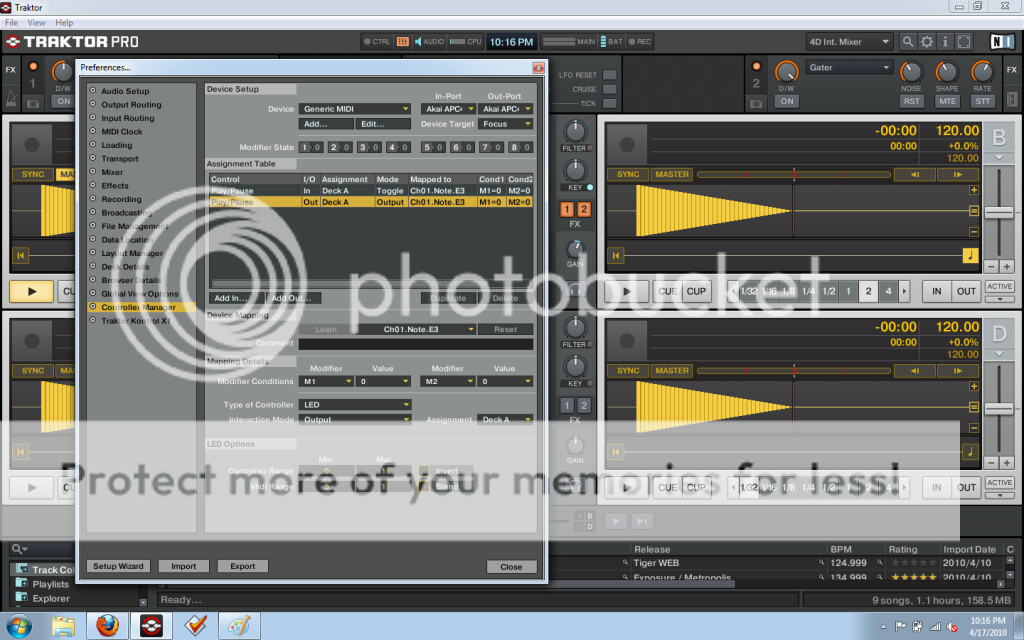
Ive been trying to create my own tsi for APC40, but been struggling with sending midi out to LEDs.
Here is screenshot of my settings, any suggestions on what am I doing wrong?:
Hi there guys, finally when i was finishing my .tsi i figure it out that i could have done it so much better, but anyways i would share i with you an uncomplete version of it.
This mapping has to be load through de import button that appears as soon as you open the configuration window on traktor pro, because its composed by several .tsi´s files per section. This way you get the chance to multiply all your modifiers, that are an esential part of any map with the apc40.
I highly recommend you turn on and connect your APC40 before opening TP, once you´re on u shoul press the first button of the scene launch row, so the lights and functions go on.
So u get 2 decks to work on but you can toggle between the A/C and B/D just like the TR-1 with the buttons above the ones that are above the cross fader (Detail View, Rec Quantization, etc).
The effects load pressing the “play” button and any of the buttons that are with the FX1 section that are: (PAN, SEND A, SEND B, SEND C).
Im not getting you an complete explination about the mapping 'cause i´m already working on the new version so i dont see it really necesary. Im really sorry for it, but this is just so u could get an idea of working with this kind of mapping.
Very soon i will post the new layout diagram, im just a couple of minutes away from ending it.