Are you f***in kidding me? I can’t count the number of guitar cables I’ve had to replace because of a kink or someone stepping on them that acted exactly like this.
The point is moot anyways considering the solution in either case is to buy a new cable. I’m done with this.
I’m not clued up on this at all as much as you guys are balanced and unbalanced etc, I just know that the cable that’s run from the TRS master out of my mixer into the XLR of my monitor, is the one that makes my monitor quiet.
I didn’t mean to have to different cables i didn’t know about make & female when I got them, but I do now!
I’m going to get another female XLR to TRS I think, that’s what the good speaker is using atm..
@mdcdesign - ah, the first link, the red ‘audiospares’ xlr to xlr cable is the first cable I ever brought for my monitors, one of them busted randomly and just started making fuzzy crackling noises and over-ran any music coming out plus I couldn’t find a longer one,
Now I’ve moved my monitors around I need the cables to be 4ft each,
Does it matter if I buy like 5/6metre cables? Like us it bad to have the cable longer then needed? It’s just because I can’t ever find the right size, only ever like 1metre or 6metre…
I need pretty much exactly 4foot long cables.
Also, how comes you posted two links/two cables, why not just by a pair of the first ones or a pair of the second ones? (Not being rude btw just wondering why u posted two different cables).
And should I stick to XLR to TRS or just use XLR to XLR?
Use XLR to XLR; it’s balanced, which means the less interference you get from outside sources such as power adapters/kettle leads, etc. The main rule of thumb is: if you’ve got XLR connections available at both ends, use them. You just want a normal “patch cable”, which is a male-to-female; it’s standardised across pretty much all audio equipment.
The difference between a 4ft (1.5m) cable and a 6m cable isn’t that big tbh, although for neatness you’d probably be better off getting 3m cables or something. 3m is a good size for club use as well, as you’re never sure just how far away from the soundboard the booth is going to be, but it’s probably not going to be 100m, and it’s likely to be more than 1m lol.
The reason I linked to two separate cables is one’s red (right-hand channel/speaker) and one’s black (left-hand channel/speaker). It’s always best to colour-code stuff if you can I’ve got a fair few of the audiospares cables, and some kenable ones, and they’re all pretty much the same… never had any issues with any of them
There’s no problem with using long XLR cables since they’re balanced which eliminates the interference you’d get from a long cable.
I’d stick to using XLR-XLR as much as possible because it avoids any of the confusion with connections like what you’ve had so far, as there are many different variations in use for the TRS connector whereas XLR is more standardised.
Ah right okay, yeah I have a lot of extension leads and that in the studio so probably get some interference there.
Yeah, round about 3m is the right length from my mixer over to my monitors, one of them is further away than the other, because the way it’s laid out, but 3m will be enough for both!
Yeah it’s always worth having a bit extra to okay with lol, ah right good idea, it’ll be nice to have em different colours to identify quicker. nice one fella. Thanks for helping.
P.S. I just can not find any 3m ones lol? There all flipping 1.5m or 6m+
.. Eh.
@makar1 - Yes! That is what I am going to do now lol, just straight xlr-xlr, having different ends and that just got confusing! Meh, nice one cheers for helping.
@Frank112916 - Yeah, I didn’t mean to get the cables all mixed up I just didn’t have any idea about male and female, and trs xlr etc, my bad! But sorted now going to stick with xlr to xlr!
a 6db drop could also be a simple cold joint or broken PCB track, broken pin between the connector and the PCB itself, faulty capacitor at the input of your monitor. Lot of possibilities, none are really expensive to fix.
I wouldn’t know what to do in them circumstances lol, but I’m about to but some XLR-XLR cables and that should do the trick. As I said, the XLR master outs of my mixer give normal volume, so that’s okay for me. Strange that there’s such a significant volume drop when using the TRS master outs, but oh well, in getting a new mixer soon so it’s all okay!
I will re-post here when I get and test the new XLRs!
I know it has RCA outs for the booth, but did you try adjusting the booth volume anyways? check to see if you changed something on the xfader settings?
Also from looking at the manual for the mixer, the XLR outputs are at 4DB, where the TRS are at 0DB. So you would have a bit of a difference there, but not to the point you couldn’t hear anything out of one side.
I use the booth monitor to record my mixes in Traktor! The booth monitor is always on just over half so theres no red when im recording! I haven;t got a manual for it, and havet looked up on the internet, but okay, so thats more than likely the reason? Plus what @mdcdesign said, must all be why ive had these problems..
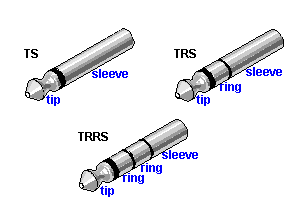
@mdcdesign - woah, lol, okay then.. I didn’t even know that existed, what on earth is TS then, why not just TRS? ufff I need to learn more about this!
It’s weird though, becasue i have a really cheap behringer uca222 interface, that only has RCA ins and outs, i have my monitors connected from RCA to RCA, just when im playing tracks from youtube itunes etc, and logic… and the volume is fine then, booming infact, but it does sound slighty muffly where its just ONE phono lead split to go into two monitors
Is it just literally the TRS/TS connection that is lower? cheers
I’ve had noooo luck finding 4m xlr to xlr leads. (just done a measure up and 3m is only long enough to reach one monitor, the other one (the quiet one) is going to need a 4m)…
Shall I just buy the two from the links u posted dude? 6m is too long for both monitors, but heck there not too expensive, i have found some 5m ones, but there 9quid each… so i may just deal with having a bit of loose lead hanging about, its going to be behind/under desks anyway tho so not much bother… I would just like 4m versions of the ones you posted but there just nowhere to be seen :s
So this is a dumb question and could have been answered already and should have been your first trouble shooting step. But, did you unplug the loud speaker from your mixer(leaving the cable installed into the mixer) and connecting the low speaker to the XLR cable in the mixer and see if it’s at normal volume.
Sounds like it’s just the loudness difference between the XLR and TRS outputs on the mixer
The speakers were switched and have been shown not to be the issue. The TS Master Out of the DJM500 is unbalanced and puts out a weaker signal than the XLR Master Out.
 balanced and unbalanced etc, I just know that the cable that’s run from the TRS master out of my mixer into the XLR of my monitor, is the one that makes my monitor quiet.
 plus I couldn’t find a longer one,
 I’ve got a fair few of the audiospares cables, and some kenable ones, and they’re all pretty much the same… never had any issues with any of them