A basic cable management hack... Share yours...

A basic cable management hack… Share yours…

This nifty little hack has been brought to you in part by… … lol.

This is a simple cable management hack. It will only cost you $2 and almost anyone can do it :slight_smile:

Buy one of these boxes above…

Flip said box upside down, and run all your cables through it.

Place your laptop ontop, the container doubles as a stand.

Please share your own cable management hacks below :slight_smile:

Velcro (temporary) and/or zip-ties (permanent).

The DJTT cables come with a handy Velcro tie. Otherwise, I grab Velcro ties from Home Depot

Ha, i like. I get soooo pee’d off with cables all everywhere, currently all going behind my iMac, as my gear is to the left and right hand side of my iMac. I’m sure all those cables are not good being all jumbled over eachother so i must get them a bit better organised. Especially when im trying to unplug one, and not even sure what is what.

I do have one organisation tip though. It’s colour coded USB’s. I have coloured stickers (these sticky labels circles - Google Search)

and i put them on the end of the USB cable that goes into my USB HUB.

Maschine - ORANGE
Bass Station - BLUE
TB-3 - GREEN
MIDI Keybaord - WHITE

etc. I set a colour for each thing i put it. It’s very handy.

I ductape my cables in groupings. so my mixer ins are together, my mixer outs are together, my usb’s are seperated… they never get tangled

Ive been trying to figure out a way to organize my cables on my flight rig for ages. Im gonna steal this idea. IN the space between gear and coffin, place a wire mesh on the rear then cur holes in the wire mesh to fed and label the cables.

So far this thing has been all I needed xD
http://www.amazon.com/VELCRO-ONE-WRAP-Self-Gripping-Cable-Reusable/dp/B001E1Y5O6/ref=sr_1_2?ie=UTF8&qid=1451517710&sr=8-2&keywords=velcro+ties

But i can see for multiple equipment setups having an actual harness or color coded cables would be essential.

No that much basic is my management but give me efficiency when I have to set up, unset up, re set up: let’s try to explain.
Traktor cables:
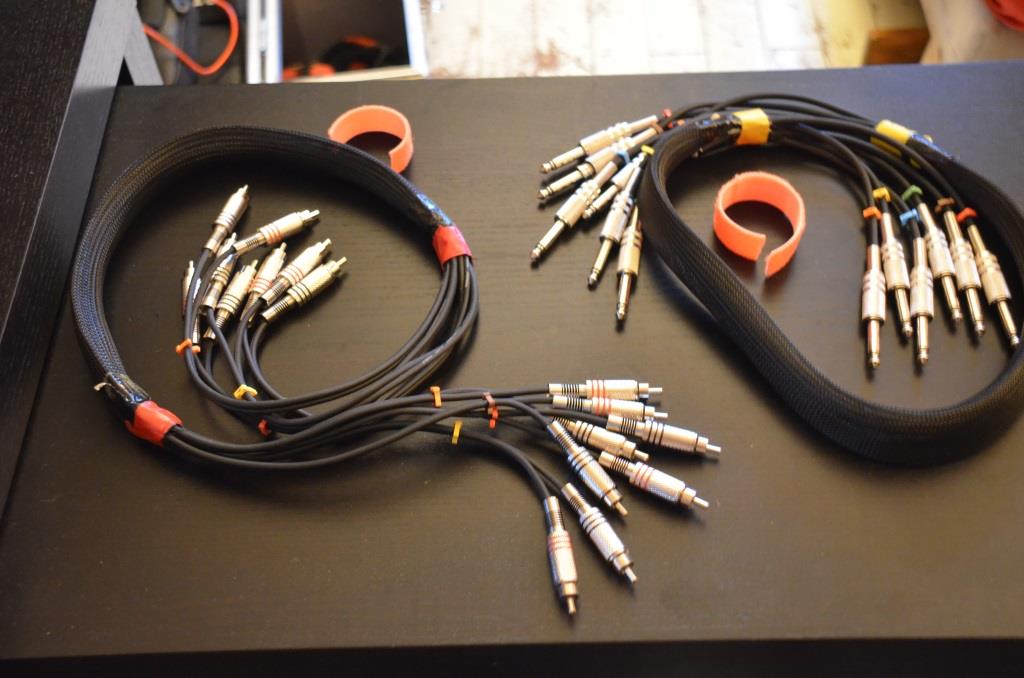
Grouped in a 4 stereo pair multicable. Each channel are numbered from 1 to 8. The mutlipair is color coded in red.
Ableton cables:
Grouped in a 3 stereo pair multicable. Each channel numbered from 1 to 6. Multipair is color coded in Yellow
I used cross braiding to group my multipair cable
Both soundcard ( audio 8 and Komplete6) are stickers color and number coded
Mixer (Xone62) have stickers colored and numbered with symetry to Sounadcard and cable color and code numbers.
Benefits:
efficency when cabling my st up at gigs or back to home.
Anyone can help me to set up my gears or even do it alone if necessary
No many cables goes every where, mixing together in a unextricable bowl of cables.
Look very clen and pro.

My OCD likes your style!

What means OCD?

Obsessive Compulsive Disorder.

It’s a joke - it means I like how organised your cables are! :thumbsup:

Ok. Understood. Lol. You’re not far from reality.
But despite this OCD, it a big source of time gains when I have to go out for play gigs. I don’t have the money to double my set up (1 at home and 1 for gigs). And I would be able to double the gigs set up in case of …):expressionless:

lol I keep a seperate soundcard for live use, because I do not want to unplug the mess load of cables in my studio…

Short example. this is my Play Away audio cable set up. You can see the red snake for Traktor and the yellow snake for ableton.

sexy :slight_smile:

I also plan to find a solution in order to take my mixer, soundcards and cable and store it in a trolley bag which allow me to not unplugged everything

Sounds like a job for a patchbay… :wink:

I guess it looks like I need a Patch :laughing:

lol I already have patchbays… need more soon