Bread's Novation Twitch Performance Mapping [Traktor]

Bread’s Novation Twitch Performance Mapping [Traktor]

Hello everyone,

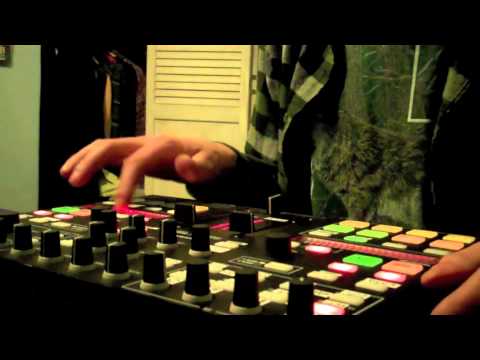
I’ve been working on mapping the Novation Twitch to our beloved Traktor. After purchasing the unit and being completely underwhelmed with the amount of control that the stock mapping provided, I set to work. I’ve been trying to implement as many features that I like into this thing while still keeping my own level of comfort and stability, and I’m pretty much all the way there. Just need to do some beta testing for a little bit and then I’ll be able to release it. I’m trying to film a quick video demo, but my voice is completely shot today so I’ll drink some tea and see what happens.

Here’s a quick list of some of my changes so far.

The Good
Pad Banks
-Hot Cues bank left alone. They did this part right.
-FX bank revamped to give control over momentary effects, meant to be used in conjunction with the effects knobs at the top of the unit.
-Loop bank is now “Grat” bank. You know what this means.
-Grid bank is now “Slicer.” Does not work the way the Serato mapping does Slicer. This is more of the midi fighter slicer variety. Awwww yeah.

FX Section
-FX Section now controls FX1 and FX2 in Group mode for Deck A and Deck B respectively.
-One knob for ALL dry/wet now.
-A single knob for each effect parameter.
-Toggle switches allow for 2 racks of 3 effects on each deck. 6 effects total on 3 buttons, bro.
-Echo Freezes. One short and one long for each deck. Like the midi fighter, but two!

Mixer/Decks
-FaderFX. You heard me right. I’ll say it again. FaderFX.
-Hot Looping. One knob to change the value of the loop, click that knob to set the loop. Sup S4?
-Filter always on. Because seriously. Who needs a button to turn their filter on and off? Just center that knob like a boss.
-Crossfader sensitivity boosted. Because I like to think I can crab after like 4 drinks.
-Tempo and Key knob sensitivity boosted in fear of carpal tunnel syndrome.

Minor Changes
-Shift buttons now blink with the beat.
-ALL LEDs brightened/colors changed for visibility and feedback.
-Assorted knob sensitivity adjusted for less sprained wrists and more fun.
-The .tsi has been completely cleaned up of all redundancies and professionally commented. Don’t like the effects that a button selects? Widen the comments section and look for the part you don’t like, then get to personalizing.

The Bad
-NO 4 DECK SUPPORT. I know, I know. You love using 4 decks and I’m a real douchebag for not putting it in. But hey, how’s about you do it? I’m feeling lazy after making this mapping so damn awesome.
-Because there are so many effects between the FX bank, Grat bank and FaderFX, you need to be a little mindful of which effects are currently loaded. Not always a big deal, but can be offputting when you turn on Transpose Stretch at 0 when you mean to hit a Gater at 75 or something like that.
-Some knobs are not encoders, so they force a soft takeover. Hoping to find a way to fix this soon, it doesn’t affect performance, it’s just kind of annoying.
-No combos in Grat mode. If anyone can point me in the direction of some help in regards to programming the midi fighter’s beatmasher spin-down combo I would be most grateful.

My main focus with this mapping has been to remove the focus from the computer. I want to be able to do as much as I can without looking at the screen often. Now I only need to touch my computer when I’m searching for a specific track or double-checking effect values. I’ve even turned the mixer portion off of my screen :slight_smile:
I was able to give the mapping a test run last night between myself and my friend that DJs on vinyl timecode in Traktor. He was able to jump right in and start mixing like a champ. At one point in the night, the both of us were using the Twitch to create a massive supercombo into a big drop. It was an absolute blast.
I’m now able to create live mashups and remixes on the fly using the Slicer and FaderFX. You like to ploop? I like to ploop. Now that the loops are on a simple knob instead of using 8 pads, I’ve been enjoying looping down into 1/32 and crabbing that GGRRRRRR sound in with another track while changing the key using shift-tempo. Throw in some Filter92:LFO and we’re getting DIRTY. The Twitch is now much more expressive for me and my style of playing. I can’t wait for you all to try it out!

Thanks for reading and stay fresh,
-Bread

Well, Im kind a big fan of you now lol Can’t wait for that come out!

Thanks, man :slight_smile: It’s been a LOT of work so far. The best way to keep up to date with my progress and the release of the mapping itself would be my youtube channel. I’ll have a demo video soon as well as a walkthrough of how to use the mapping. Thanks for your support!

Great job! I cant wait to try it!
I made some small modifications in original tsi file,
but i was waiting fo someone, who i is more mastered at it!

Like i said, i cant wait for it, keep going man!!!

Got this for ya :smiley:

Hoping to give it out later this week, I want to put a few more videos of the mapping up first, including a walkthrough of the mapping and how to sticker your overlay to match the .tsi.

Currently beatmasher is on the touchstrip. TouchstripFX was a last-minute thing, so let me know if you guys can think of any effects that would suit the touchstrip better. I’m still thinking of adding a drama/sweep knob, but there’s already sooo much hahaha. Thanks for watching, guys :smiley:

Very excited to get my hands on this.

Quick update for you guys before I go to work today…

-Still no 4 deck control. I likely just won’t be adding it, because I never use 4 decks. Sorry guys, but that’s almost doubling the amount of work I’ve put into this mapping so far and I’m trying to get it out this week :confused:

-FX Select added to all FX buttons, so it’s pretty idiot-proof.

-Touchstrip FX! I added Beatmasher to the touchstrip, just gotta hold shift. The value jumps to your finger’s position on the strip, too. I really like this one, it adds a huge element of playability and freedom.

-Instant Grat combo! I’ve managed to program the Midi Fighter’s beatmasher combo (Press 4 buttons, spin down) but it doesn’t sound 100% there and sometimes the modifiers it relies on can hang, leaving the combo available with just 1 button press. The LEDs for beatmasher in Grat Mode currently feed back the Beatmasher’s amount, so it gives you all yellow buttons if the spin-down combo is “primed.” I need to work the bugs out on this one the most. If anyone could show me or point me in the direction of how to copy that combo exactly, I would be most appreciative.

It’s coming along, guys! The mapping is 100% done, I’m not adding anything else to it, I promise. I just need to work the bugs and glitches out and make sure that it’s ready for playing out! I’ll film a walkthrough of my changes tomorrow as well as a tutorial on how to sticker your layover so you’re not confused when you start using the mapping, lol. I’m working on getting the 12inchskinz template to match my mapping, too. But I’m not very good at photoshop so I’m having a hard time, lol.

Thanks for your patience, everyone. It’s coming :smiley:
-Bread

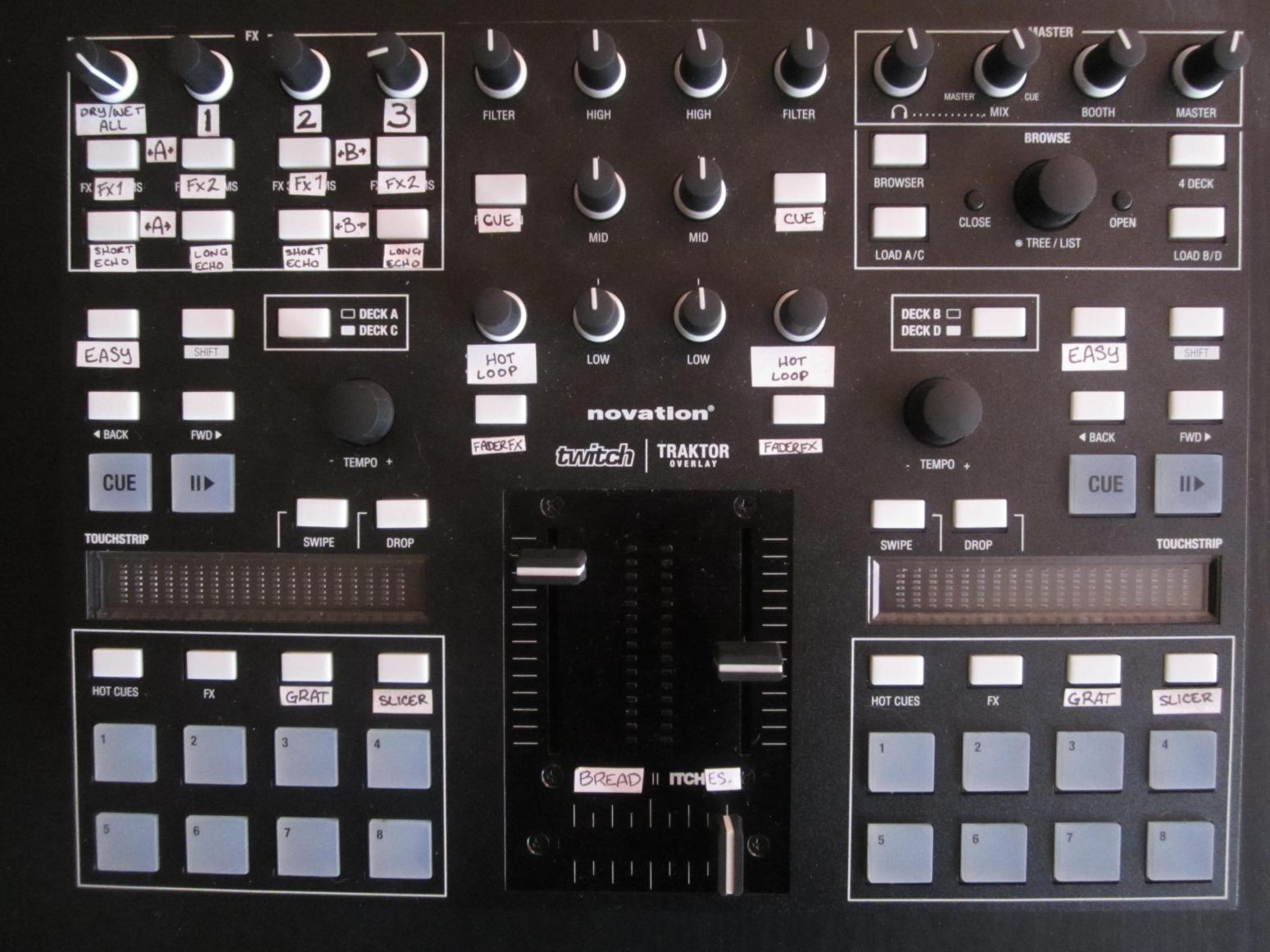
Also, since everyone’s been so patient I snapped a pic of my powered down Twitch so you guys can see my stickers :smiley:

Good job man!
I never used 4 decks, so it’s ok for me.
I hope to try it in few days =)

Jan

And what is “easy” button for?
I also noticed “Bread itches” labels =D

That’s for “sync,” lolol

Really nice job! about masher combo.. How I did it was is to place modifire on first masher button that turns transpose sweep when hittin’ last button combo. I know it’s not original mf way to map it but it’s more simple and same effective. Hope this helps.

edit:

I don’t know if you can copy this to your mapping but I come up with solution for this combo few minutes ago]…
example:
Mash1:M1=v1
Mash2: M2=v2 (M1=v1)
Mash3: M3=v3 (M2=v2)
Mash4: M4=v4 (M3=v3)

Mash4: M1=1, M2=v2, M3=v3, M4=v4 (need to map this last to shut down all modifires at once)

interested to give this a try…

This is exactly how I did it, but the modifier doesn’t automatically go back down to 0. I think it has something to do with the way the Twitch itself treats multiple button presses… I’ll mess with it some more and see what I come up with. It’s FINALLY friday and I picked up the software I need to edit my videos last night. Shouldn’t be too much longer now guys, thank you so much for being patient :smiley:
I’m working on a 12inchskinz template to release alongside the mapping, too hehehe

You didn’t get it do you? You need to map that last button in row to multiple modifires (M1=1, M2=v2, M3=v3, M4=v4) so when you let it go traktor at moment shut down all modifires in this combo.

I feel silly, this is exactly what I have minus the M4=v4 part hahahaha. I’ll fix it tonight and report back, thanks Stewe!

Your welcome Bread. I’m glad to be a little part of that mapping, hehehe… Lookin’ forward to see final result soon.

I’ll definitely throw your name in the comments section under the commands I use :smiley: Thanks again, I’m home from work now so I’m getting to work!

A little update for everyone. Thank you for being patient. It’s all coming together now :slight_smile:

Don’t forget to click on the ads, it helps me out a wee bit and every bit helps :smiley:

Wow that looks awesome. I’ve only used Itch with Twitch, but I’m really interested in trying this out. I appologize if this is a dumb question, but are you going to be charging for access to this mapping and overlay?