Cant stream/broadcast digital with Traktor / DJM-850 + Shoutcast [Windows]
Since there are so many cons using an external/2nd soundcard using the line-in, to record or broadcast your audio, I want to do it digitally/internally.
So I used this video of DJTechTools to set it up:

In short the video, shows u to dedicate one channel on the DJM-mixer, where u put it to REC-out in the Pioneer Audio Utility, and making sure this one channel is setup as input on the Input-FX Send (Ext) in Traktor.
This actually does work to Record/Broadcast your audio in Traktor, but not when u want to broadcast using Shoutcast/Nicecast/external program.
Thanks to this thread, Traktor on MAC, External Mixer and Shoutcast stream via Nicecast not playing ball. , I found out u have to set REC-out on all Channels in the Audio Utility of Pioneer.
Next step, to broadcast, I’ve used Nicecast on my MacBook Pro;
Set source up to Audio Device/Pioneer DJM-850 and start broadcasting.
Works 
But it doesnt when I’m using Windows on my main desktop pc. 
I’ve tried using the Winamp + Shoutcast DSP Plugin + Icecast server work-around, as described here:
http://www.kraftyradio.com/profiles/187/
I used this method for several dj-controllers in the past like the Kontrol S8, VCI-400 EGE, Numark 4Trak, and all worked.
But this time it wont with the DJM-850.
I get the info of the titles in Winamp and a split second of audio pops up I see in Winamp, and then audio stops.
I disabled virusscanner + firewall; still same.
So I tried using same setup, but instead of Input set to Winamp, I changed it to Soundcard / Pioneer DJM-850 (Line). But no sound coming thru.
I’ve tried BUTT aswell, but no sound either.
Who can a shine a light on this?
Why is it working on MAC and not on Windows?
Note 1:
I also dont have audio in another program (like a youtube in Chrome) when Traktor/DJM-850 is started. Neither I can play an audio-file with Windows Media Player for example at same time. I never had that issue with the other controllers mentioned before.
Note 2:
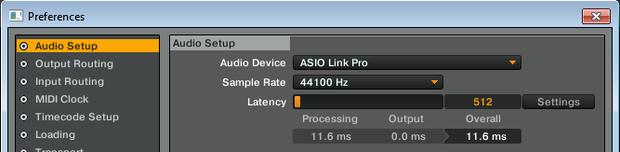
Yes, I renamed the Traktor64.exe and copied the 32-bit version, otherwise ASIO Pioneer DJM-driver wont show up in Traktor, as mentioned here: Problem setting up DJM 850 with Traktor
Note 3 (versions used):
- Windows 7 64-bit / OS X Yosemite 10.10.5
- Traktor 2.10.2 9 / MAC and Windows
- Nicecast v1.11.8 on MAC
- DJM-850 v1.2 Audio-utility on PC, v1.0 on MAC
- Icecast2 v2.x + Winamp 5.666 + SHOUTcast DSP 2.3.5 on PC
- DJM-850 firmware v1.10
 but atleast the demo showed it prolly worth it.