I’ve jst received my SE overlay and uploaded the latest 1.6 midi mappings.
However the FX work nothing like the video shows or the overlay labels indicate.
For instance you can’t select the type of FX being used as the buttons describe, and the Deck A and B sections are not divided as on the overlay…very confusing and not like Ean’s video.
I’m running 1.2 firmware…Can anyone shine any light on this?
Also I don’t understand what the Filter buttons are for if the filters are assigned to the knobs…?
I think you will require the 1,3 firmware if you want the vci to behave like an SE. the updated firmware allows a knob/fader to be multiple functional. I think thats why you having the FX issues.
So the 1.3 firmware is essential for the VCi 100 to function as the SE layout indicates - even the standard Deck A and B FX Banks?
If this is the case, once the 1.3 firmware is installed will it all function correctly on loading the v1.6 mappings or will further adjustment be required?
I just want the A and B FX Banks to operate simply as Eans video shows, i.e the knobs adjust speed and Mix, and the buttons select the type of fx…at the moment when running the v1.6 mapping the knobs and buttons do something completely different.
Also, please can someone confirm what the function is of the FILTER buttons next to the FILTER knobs?
If you are keeping your 1.2 firmware you will have to make some adjustments to you mapping as this particular firmware will not assign Knobs/Faders to ‘multi’ function like an SE.
You will need to go into Midi mapping and make the adjustments to certain things you want Faders/Knobs to do.
If you are going to update your firmware to 1.3 see below.
(i have tried to lay out the thread as easy as i could but if unsure go straight to this thread after reading on) DOWNLOAD VCI100SE TKS FILES HERE TRAKTOR 3.4
When the firm ware is updated to 1.3 and you are using Traktor 3.4 please use below, then it will match to Ean’s vids.
This one fixes all known bugs including the pitch down not working on deck B when loop is on.
If you are going to use Traktor Pro use this, best bet is go to the thread to sign up for the TSI if you have not done so already. Download VCI100SE TSI (TRAKTOR PRO)
Members of this email list will receive:
notification when updates are made to this basic TSI
new beta versions including the current 1_6 which has a lot of great features that are designed for the new overlays (due in late march)
Discount offers on overlays
Differences From the Traktor 3 Version:
The FX section loads groups of FX not single FX so use it in chained mode
Number 5 cue point on the jog wheels has been removed
Deck C changes all controls to deck’s C/D
UP/DOWN list scroll enters browser mode- to exit load a track or press deck copy.
Settings you will need to load.
if you are new to traktor load all available settings including audio,midi,fX
if you are not then only load midi as the others will overwrite your settings
I think it might be better to use v1.4 mappings until you get the 1.3 firmware. That’s what I’m going to do. I hope the firmware is back in stock soon!
Does anyone know - if you upgrade the firmware on a PC (the only option) will the new firmware work with in conjunction with a MAC?
When you upgrade the firmware on the vci it will work with a PC or MAC no problem, the update in firmware just allows multiple midi messages to be supplied to a fader/knob/button. In other words the vci 100 SE
Try having a little look at this if you have the SE, but it really does depend on whats been mapped to deck B. if you are using a TT tsi this should help, if not go in to the midi mapping in traktor and check what deck b is set too.
Got it i think . . . . . you are still using 1.2 firmware right? Also you are using the 1.4 tsi? This one is for traktor 3.4 not pro. Please see below
These files will only work with VCI-100’s that have the special edition firmware installed. Regular VCI-100 users may try them out as many of the functions will work but some functions will be disabled.
This is why you are having differences, plus if you are using TPRO try using this file.
Also im pretty sure to get ALL performance modes working as they should you will need the 1.3 firmware.
I am using 1.4 TSI..the link you gave me for TPro.
When I load the TSI, it give me these fx..
It is not the same as on the DJTT Faceplate.
This is why I am confused a bit.
Thanks for your help.
yes, I want to upgrade the firmware, but not in stock..
Awwww right right my fault. You will get differences because of your firmware only 1.2. Sorry if i was a little confusing. the link i gave for pro is the correct one. I got confused and throught you ment 1.4 thats for T3.4. You are using the correct tsi 1_4 TPRO
(thats were i got confused, between the 1.4. 1_4 . . . . never mind)
However, you could try the odd modification on tha particular mapping to see if you can incorporate things you want until you get your upgrade
Once you are upgraded everything will work as it should.
No problem glad i did help in the end The layout can be a little confusing in the forum. i did help someone else with a similar problem a while ago and Ean did say he is looking into organizing the SE section out so watch his space.

 . . . . . you are still using 1.2 firmware right? Also you are using the 1.4 tsi? This one is for traktor 3.4 not pro. Please see below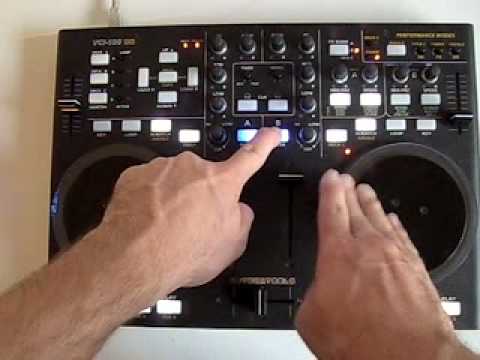
 The layout can be a little confusing in the forum. i did help someone else with a similar problem a while ago and Ean did say he is looking into organizing the SE section out so watch his space.