I am very new and spending a lot of time to make cue points over and over again because of my lack of knowledge.
one of issue is using mac as well.. im pc user and i have started using mac for djing but, so hard..
my question is
is is possible that I can share my mp3 cue points between Mac and PC? + and settings.
I am pretty sure that I can keep those but I am not exactly sure how to do that. I have looked up youtube and tried my self but.. hard to find exact what i want.
please guys i know it is very easy for u guys but not for me
Well i don’t know how well it would translate over to a Mac but it should work. Here is an excerpt from another post I made that may help:
Odds and Ends
Just a few notes to add. This has been an ever evolving process and may not work for everyone. I’m just throwing it out here to help anyone who may want it. This works very well for me and has cut my prep time on tracks in half if not more. What I would recommend for a new DJ or any Traktor DJ is to get an external hard drive. Put the following on it:
Traktor install and update files
Your iTunes library
Your Traktor Collection and settings
I run Traktor and iTunes from this drive. To move these items to and run those from the drive do the following: (This is for PC as I do not have a Mac)
Copy the entire iTunes folder for your “My Music” folder to the drive
Start >Run >%userprofile%\Music
Copy your Traktor collection and settings to the drive
Start > Run >%userprofile%\Documents\Native instruments
Grab the most recent version folder
To get these programs to use this information do the following
ITunes:
Hold shift when launching iTunes
This will make it prompt to choose or create library
Select choose library and navigate to your external drive
After you have your external drive setup and working back this up to another drive. The idea behind all of this is that if something happens to your laptop you can buy/borrow another laptop and you have everything you need on the external drive. (Including the install files) The second drive is in case something happens to the first drive.
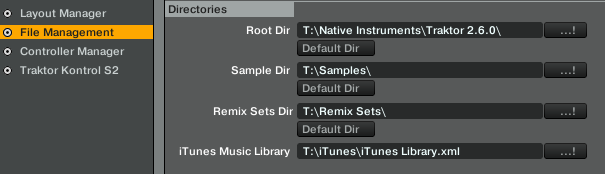
I think so long as you put everything on an external drive and just have your software point to that drive (T: in my example) it should work across both platforms.
I do this from PC to PC. I can be on my desktop making changes. Close everything and take my drive to my laptop and am able to pick up right where I left off.
I just don’t know how it would work between a Mac and PC.
Pretty sure all you need to do is copy the folder that all your music is on, and replace that folder on the computer that needs the cue point updates (assuming if all your music is MP3 cause not 100% sure about other music file types). If you have Traktor playlists that need to updated over or want to copy over your main Traktor collection list (if you play from that at all) then you need to copy and paste the collection.nml file