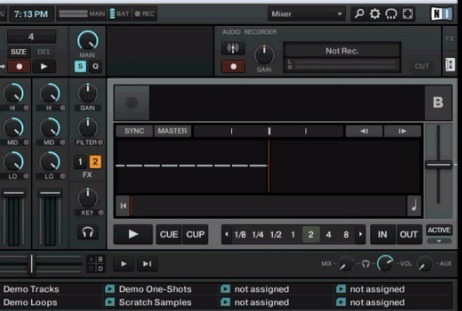
I am kind of new to this whole thing but how do i record. I have my Traktor Pro, Kontrol S2, and some monitor speakers hooked up. I also own the Audio 6 but it is not hooked up at the moment. Do I need to use that? Does anyone have kind of an easy step by step guide?
Top right of traktor pro 2 software, click on the cassette tab, and press Rec, when done, stop the recording.
You’ll find your recorded mix under music/traktor/recording
ok i see what you are getting it. I dont have my other computer with me right now so i couldnt try it out. So you just press that button and then the recording panel will show up. Then you hit record correct.
Yep, and when you want to stop, you press the Rec button again (while recording is red).
While recording you can switch between recording tab and fx tab with no prob.
Before you start recording, open the preferences window and under the recording category check it’s set to internal. You can adjust the maximum size of the size before being split in there as well.
so i tried hitting that button and nothing popped up. When i go to extended view. There is a recorder that only records 4 beats at the top of the mixer. How do i record the whole set. It looks like this is to record samples. I am missing something please help
I have both traktor pro and traktor s2 that I just bought from djtechtools store. I know where the record button is and every time I try and record something I start recording then go listen to it once Im done and there is no sound. Any suggestions? Thanks in advance