I am facing the following problem:
I want to map a pad (in traktor 2.6) of NI Maschine in a way to activate an effect when i hit it and control the effect value with the PolyPressure Value of the pad.
Can’t figure it out how to do it. Have tried some things without success.
I think it should be possible without using “Bome’s Midi Translator” or am I wrong?? (it’s said in this article: Unlock the Power of Aftertouch! - DJ TechTools )
Would be nice if i don’t have to use another program to do this.
I don’t have maschine to tell for sure but you should be able to test out if your pads are sending velocity CC to traktor. Enable learn and press the pad - you should get ‘note on’ value and while pressed push it a bit more and check if other value show up. If so that would be your FX parameter code.
I’ve tried that already.
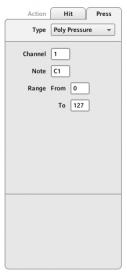
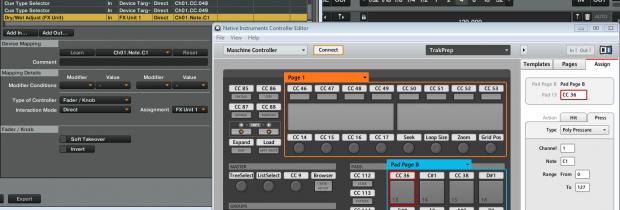
in the controller editor I set the “Hit” event to a midi note and the “Press” event to the Polypressure values.
if I hit the pad with learn enabled I get the Midi Note from the Pad but when I change the pressure on the pad the command in the assignment field doesn’t change.
But on the Maschine display I can see the value of the Polypressure changing but Traktor doesn’t get it.
Try to change value from note to CC (seems that press/velocity are sharing same note). If Traktor still don’t recognize it by press try to assign it manually with mouse.
and when i hit the pad the Dry/Wet knob jumps to 100% and after releasing back to 0.
I think this happens because the CC Value jumps to 127 on hit and the command gets just the value from the initial hit.
when I assign the command to the note of the PP event (Ch1 C1 in my case) by hand. nothing happens if i press the pad…
when I change it to Direct Encoder it jumps to full when i hit the pad and back to half when I release it and ignores the PP. (tested with the learned command.)
Disable the Hit MIDI note, use only Press. Map it as a fader/knob>direct using CC and make sure the fx on command is mapped as hold so it turns off when you release it.