Nem0nic, I agree — but we are not talking about if I would use it 5 years from now. We’re talking about today/right now. I would not use an iPad as it currently works vs. 1200’s (or CDJ’s) and a mixer. The OP was talking abou tusing solely an iPad for DJing — truth is it’s not their yet for real(club) use when there are much better options available. Perhaps down the road it will, and at that time folks I’m sure will become open to it, just as we are seeing the boom in controllers.
My buddy DJ’s his house parties with an IDJ Pro and an iPad. He’s pretty good, but even he says he would upgrade to a more professional setup before leaving the house. The IDJ pro is pretty cool, but unless you already have the ipad, and just want something to manipulate the Djay app better, I wouldn’t recommend making it your actual setup. I just dont see the point, and the software is really lacking IMO compared to VDJ, TP2 SSL etc. Not to say you couldn’t make it work, I just don’t see the point and personally wouldn’t trust the touch screen.. What happens when your fingers get sweaty and the iPad doesn’t respond???
Neither am I.
The fact is that the iPad is now capable of being a perfectly acceptable DJing platform. There are currently apps out there now that can take advantage of professional hardware, and this situation is only going to improve. I think DJs that worry about what someone else is using to play out (anywhere) are sheep, because seeing someone use something else somehow threatens them. These are the same people who will argue about what gaming platform is best.
When you look at the history of dance culture, you see that every great new addition to the scene was brought about by people breaking the rules. Scratching, Beat Mixing, House, Reggae and Dub, Acid, Techno, Hip Hop… All of these and more are around now because someone said “fuck the rules”.
So if the OP wants to use an iPad to DJ with, why not try to help him instead of shooting him down? He might end up being the next GrandWizard Theodore or Juan Atkins.
Almost forgot about the Vestax Spin MK2, designed to be used with and Ipad / iphone with multichannel support and charges the device at the same time.
And they got the EQ’s in order this time.

You guys act like no DJ has ever used an Ipad.. Its not a revolutionary idea here.
Anyway I know I would flip out if I played a gig with an ipad, when all the sudden I can’t adjust the faders because my fingers are too sweaty. Plus I like to look at the crowd a lot when I mix, making the physical knobs and faders a must. I just wouldn’t want to be looking down at a pad on the table the whole time, but thats just me
You’d think it was with all the people dismissing the idea out of hand.
However, the article you refer to has absolutely NOTHING to do with DJing on an iPad. And the discussion in this thread has nothing to do with TouchOSC or any other MIDI control app. The OP wanted to use the iPad as a SOURCE - the sole computing platform. Not as just another controller.
And there’s no reason at all why you can’t have tactile controls and still use an iPad as your DJ source. You’d know this if you had bothered to read the thread.
I don’t see a difference whether you use an iPad, PC or a Mac as your software platform tbh.
It’s a computer - whether you use a cheap droid tablet or a $5000 macbook - it’s still just a computer.
Tablets as controllers is another point and I don’t think that works if you use the tablet on its own.
I use an iPad as a secondary controller for loading fx, changing layouts, browsing etc. and it’s cool for that, but faders/knobs just don’t feel ‘right’.
Of course that’s because I’m used to real faders/knobs - some new kid might not have ever twiddled a knob and find a tablet to be fine.
What program are you using that allows iPad as a secondary controller? That seems like an good use for adding a tablet to the mix.
At this point in the game, not sure if a tablet has enough performance to handle heavy utilization of effects, remix decks, etc.
I just realized you could setup Traktor to use the iPad as a Midi controller. I answered my own question. Thanks!
Oh yeah than whats it about? When I see a guy DJing on an Ipad I think it has to do with Djing on an Ipad..
Right you are. And if you would have read my previous post you would see that I already talked about the Djay app which is in fact a complete djing software, not just an app for another controller.
Annddd this one doesnt make sense. Brother, I read the entire thread.. and yes I know it can be done hence my comment regarding the Djay app. But if you had an iPad/iPhone, you would know that if you have moisture on your finger tips, the touch screen is a lot less sensitive. When I DJ I sweat, therefore It would not work for me, at least I wouldn’t want to risk it. Not all Dj’s will have this problem I’m sure, but its worth considering.
Please tell me where in this elaborate thread does anyone actually refer to this concern I raised? because I checked 
He means using a controller with the iPad mate - just using the iPad as the computer…
I use this one but there are loads around:
Pretty cool app - supercontrols etc. - worth the money imo 
Very cool app, thanks for the link!
Back to my other point, not sure if tablets have enough horsepower to have the same level of features. However, I think the touchscreen gives developers an opportunity to change the way people perform with music. I grew up twiddling knobs and slamming faders, so that is natural for me. The next generation DJ probably not locked into a the historical approach to performance.
I work in IT and see it all the time. Older people work with applications the traditional way, the younger people do things with a fresh perspective. 10 years from now we will probably look at laptops like we look at turntables.
No probs - forgot to mention it has XY pads as well which are pretty cool - you can attach them to multiple knobs for cool fx shenanigans - yup shenanigans 
Jumping in this forgotten thread.
I’ve already did about 5-6 out-of-house parties with the iPad only last year. DJay did very well for solid hours sets on an iPad 3. At first, I had no pre-cuing, but later with iOS 6 I got a behringer UCA202, which just works on the iPad.
There was no sweat issue, although I was literally bathing while dancing and playing . The iPad handles the liquid drops perfectly acceptable. I did some mixing mistakes, but it wasn’t the pad’s fault, but mine.
Track selecting on the pad is superb, EQing, not great on the DJay app GUI and I was using the house mixer to adjust EQs and levels. All in all, great fun, very acceptable for a portable setup.
At the end of January, I upgrade to iPad4/64/cellular and that thing is a beast. I don’t currently own a laptop and the iPad is my primary mobile computer. And it works perfectly well for me A to Z.
Last week, I also sold my S4 and got a VCI-400 so I can use it with the iPad & DJPlayer. Was hoping the Z2 will work, but no - it can’t be switched to MIDI without connection to a computer with Controller Manager installed - MIDI is drivers only, unfortunately. For Audio Z2 works, but MIDI is a NoGo. Also checked with DJM-T1 - the oposite, MIDI works, but no Audio. Anyway, VCI-400 is just PERFECT for DJPlayer, I’m very happy!
Last night, I did my first public set on the vci-400 with DJPlayer. It was 5 super fun hours. Mixing, looping, effecting, cue juggling, everything. Sound quality is very good for an average bar system, even with the in-app mixer. Battery of the iPad was at about 40% after the 5 hours.
I have switched to iPad DJing, yes. I’m an early adopter and I’m happy about it. Can I get myself a proper MBP, install Traktor and Serato and not bother with the iPad’s limitations? Perhaps yes but I enjoy it more like this for now. It has to start from somewhere and eventually grow to a pro level. I’m not a pro, so I can afford to ride the bumpy way of the early adopters. Eventually, I will contribute to this evolution in some/many ways.
Apps wise, DJPlayer is great - I love it. There may areas for improvements of it, but the app is already usable for real work. The VCI-400 is my controller of choice for it. There are also those “made for iPad”, but I find them toyish.
Besides the DJay & DJPlayer, I’ve also discovered the MixVies Cross app few weeks ago, and dare to say that it seems better than DJay. When I do an iPad-only set again, I would probably do it with the MV Cross - much better use of the screen estate and amazing access to the features. There’s some bug with it on iPad2/3 and iOS 6 - audio drops on track load, but I don’t have it on iPad4. MV say that fix is coming, and also, they will enable MIDI support on the iPad app. First for their own U-MIX Pro, later for others hopefully.
I will probably try one of http://theauris.com/ to see how remote bluetooth will work. These guys claim that they have some better protocol than the A2DP, which is less compressed. If this sounds good enough for remote playback, it will be very nice. In general, BT configuration is supposed to allow me to use the local headphones for pre-cueing, while Master on remote with relatively low latency. We’ll see about that.
So those of you who think that iPad is only in the future - wrong, it’s in the NOW already. Is it usable for big Clubs - probably yes, but the softwares are still a bit limited. For bars, small clubs and mobile use, it’s enough already. My experience is that a VCi-400+iPad kit is as good as a CDJ-400 + mixer setup (CD playback aside), which I used to have before I got an S4 two years ago. More or less, all that I could do on CDJ-400s, I can now do with the iPad+VCI-400+DJplayer.
Ok, just to say…
I use one iPad 2 64gb to play sometimes. And i can tell u, ITS GREAT.
3 APPS PERFECTS for ANY ocasion:
DJing: CrossDJ from MixVibes - You have a lot of good apps like DJay and other… But i LOVe this one. Get it and u will see why  They have two versions, one for run directly in the iPad and other one which works like a controller for the program running in a PC or MAC.
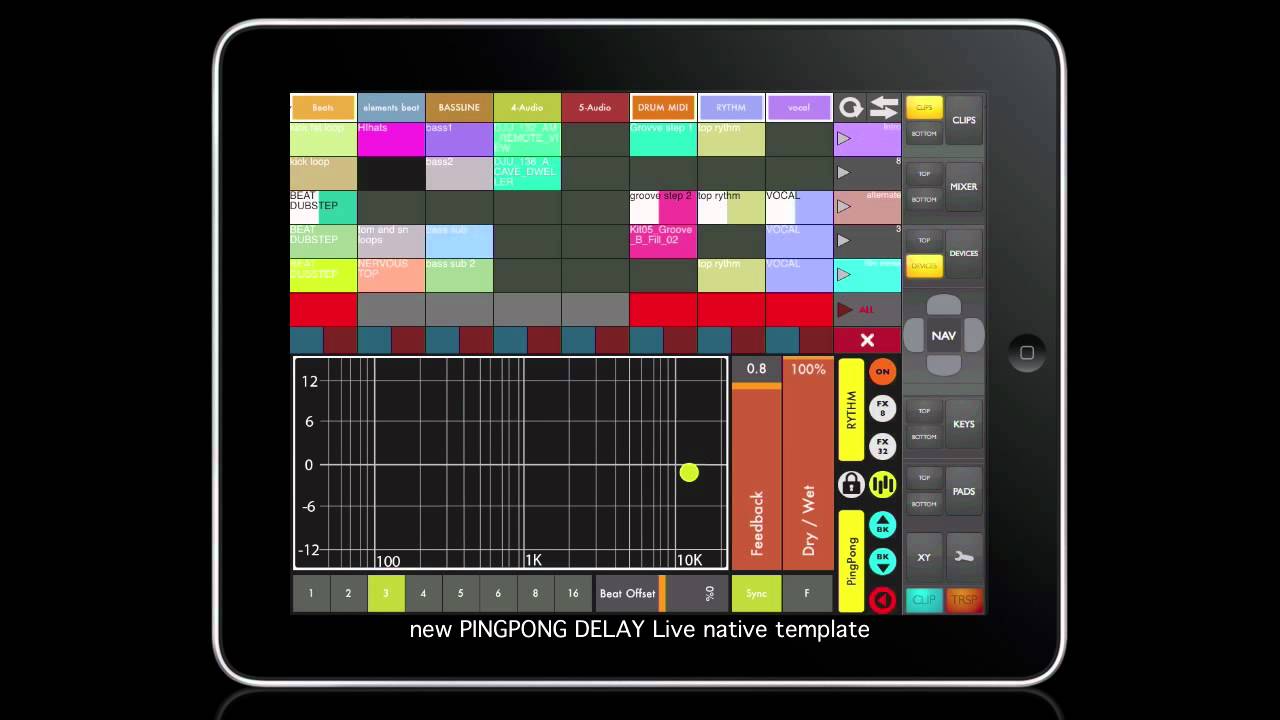
MIDI COntroller for the Ableton Live: TouchAble - Simple, Perfect, Great, Awesome. You can see all in your iPad screen exactly how they apear in the computer screen and control everthing through the iPad.
Music Production: BeatMaker 2 - Its a COMPLETE app for create music. Just that. U can do ALL the job on the iPad.
So, the time for iPad or touch and mobile devices for DJing and music production IS NOW! GO GO GO MAN!
PS: Sorry for my bad english, i learn it alone 
Here some from TouchAble, its great…
Here the MixVibes Features, i love control the effects with the touch panel
http://www.mixvibes.com/content/products/crossdj-ipad
And here all about beatmaker, this is REALY great: