Latencymon says that usb 1.0 and 2.0 drivers are giving me issues.

Latencymon says that usb 1.0 and 2.0 drivers are giving me issues.

Hey guys, I’ve been having audio pops and CPU surges with the latest few updates of Traktor. I’m using a windows 7 Dell Inspiron with 4 gigs of ram, i5 processor, 2.5ghz clocking speed, 600 gig 5400rpm hard drive. I’ve followed all the performance tweaks that are listed on the NI windows optimization guide and ran the windows performance script.

Running Latencymon, it shows my highest excursion of 1.0 or greater to be my USB drivers even with my audio 10 being the only thing connected. My USB drivers are up to date. The only software on my computer is music and audio related stuff that i use all the time. Not sure what else to do.

Would I benefit from upgrading my ram to 8 gigs or running a small solid state hard drive and putting my music on my 1tb external?
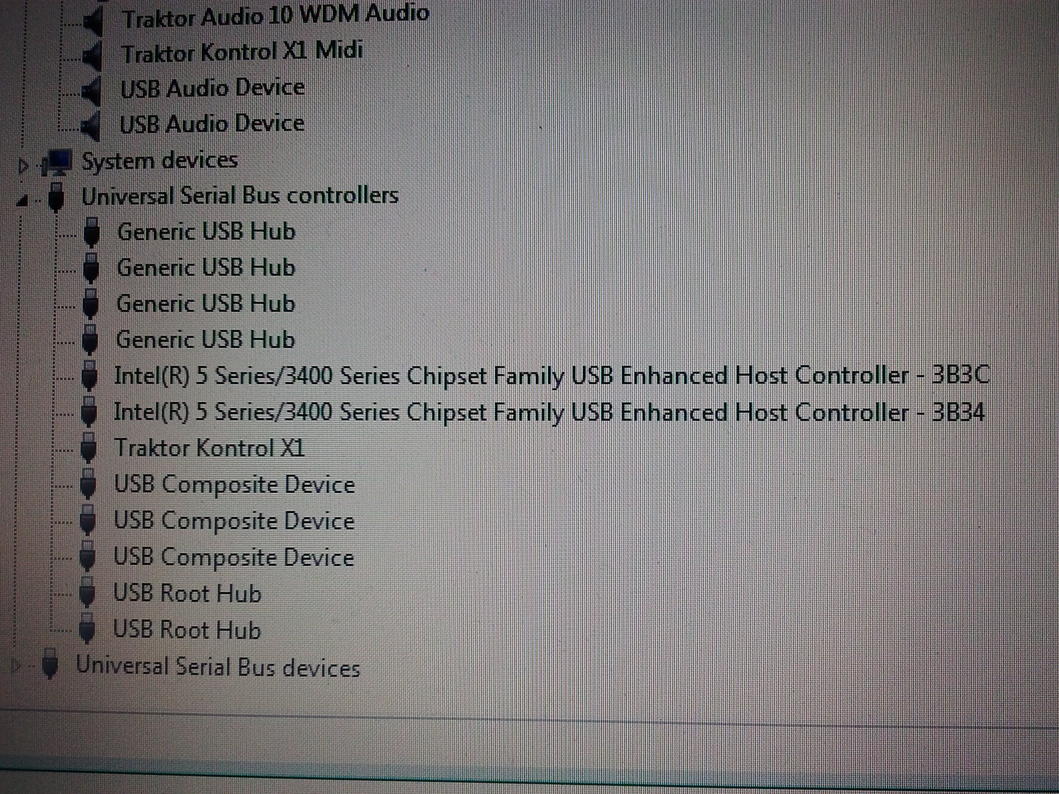
I’ve read that other third party software USB drivers could be creating this problem. Is there any way to check?

LatencyMon should tell you which driver is causing the problem? Increasing RAM or changing hard drive won’t make a difference.

I’m open to just about any suggestion at this point. I’ve been messing with this computer for almost two months now trying to get it to run Traktor smoothly. Right now I’m in the process of switching from 2.6.6 to 2.6.1 to see if that changes anything.

The last USB driver update for this machine was about two years ago, so I don’t think that could be the problem. Unless, something else that updated effected the USB drivers in a bad way. Are there any updates that I should try reinstalling or reverting back to?

The third party software I have now besides Traktor is the MF utility, Room EQ Wizard, Minidsp sound processor software, mp3gain, Google Chrome, and AVG antivirus.

The hardware I use is in the signature, plus the minidsp.

Is there a surefire way to disable AVG and windows defender besides through the software?

In device manager I have disabled the CD drive, windows audio, webcam, and network adaptors. I’ve tried disabling the Intel graphics, but that didn’t change anything. The “ACPI-compliant control method battery” should be disabled as well correct?

In advanced system settings I have it set for best performance and background services.

The power options are all set to max performance.

Appearance settings are set to windows 7 basic.

Traktor settings are quality - eco, mode scratch, multi core support disabled. I’ve tried all kinds of latency settings, but I can’t get rid of the pops and load spikes.

Any suggestions would be greatly appreciated.

Which driver does LatencyMon show as giving the largest DPC spikes?

I’ve reformatted my computer since I used Latencymon, but I’m pretty sure that it just said “USB 1.0 and 2.0 Drivers”.
The only other offenders were the Latencymon program itself, and Traktor; but those only exceeded the threshold a few times compared to the 468357 million times that the “USB 1.0 and 2.0 Drivers” went over 1.0. Latencymon and Traktor usually registered around 0.3.

Try latencymon without connecting the soundcard (to eliminate posibility of a broken or conflicting driver).
Another thing to try is to uninstall all usb related entries in device manager (usb root hub etc.) and restart.

I’ll try that next. If I’m going to play audio during the test without my audio 10 connected, I’ll have to use my computers internal audio. I’m guessing that after the test, I need to download the drivers from the Dell website? I think I’ll try and switch to some older drivers and see if that helps.

Speaking of the Dell website, last night I ran a self diagnostic report. It told me that my hard drive needed to be replaced. I scanned and repaired a bunch of files and ran the diagnostic again. Again it said my hard drive was bad. Other than Traktor giving me problems, this computer seems to work fine. So I don’t know what to think about that.

I have dealt with some issues before on way over spaced computers 50% drivers 50% failing hardware.. Example have a laptop that with wired internet/Ethernet enabled I get latency spikes… Most likely caused by a failing Ethernet card… Other issue bad nvidia driver on another laptop so things can vary.. Recently I ran into where a bad Bluetooth driver was fucking up a usb3 driver because the USB driver did not install correctly due to bad Bluetooth driver had to remove all drivers and reload them and make sure correct for it to work

When disabling the Intel 5 series/3400 series chipset family USB enhancement host controller drivers and running off of the internal soundcard, Latencymon showed that the Intel management engine interface driver was the next audio problem, but a far second from the 5 series USB drivers.

I suggested to uninstall (and not disable) all usb entries one by one under universal serial bus controllers in device manager so everything will be reinstallled after restart. I’m not sure you need dell drivers for that. Those entries usually take care of themselves (win drivers) and if some driver is missing win update can help too.
But..yes,there’s a possibility that some update (through win update) messed up your system.
That disk diagnostic report doesn’t sound nice though.
You can also try different audio 10 driver versions.
And yes, ACPI-compliant control method battery should be disabled if it causes trouble. Sometimes graphic drivers are troublemakers but sometimes it is other way around and they should be enabled (if disabled causing audio clicks when rapidly moving through the song with hotcues). Just remember to reenable those vital devices if disabling them doesn’t help. And try to restart after you disable graphics and then check latencymon.
One more thing, you said you’ve tried different latency settings.Did you also try to increase ram ms?
That’s all I have. :confused:

Thank you for your help, but I’m giving up on this computer. Even when it did work well, I still had dropouts when using key lock or playing more than two track decks, so I ended up getting a second hand quad core Toshiba for pretty cheap. I’m still working on getting things switched over and haven’t tried it out yet, but hopefully it works for me.

Sorry to hear that. Well, good luck with the new one.

When you go into device manager goto the USB and uninstall each one and when it asks to unto all drivers select yes and reboot… When you reboot do not let windows install any drivers… Now goto device manager and click on one of the unknown devices and goto the tab that’s like options or something think third one it will say device info and a drop down on this page… So click on drop down goto hardware Id… Here it will say something like VID8086&sub_xxxxx so one this information you will type into google.. This is the hardware identification for the device it will give you results that will narrow down manufacture information to make sure you install the correct drivers.

Alternatively you can roll back your devices and systems changes to when it did work. This can sometimes cause bad problems but I have had to do this before and if will work