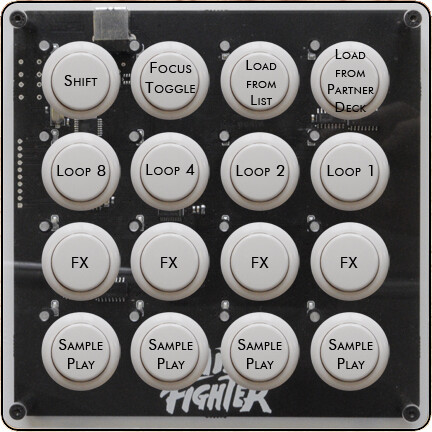
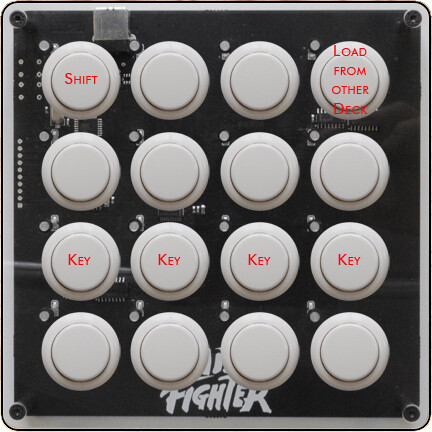
The Idea
With this mapping you get control over the various loop features Traktor Pro 2 offers. You can use your Midifighters next to a VCI-100 or any other controller.
This mapping is designed to use decks C & D as sample decks.
Each Midifighter controls one track deck and one sample deck (either A&C or B&D). So to control 2 track decks and 2 sample decks you need 2 Midifighters atm.
However, I’m working on a focus-like version for only one Midifighter.
Please remember that this is version 1.0 of the Loopfighter mapping so some of the concepts may change with future releases.
If there are any bugs please let me know. I’ll try to fix them as soon as possible.
If you’ve got any questions feel free to ask.
Comments, tips and feature requests are highly appreciated
Overview
Shift functions:
The 1st row contains all the options/parameters.
With the Shift button you can delete a recorded loop or a sample
Holding down “Load from List” and pressing one of the sample buttons loads a sample from your track browser into the selected slot
Holding down “Load from Rec” and pressing one of the sample buttons copies a recorded loop into the selected slot
Holding down “Load from Deck” and pressing one of the sample buttons loads a loop from the other deck (If your Midifighter controls decks A&C it loads a loop from deck B).
The 2nd row contains all loop recorder functions (I think they are identical to the buttons on the Kontrol S4).
“Loop Rec” records a loop of the selected size (overdubbing possible)
“Undo/Redo” undoes or redoes the overdubbed material
“Loop Size” selects the size of the loop you want to record
“Loop Play” toggles the play status of a recorded loop
The 3rd row controls the loops for the track deck (A or B).
Pressing one button sets a loop of the specific size or resizes an active loop
Pressing an activated loop button exits the loop
The 4th row controls your sample deck (C or D).
If no sample is loaded, pressing the sample button loads a loop from the associated track deck (for sample deck C it loads from deck A, for sample deck D it loads from deck B)
If a sample is loaded but not playing, pressing the sample button starts the playback
If a sample is playing, pressing the sample button toggles the mute state of this slot
Download and Installation
Download the attached .zip-file and extract it. It contains the two overview pictures and the .tsi.
Open Traktor, go to Preferences and import the .tsi by clicking the Large Import Button on the bottom. After that go to the Controller Manager Section and select your Midifighter as Input and Output Device. Note: You have to choose whether you want to control decks A&C or B&D for now. There will be an all-in-one mapping later.
ToDo
Develop all-in-one mapping to use with only one Midifighter
Think about what to do with the 2nd loop recorder section when using two Midifighters
Wow i was searching on google for a good loop and sample deck mapping for the Midifighter and found this!!! i am almost selling a bunch of my equipment including my s4 (need the money) so now i need options to use traktor sample decks function!!! i was wondering because i only have one midi fighter did you manage to finish the focus one??? thx in advance for this amazing mapping!!!
Honestly, I stoped using this a while ago, so there hasn’t been any further development on this. BUT, I think it would be a lot of fun to continue this idea.
Also, as the Sample Decks now support individual effects and keylock, there might be a lot of potential.
Please don’t expect the focus mapping to be ready tomorrow as I need to start from scratch and think about the layout to be easy to use and simple to remember. But it’s very possible I release the focus version within one or two weeks.
Meanwhile, if you have any ideas for the layout or the included funtions go ahead. I’m allways looking for feedback.
The focus toggles between Decks A&C (LED off) and B&D (LED on).
When A&C are focused (LED off) you can either load a Sample from the List (Track Browser) or from the Partner-Deck (in this case Deck A). By holding Shift + Load from other Deck + Clicking one of the Sample-Buttons you can load a loop from the other deck (in this example Deck B).
The FX-Buttons toggles the FX-On-Off for each Sample-Slot.
By holding Shift you can toggle the Keylock-On-Off for each Sample-Slot.
If a Sample is loaded into a Slot but the Slot is not currently playing, Sample Play starts playing the Sample.
If a Sample-Slot is currently playing, Sample Play toggles the Samples Mute-State.
The Loop-Buttons act the same as in the non-focus version.
Download and Installation:
The attached .zip includes the mapping (.tsi) and the two layout-pictures above (.jpg).
For installation instructions please check the first post.
What’s not working:
There is no visual feedback on the Midifighter other than the Focus-LED, so you have to check Traktors GUI for Slot-States and so on at the moment. I might change this in future releases but at the moment I only have 8 modifiers I can use and I can only check for two modifiers in one mapping command (which should be changed in my opinion…).
You’r welcome!
After testing, please leave a feedback about stability, bugs, layout etc.
I tested the mapping, but couldn’t run an extensive test over a few hours, so any feedback is very appreciated!
I’m glad you like it. I’ll start working on the LED Feedback after my exams, which is in two weeks from now, so I hope there will be an update around the first week of march or so.