is it possible to map more than one shift button on the mf3d with each shift button acting as a unique shift button?
let’s say i’m on four banks enabled and want the 1st bank to have 3 different shift buttons. the shift buttons dont do anything on their own unless they are combined with at least a secondary button.
As long as you have free modifiers, map away! You can set the MF from the utility to either keep or send different values from the side buttons as you navigate the different banks.
what if I want to map a button to do different things without a shift/modifier, such as if I press the arcade button once it does a command and if i hit it 2 or 3 times in a row it does something different. Is that possible?
You map the conditions so when the modifier is 0 it jumps to 1, then to 2, then to 3 and finally back to 0. If you mean that the interval between clicking is timed (picture clicking and double clicking with your mouse) then you are out luck unless you use a 3rd party app such as Bome’s.
I’m still having trouble setting this. I want one arcade button to modulate the filter values. I was able to make one arcade button to increase and decrease while holding a modifier. but how can i set it to “reset” the value by simply double pressing the same arcade button?
I’ve mapped the filter by holding it to increase with autorepeat and by holding a modifier next to it it would decrease. I was thinkin to perhaps double press it and it would reset. Or any other suggestions or way around it?
Yeah I thought of that reset by releasing but technically I am mapping an EQ mixer on one of the pages of the MF3D so it would be nicer if I had the possibility to inc/dec.
Can you please help me out here?
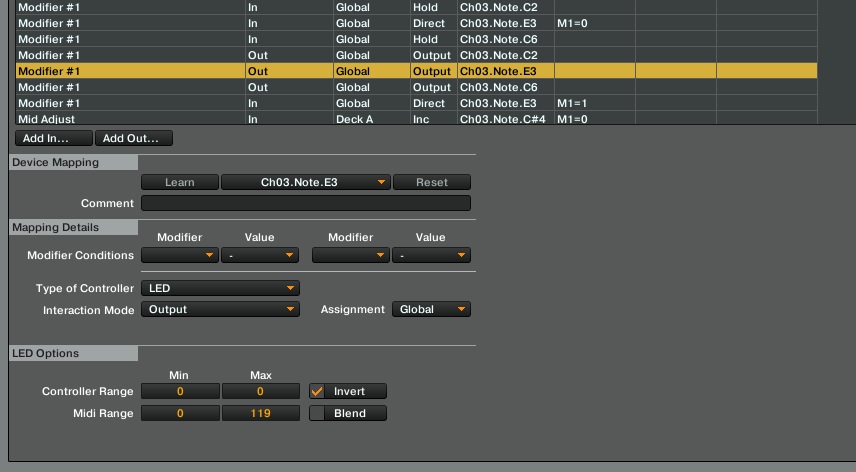
not sure how to do that toggle modifier.
Add in Modifier 1
Modifier conditions / M1=0
Type of controller-button
Interaction mode-direct
Set to value-1
Add in Modifier 1
Modifier conditions / M1=1
Type of controller-button
Interaction mode-direct
Set to value-0
After you got it working assign condition 0 for increment and assign condition 1 for your reset command. In this scenario the parameter should be reset every second time you hit the button.
Thank you gain for your input. Can you give a step by step please. I don’t usually do such complex mappings. I’m still tryint to understand and learn difficult mappings. They get pretty confusing sometimes, especially after having over 100 commands…
Would really appreciate it.
What ever modifier you’re using for adjusting filter just go ahead and assign it for corresponding modifier value of your toggling modifier. That way your inc/dec modifier will be activated only when one of this two states is toggled.
But there’s still something missing. Or not? It’s basically the same mapping i had in the beginning except that the modifier is in toggle mode.
here’s a screenshot.