I’ve got a Trigger Finger and was wondering if I could use the Midi Mappings of the Midi Fighter on the Trigger Finger? After all it’s all just midi CC (Control Change) signals that are just flowing.
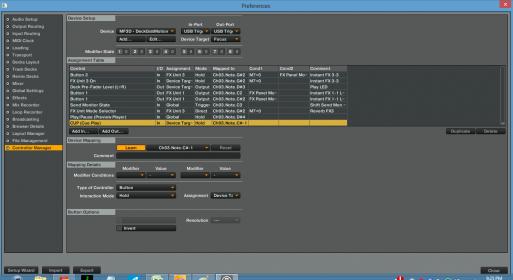
Would you be able to guide me a little on how to do this? I know it’s in the settings > Controller Manager area. And I import a *.tsi file - Let’s say for Midi Fighter. But once it’s imported, and Traktor recognizes my Trigger Finger…what’s next?
You need to import the tsi for both the controller settings and the effects because the way the tsi works is set on the order of the effects.
Then you need to have your controller set to send data on channel three with the following notes:
C3 C#3 D3 D#3
G#2 A2 A#2 B2
E2 F2 F#2 G2
C2 C#2 D2 D#2
Where each note is a pad.
This is the theory and it should help you get started, as I don’t have any of those devices I won’t be able to help further, good luck !
Should work for deckalized ?
also, has the instant gratification always been tied to the 4 banks in the firmware ?
I thought some early versions of the mapping were not, might be wrong though.
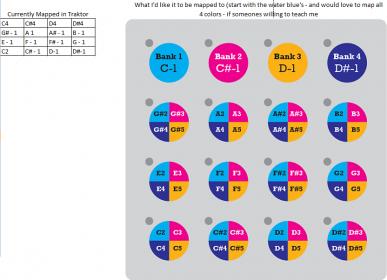
Thanks for the image, Stewe, IG mode then should work for deck A, if the triggerfinger is able to have different pages then have 4 pages mapped as the above pic should allow you to get the Instant great mode surajOm.
You should try to use the deckalized mode first though, although you might not get the instant gratification you might get quicker results
So here’s my problem…
I think my Trigger Finger mapping is screwed up.
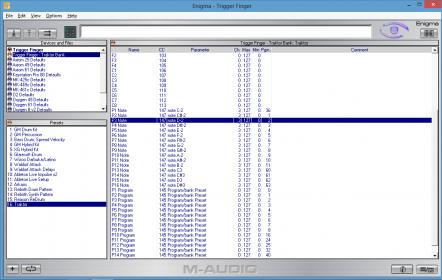
When I look at Enigma, the mapping seems to be correct (at least as a starter) - You’ll notice the P1-16 notes mapped to notes. I would send/export this mapping to the Trigger Finger. (See the image below).
What are the current mappings and what would I like them to be? Would really appreciate a step by step tutorial - or if someones brave enough a youtube video - can’t hurt to ask right? I would settle for an iphone/ipad/mobile video as well
(see image below)