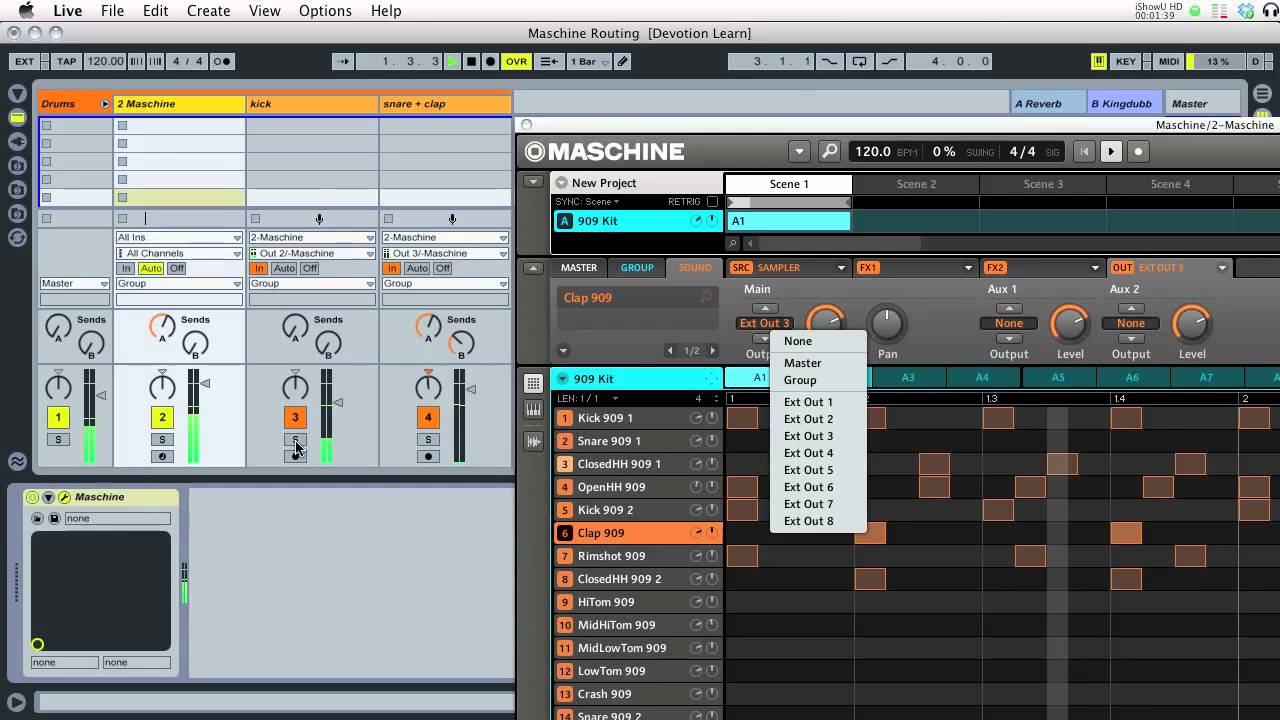
Maschine and Ableton worlflow and integration, how do you approach it?

Maschine and Ableton worlflow and integration, how do you approach it?

I’m trying to figure out the best way to integrate maschine into my ableton workflow.

It looks like some people work mostly in standalone then export audio clips of loops into ableton. That kind of gets rid of much flexibility with maschine though.

Then I was looking on youtube of how people were running maschine as a VST in ableton and it looks like a lot of people are creating a midi track which routes to maschine to trigger samples and do away with maschine’s internal sequencer completely- which doesn’t really help me since I bought maschine to stop clicking in drums with my mouse in ableton.

I would like to get the best of both worlds while using maschine and ableton and still retain all of the flexibility with maschine while working in ableton.

Is there a way to set up ableton so an ableton clip triggers a pattern or scene in maschine? Seems like the most logical thing to do but I’m not sure how.

Additionally are there any ableton templates for maschine that have audio groups and sub groups and routing set up for each pad and group in maschine (or is there a limit of how much you can split audio out of maschine and are you limited to 16 outs?)

Thanks. :slight_smile:

You’re limited to 16 stereo outs. I’m not sure how Ableton works with it, but it’s really straightforward in Logic and Pro Tools, so I’d imagine it’s similar in Ableton. My guess is that you create some extra audio tracks and as long as you loaded one of the multi-channel versions of the plugin, you just select their inputs as outputs from the MIDI channel that’s hosting Maschine.

As for triggering Maschine scenes/patterns from Live…it’s covered in the manual, but I don’t remember where it is or how to do it because that’s not how I work.

I’m a fan of using it like a 16-out MPC and do only basic mixing and effects. Make the beat/song on Maschine, then when you’re ready, host the plugin in software, record the audio, and do the mixdown there.

You can even host multiple instances of the Maschine software, so if you need 32 stereo channels, host 2 instances of the plugin and route their outputs differently. If you’re doing that, you either need to use song mode to trigger the scenes or control the scenes from Live.

You also don’t have to record the audio until you’re ready. It’s perfectly capable of just playing as a plugin along with whatever you’re doing, and ableton does automatic plugin delay compensation, so you don’t really have to worry too much about timing issues. I think it’s mostly a workflow and computer power thing that determines when you bounce Maschine’s stuff to audio.

I use Maschine as a VST route the output of the channel into a muted channel that is recording the Maschine channel. If I need to bounce out individual channels within maschine i just solo them and and record 4,8,16 bar clips within Live.

It’s not perfect and it’s a bit annoying but the sounds included within Maschine are very high quality.

How do you find the worlkflow of recording audio from maschine vs. just running it as a VST?

I figured out scene launching in maschine using clips with program actions which is pretty easy and I’m running a group with various audio channels for various sounds for mixing.

I guess the benefit of recording loops is more flexibility with arrangement where the way I’m doing it is more prep work in maschine itself.

It’s just a difference in workflow. I’d much rather have a full song as done as maschine can do and then record it into a DAW instead of going halfway. But, I also work better with audio than midi.

Yes, I know it’s more limiting and that otherwise it doesn’t make much of a difference. The limiting is why I like it. I find myself focusing on the few things I know how to do comparatively well and tweaking forever as opposed to working on the things I don’t know as well or aren’t as good at. I find that committing to audio quickly helps me not worry about things. And if I really need to go back and do it again, I can.

IMHO, if you’re going halfway, there’s no reason not to use a simpler software drum machine like Battery, BPM, Kong, ReDrum, Impulse, Ultrabeat, or Boom along with directly hosting synths.

They all do kind of the same thing. IMHO the only thing Maschine has going for it is the workflow, and I think it works better if you think of it as an instrument instead of a plugin.

Working the way I do seems to separate writing/performance with recording/mixing…which helps me at least because I’m much better at one than the other (guess which) and not great at either.

Adapting my workflow to force myself to work on grooves and sounds has helped a lot. Also, because Maschine’s internal effects are kind of limited, I find myself just not tweaking things…which helps me write.

“This compressor doesn’t sound right…I’ll just tweak it” turned into “this compressor kind of sucks, so I’ll use it to get an idea and then use a real one when I’m going to record it.”

Of course, that limits the live uses of it, but I’ve mostly just been using it as a drum machine live anyway. I still suck way too much at melodies and synth programming to subject anyone else to things like that at this point.

Yeah I love the maschine workflow and pretty much approach it first working in maschine standalone completely until I have enough for what I think is a full track then open the project as a VST.

I’m just getting to a point in production right now where I think I can start to produce half decent stuff I’m not totally embarrassed with and maschine has really helped me with programming drums since I just couldn’t come up with anything exciting in impulse or drum racks in ableton.

I really like the the high quality mashine kits and expansions and like not having to think about finding drum sounds and building kits and can just mix and match a few in maschine and create something.

tbh, I think Maschine is cool but I work better with my mouse and just in Ableton by itself. Adding too many things to route and configure in what is essentially a daw within a daw is, quite frankly, not worth it.

But alas, I bought the educational version so im going to stick with it whether or not i like it.

Yeah I got the edu too so I’m stuck with it which turned out to be a good thing since I really like it and probably would have sold it ages ago before giving it a chance.

It’s too bad there isn’t better integration where every kit and pad automatically came in on its own channel in ableton.

I also wish there was a way to have program actions trigger patterns instead of just scenes.

Mostly, I’m happy to have an 808, 909, and kit built off the amen break just sitting there. There’s a lot of other stuff, but so much music has come out of those sounds, it’s a great place to start IMHO.

And I actually like the way Maschine does “synthesis,” as in using a raw waveform in the sampler. Just having knobs that are labeled is a huge jump for the way I think. Now if only they didn’t require paging through stuff and using so many sounds…or a way to use one envelope to control multiple sounds.

It’s a weird way to work, but I’m really to the point of believing that if you can’t create a song using just Maschine (no plugins, no other samples, nothing else) then buying more gear won’t solve it. Make it easier or more fun, of course, but it won’t solve the problem.

That being said…I really want to buy a hardware synth…something like a Radias, MS2000, or old Virus (the new ones are too expensive, and I’d want to run it through an outboard preamp anyway, so TI doesn’t give me much).

But, I’m actually getting results out of using Maschine that might tide me over 'till I can actually afford (and find) a used VA synth and all the other stuff I’d want with it (good sound card, preamp or channel strip, maybe a real compressor).

As for opening up in Ableton with stuff already routed…you can do that with templates and still use it standalone…just assign the aux sends to outputs that you’re not using and use those when it’s hosted. Set it the way you want with nothing in it (or a few kits of sounds you really like if you want to) and just save it as a project file…and instead of creating a new project, open that one and immediately save it with a different name. You’d have to mute the sends for whatever’s on Out 1 (or whatever you’re using for the master) when you’re running it standalone, but that’s a lot simpler than re-doing the routing every time.

It’s not ideal, because it doesn’t have enough outputs to actually route every sound to a discrete channel. But it could work. If you wanted and your computer were powerful enough, you could duplicate outputs b/t groups (A 1 to out 1, B1 to out 1, etc.) and record it with 8 instances of maschine, each with a different group solo’d. You’d be running 8 instances of maschine and writing 128 stereo channels of audio to your hard drive (many of which might be silence)…and save that setup as a template for your DAW.

But it is possible. I just don’t know what kind of computer you’d have to have to pull it off. It might be perfectly doable…I haven’t tried anything like it.

And the templates are probably more of a pain in the ass than just re-doing the routing. It takes less time than patch cables, especially when you’re limited to 8 or 4 mono outputs like with most of Maschine’s competition (the MPC Renaisance notwithstanding).

And the templates are also less powerful. Maschine’s internal routing is a good bit more advanced than I’ve seen (or heard of) many people taking advantage of. I’ve been using my H group basically as sub-busses for parallel compression, send effects, and stuff like that, and I have a couple groups set up as multi-oscillator synths with step-based modulation ready to go. It’s remarkable–to me, at least–just how deep Maschine is if you get into it.

It’s not that hard to make multi-oscilator synths out of multiple sounds, and route them somewhere it’s easy to mix them…while sending them either copies of the same midi parts or different midi parts. I’m not aware of an actual synth that can do that. And I know you can use different effects, LFOs, and envelopes for each waveform…but I think it might be possible to trick it into also allowing you to use a kind of “master” section for envelopes, modulation, etc.. I need to see about that, though.

Anyway, I think the routing is worth the hassle.

Really, the only thing I want is some of the Ableton Live MIDI effects…they’re the things I miss from producing in Live, the Arpeggiator, Scale, and Chord effects. I don’t actually like the way they’re implemented all that well, but AFAIK, they’re the only things like them.

Oh, and time-stretching. Huge oversight. But apparently I can run Pro Tools 10 on my computer and already own Logic, so I’m actually pretty good on that front…I just don’t play loops in Maschine until I’ve decided on a tempo.

My 2cents

Hi Guys,

I have got te following setup and realy like it for DJ’ng as for producing.
this layout is based on the Akai apc40

-Maschine as a vst in ableton.
-Group A+E share an audio out, the same for B/F, C/G and D/H.
-Routed the outputs of each combined group to its own channel in ableton.

So the first four channels in ableton are machine sampledecks and even during live performance i just grab a chuck of samples in ableton’s explorer and drag them to the disired group.

Now i have four channels left on my apc. These are my track decks. I put a warped track on deck A and copy it to the other three decks. deck one is an intro loop, deck two the drop, deck three the break, deck four the outro.

This way i can play the drop of a track and the intro of another and just punch in a hihat loop on the maschine. I am kind of a techno freak and with this setup i af made allot of techno mashup’s with songs from another genre easily.

As for sampling;
added a audiotrack in ableton that has it’s audio in listening to the master bus from ableton and send it’s output to machine.

sorry for the typo’s…working on it. :open_mouth:

https://soundcloud.com/r_a_w_s_e_w_a_g_e/rawsewage-attic-noise-001

Hello,

Im new to using ableton and have limited experience with mashine, so forgive my query if I sound well noobish. Im sorry to rehash the past in this post but it seems that none of the info above really makes any difference to anyone who is trying to actually integrate maschine with Ableton. We have a few people using mashine as a standalone, then we have a few using it as a VST, and a few opening up muted channels and redirecting the sound. If this is really the answer then between mashine and ableton there seems to be someting missing. I have looked up this issue and found a few other ways to map mashine and ableton together but its obvious these two platforms arent made for simple plug and play. I hope one of these companies works something out but in the meantime I am still trying to find the best way to integrate maschine with ableton. If you have a better way to make these two work together then please share it here - and remember there are Noobs looking to make this work, so baby word it if possible.

My questions about this issue:

**When using maschine as a VST, why are the beats I make up in the maschine VST available to see in the VST but not on the ableton instrument key section?

I thought after getting a good groove on the mashine that I would see the what I made duplicated on the ableton screen and yet it only shows on the mashine VST. Can i do something to perhaps get the beats to show in ableton so i can play more within ableton?

**Why is it when I use a maschine VST in ableton that I cannot see the maschine browser for music, I can search on the mashine controller for beats/samples but I see nothing on the browser for maschine in the actual VST?

Basically I try to find beats faster by seeing them on the mashine browser but without the browser available I am searching on my controller to find the beats which is time consuming since I have a ton of files to go through.

**Is there anyway of exporting or enabling the music samples from mashine to ableton so I can use the mashine’s sample within ableton?

I basically want to make the inventory of sounds show up in ableton, I’d like to think that these sounds are interchangable but perhaps they are not - thus requiring the use of the mashine VST.

Thank you for your time!

Real

You can see everything in the maschine VST you can see in the maschine standalone, it’s all there but by default the VST window is smaller and some stuff is hidden- you may just have to increase the VST window size and click a few things to expand the maschine VST window and see everything (click the little arrows).

Also no one told me this when I asked here or on the NI forums, but maschine and ableton integration is really, really, awesome and easy. You can drag and drop patterns from maschine VST into ableton as MIDI or as audio loops.

Thank you so much for your response and video!

I will try to expand the screen so i can at least see the browser. Trully appreciated.

On a last note, while you may be able to drag music from the maschine into ableton and get the beats warped you will run into other issues if your trying to tweak the sounds or even if your trying to use the groove pool features. For these reasons I feel there needs to be a better way to link these two so the features of maschine and ableton dont get lost. I mean we all paid a pretty price and it would be nice to get these two unified.

Doesn’t get much better than dragging MIDI to clips- the groove pool works just fine there. Then with dragging midi you can still create up to 16 tracks in ableton and route each of maschine’s parts to it’s own track and group it and mix it and treat it exactly like you would a regular drum rack group where you have control of each part. That’s what I do.

This is a great Tut for splitting Maschine’s outputs to Ableton and recording all your midi data into Ableton instead of Maschine.

http://maschinetutorials.com/2011/01/recording-midi-from-maschine-into-ableton-live-sequencer/

I also recommend this Ableton template for Maschine.. Works great!

I realize I’m not whom this tutorial is targeted at because I prefer Maschine’s sequencer to any linear DAW I’ve used or Live’s clips, but…uhh………why would you want to do that?

I’m not attacking you (or anyone else who likes working that way) I just don’t get it. Working with Audio is just easier for me…printing your sounds and some of your effects to audio makes you so much more careful about sound design (because it’s harder to tweak after the fact) that I just don’t see the advantages of working that way. I know it’s just a different workflow, but I’m curious what you guys get out of it.

Simply because midi is much more flexible. Once you commit to audio, that’s pretty much it. But if you want to try a different sample out, you still have the midi notes and can just drop the sample in and go. Plus you can copy the midi notes to other tracks as well and try and do layers and then make little adjustments on those layers while still keeping the main groove/riff.

This is just a quick example off the top of my head.

I like making patterns in maschine, but for actually arranging patterns I much prefer doing it in ableton. I prefer working with midi and not committing to audio unless I have to, and then you can mix your drums directly inside your DAW without having to drag in audio files or export anything from maschine, and you can tweak things later. I don’t want to be totally careful about sound design since it’s not like I go in knowing exactly what I want to make and it allows for experimentation. I find getting a good/rough idea for sounds and figuring out some sort of rough arrangement then developing it and committing to that much more important than committing to the actual sounds which can be fine tuned later.

Also sequencing that way is a lot more flexible than doing it in maschine. You can just drag in your main patterns as midi files, then if you need to make subtle changes or just use part of a pattern when you are arranging you can easily do that in your DAW without going into maschine and making a new pattern for every tiny little change so that it works in maschine’s sequencer.

I guess it’s the same reason you prefer working with pro tools and the majority of people who produce electronic music prefer working in MIDI oriented DAWs. I just don’t think I would really gain anything from recording to audio, and I try to avoid doing it wherever possible since ableton is much better and more flexible working with MIDI than with audio files anyway.

So Jason and Xone basically said what I would say about using MIDI over audio and this style of routing. Recording midi into Ableton simply allows for a little more flexibility. Being able to change sounds quickly, both in and out of Maschine. Now mind you, I’m normally used to working with audio as a recording/mixing engineer so I understand and in many ways do prefer working with audio then midi, but this method definitely has it’s advantages for the preliminary production/arrangement process at least.

I think I prefer leaving the MIDI in Maschine, routing audio, and using CC’s to switch scenes/patterns in Maschine.

It maintains the Maschine-like workflow. As long as you don’t mind updating your patterns in Maschine itself.

But I’m new to this!