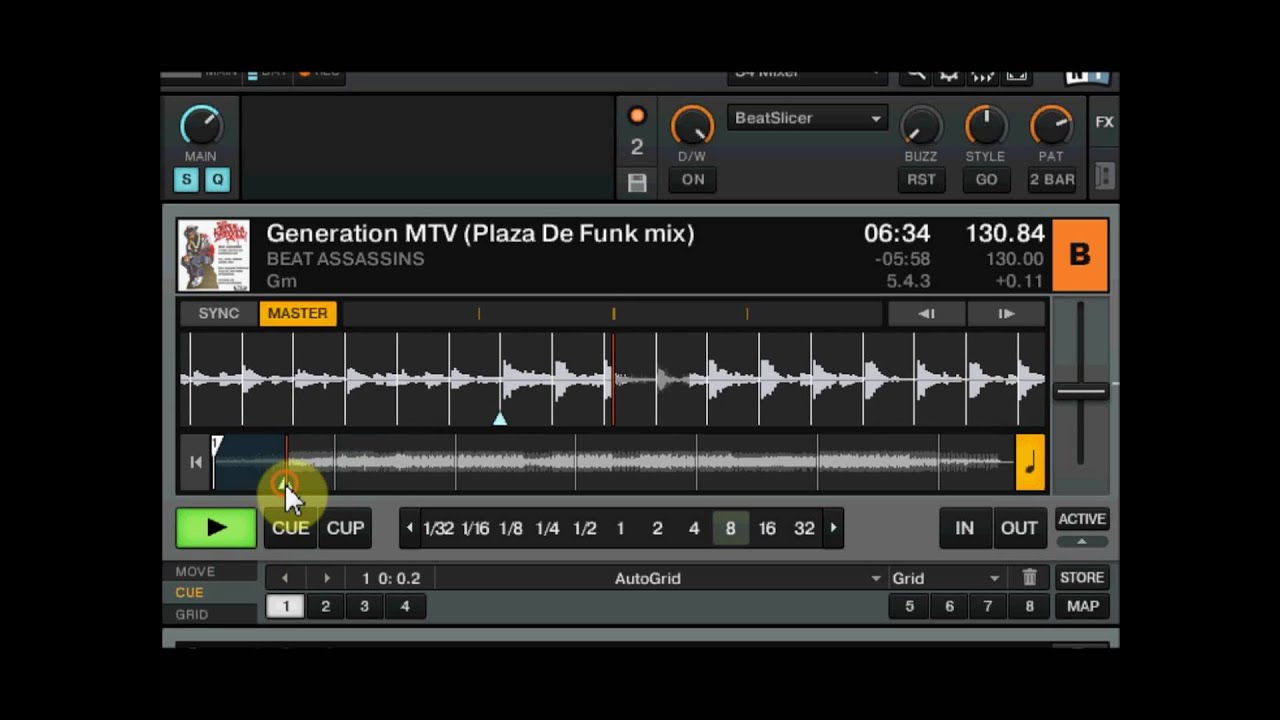
Nothing revolutionary, just beatslicer settings I have premapped to adjacent keys on my Oxygen 49. I’ve seen a few posts where folks say they don’t know what to do with the beatslicer, or it never sounds good. So I knocked out a video today. Hope you like it.
Was able to knock out another quick video. Builds on Ean’s freeze videos by premapping settings to different values as in the beatslicer video above.
Happy to share, and glad you like it! Break Beat is my prefered genre (always gets me moving), and they do work well with it.
Try using these on the upbeat and the down beat for different sounds. In the video I did mention it briefly, but just to be clear,I am holding down the first button, then with out letting go of it I am holding down button 2, then adding button 3.
Nothing earth shattering I know, but I remember 11 months ago when I first started, and had no clue as to where to even begin with the Fx. So I hope it helps some people get started.
thanks for the share, good work. just wondering, do you ever use the “buzz” knob, the first knob of the beatslicer in advanced mode? i found this is the hardest knob to use and make sound nice at the same time.
I haven’t used the buzz knob premapped as yet, but have used it while using my slicer “sample” button that I mention in the video, and Ean shows in one of his videos. But I do not leave it on for very long. I am going to premap some more slicer values with some using buzz. I’ll see about another video when I do. I still have 6 buttons in my slicer area to use, and don’t know if I can come up with that many, lol.
Ok shmobletons, you stirred me up to play with the buzz knob. I have come up with some fun stuff I’ll make a video of in a day or so.
For now though my favorite using the buzz knob is…
parameter 1 (Buzz) knob value=21.84, mapping value=direct and .729
Parameter 2 knob value=S4, mapping value=direct and .750
Parameter 3 knob value=P4, mapping value=direct and .750
Both buttons are off
Works very good for 4 beats, 2 beats, and 1 beat. Sometimes longer, but rarely, depending on what is sampled. Once again, try it on the upbeat, and the down beat. Nice and glitchy!
In this mix the first song is mashed with Pony and I use the first premapped beatslicer values I covered to vary up the bass line from pony. I also keep the bass line going for the next song and again slice it up.
Quick demo of my settings, and the parameters are listed below
Because the buttons are mapped on my keyboard this way I have listed them by the corresponding key they are mapped to in the video.
C# - Button1= Direct 0
Button2=Direct 0
Param1=0.729
Param2=0.750
Param3=0.750
D# - Button1= Direct 0
Button2=Hold
Param1=0.180
Param2=0.750
Param3=0.250
F - Button1= Direct 0
Button2=Hold
Param1=0.00
Param2=0.00
Param3=0.250
F# - Button1= Direct 0
Button2=Hold
Param1=0.180
Param2=0.000
Param3=0.250
G - Button1= Direct 0
Button2=Hold
Param1=0.000
Param2=0.450
Param3=0.250
G# - Button1= Direct 0
Button2=Direct 0
Param1=0.000
Param2=0.500
Param3=0.750
A - Button1= Direct 0
Button2=Hold
Param1=0.000
Param2=0.500
Param3=0.620
A# - Button1= Hold
Button2=Direct 0
Param1=0.000
Param2=0.500
Param3=0.750
B - Button1= Direct 0
Button2=Direct 1
Param1=0.000
Param2=0.830
Param3=0.500
C - Button1= Direct 0
Button2=Direct 1
Param1=0.000
Param2=1.000
Param3=1.000
I covered B, C, and A# in the first video.
Good combinations in order of pressing the keys (while still holding down each key) are
F, G, A can add A# to finish
B, C, A#
F, F#, D# can add C# to finish
F#, D#, C#
If you have any questions just ask.
Even though I’m probably gonna design it in another way as you describe I do want to thank you for taking the time and energy to make this post.
It’s these kind of posts that make this forum a very practical and inspirational forum that does bring someone forward in their skills!
You r welcome! And thanks for the kind words. The posts/videos are ment to inspire, more than be a “copy what I have done” kinda thing.
So mission accomplished, lol.
elio_xh, thanks for the settings. I had 2 keys left to map so I’ll give those a go.
hmmm, been playing around with presets this way and for some reason, when I map all the parameters including the effects select to 1 button something doesn’t work. It only selects the effect and not the parameters. only when i have already selected the effect manually it selects the parameters when pressing the button.
almost like it sees it as 2 steps which it can’t take at the same time.
Also, i wanted to give me more possibilities by using a switch to advanced by pressing the same button, since i normally have my effectunits set to chained mode. That makes it three steps to take in one go.
Is this something you bumped into too Vangogo? If so, any ideas how to work around this?