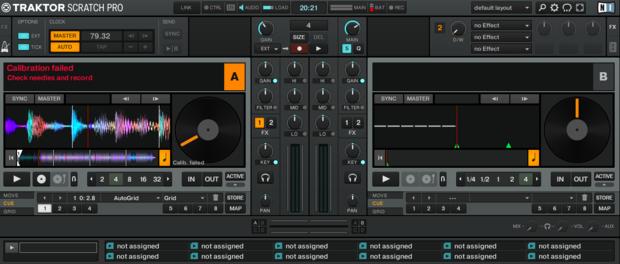
I connected the Turntable to the audio interface and output of the audio interface is connected to the mixer. I think i’ve done this correctly.

Post a screenshot of your audio routing prefs.


This guy seems to have successfully connected his Denon 1800 mixer to Traktor Pro.
He’s not using timecode.
And yes, the X1800 does work with Serato DVS without an additional audio interface.
I have the additional audio interface. I have no idea why I can’t get any sound to come out of Traktor. Any suggestions?
Earlier you said you did have sound coming out of it, but it was distorted.
Either way, does the channel’s OUT light up on the Audio 10 when playing music? If not, either Traktor is setup wrong or your sound card is broken. If it does light up, then either the Audio 10 is not connected to the correct LINE input on the mixer, or the input selector on top of the mixer is wrong.
Regarding timecode, once you have the vinyls make sure the Input Routing is the same as the Output Routing, and under Timecode Setup set the decks to Scratch Control and make sure the signal comes in correctly. See the manual on what it’s supposed to look like.
Did you read from page 41 in the manual?
Sounds like you need some step by step guidance on this.
Make sure the outputs for each channel of the audio 10 are going into the the LINE inputs of the X1800, not the phono inputs. Make sure the input selectors for each channel on the mixer are set to line as well. Connect your turntables to the audio 10. Make sure you have downloaded/installed the audio 10 drivers to you computer then connect the audio 10 USB. Open up Traktor and go to preferences. In the first (top) audio setup tab, make sure Audio 10 is selected then hit ‘Settings’. This will open a knew window. Click the ‘channel setup’ tab and make sure the channels that your turntables are connected to on the A10 are set to PHONO. Close this window now and go back to preferences in Traktor. Select ‘timecode setup’ and make sure the channels that your turntables are connected to are set to Scratch Control. Close preferences and load a track into a timecode deck and play the timecode vinyl. The track should start playing on the mixer.
Traktor is not the simplist to setup but it works great once it is set. Serato is definitely simpler, and if you purchase the club kit should be pretty much plug and pluy with the mixer..
Did anyone else notice that he has the latency set at 14 samples?
Isn’t that insanely low?
Yup
Yes that’s correct, sound does come from the turntable and CDj, but I can’t hear any sound from Traktor when playing something internally, as shown in the previous screenshot. My Traktor vinyl mk2 has arrived. i will try once again, to see if I can get it working
Since i want to use the x1800 and DC5000, I think I will switch to Serato, since they are certified and will prob make things easier for a newbie like me.
if anyone is familiar with Serato? can I use the serato timecode and Vinyl from 2009 (I was given them)
If you have the SC5000s, why even use your laptop?
Thank you Eguerr731
I didn’t download and install the drivers, I thought it would happen automatically when setting it up. Im downloading it as we speak. Thank you for the instructions, will let you know how it goes
I have 1 SC5000 and 2 technics turntable. I wanted to use the timecode vinyl via my laptop and to be able to record mixes. Or can I directly do this from my SC5000? Im pretty sure I cant
Hi Mostapha, what latency would you recommend?
Thanks
I have followed your instructions and when playing the timecode vinyl I can only hear a squeaking sound coming out of the speakers from the Traktor mk 2 vinyl. I now know everything is set up correctly. Not sure how I can now play a track on the timecode vinyl via traktor.
I have attached a picture if anyone can help out?