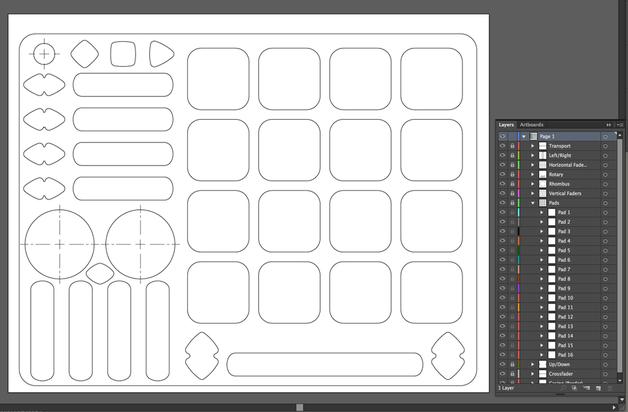
I wanted a way to quickly visually mock up presets in an organized manner, and thought others might appreciate it as well.
All I did was organize a simple template out of the overlay files provided by KMI. Everything should be labeled and easily adapted to whatever your brainstorming workflow is.
This diagrams could be cool to share along with mappings for people who know to edit and modify scripts. Especially Quneo and other controllers with fancy firmware.
Thanks! This is much nicer than my crappy hand drawn ones are. I’m interested in any mappings you might have done for the Quneo. I picked one up and have modified the presets a little, but haven’t dug in too deep yet…
I saw this post and though it would be a good project to learn svg. I have made a mockup pf the midifighter spectra that can be viewed in a browser. I was trying to add interactive events so you can click on the buttons or colors to change the mapping description and color of the buttons just like the midifighter application.. If it is something you think you would use I’ll continue with it, although after spending a couple of hours on it I’m not sure it will be that beneficial to what your after stewe but it would be a self contained application If I can figure out how to incorporate javascript.. The uploader is being a turd so to view it you need to change the file extension from
Whoa, great work OP and thanks for putting this together. I’ve had the quneo for two days now and have created an ableton project with all the pad LEDs in 3 8x8 boxes (green, yellow, red) in session view. Using the follow feature in envelopes I’ve been able to make some interesting patterns. I could share this also if there is interest.
Made this one for my Spectra map back in February. Here is the psd file so you can mess around with led layers and stuff. Couldn’t be arsed to do it in Ai since i got what I wanted faster out of Ps
The aim is simplicity - be able to mix on two decks comfortably, have the features I regularly utilize, not worry about anything I only sporadically use, and have the absolute minimum amount of gear along while still feeling like I can play a high quality set - again, comfortably - anywhere, any time.
Would require me to have my laptop, the Quneo, X1, and an audio device - though in reality I could even run a y-cable out of my headphone jack and make it work.
Obviously the Quneo mapping is heavily based on the original Traktor preset, but there was so much crammed into it that would never get used in my desired use case that I mainly just axed what I didn’t need, made minor alterations where necessary, and (at least to my brain), laid out the pads infinitely more logically than the initial preset.
Anyway - I can toss the preset up later on if anyone wanted, but really just wanted to share a bit of my workflow.
More than anything I just like figuring out what my problem is, or what I feel I’m lacking, and find ways to make it happen with whatever toy I’m tinkering with today.
Edit: I should also note that part of the intended use case here were situations in which a DJ mixer was unavailable.