Thanks in advance to whoever is willing to help me out. I am new to this and could do with your expertise.
I bought a Soundbite Micro (http://www.redsound.com/images/sbmicro-manual-v1.pdf) for the sole purpose of making loops during a live performance. I don’t know how to hook it up properly with Ableton through a mixer.
I’ve connected it to my Pioneer DJM 750 mixer as instructed in the manual:
‘input’ is going into the mixer’s headphone socket
‘loops out’ is going into a spare channel of my mixer – in this case channel 4
The Soundbite Micro is definitely getting an audio signal because I can hear it when I connect headphones to its very own headphone socket.
Now here are my questions:
Should the Pioneer mixer channel be switched to ‘Phono’ or ‘USB’?
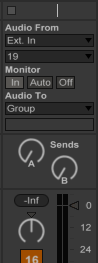
How do I setup the routing in Ableton on its channel? ‘Audio From’, ‘Audio To’?
All I want is for the Soundbite Micro’s loops to come out of channel 4 of my mixer. Can someone please help?
I don’t have Pioneer mixer or the Red Sound Soundbite but I do have it’s predecessors: MicroSYnc extractor and the Cyloops.
It’s Definitely not phono. It’s a line level device
From what I gather,
insert the Soundbite output into the CD/Line input of your DJM750
set the mixer’s input selector on/above CH4 to CD/Line.
Open Pioneer Utility Software. this is where you make software routing configuration for the mixer.
select the Mixer Output tab on the top of the software window
set the Dropdown list for CH4 to REC OUT.
Again I don’t have a DJM mixer but I do know ableton pretty well. I won’t know the exact inputs you would use. you can probably find that in the manual
Open Ableton
go to the Ableton’s preference/settings section
open the Audio tab on the left of the preference section
Select your pioneer mixer sound card in the input dropdown menu
push the “input config” button next to the word “channel configuration”
turn on all the necessary inputs. I would just select all the ones on the right side. these are the stereo inputs which is what I would think you would want.
close preferences/settings section
make sure you are on the session view(mixer view)
you can use the tab keyboard button to switch from arrangement view to session view if you’re not already on it.
make sure your IO options are viewable by selecting “I-O” icon on the right side of your screen (The top Icon here )
find an open audio track(channel strip). if you don’t have one available, add a new audio track via the Create menu at the top of your screen.
EXT IN is selected on the first dropdown list under “AUDIO FROM”
your pioneers inputs should be available under the second dropdown list under “AUDIO FROM”
if it has something recorded on the soundbite and it’s playing then it would help you to identify which input it is. there are small green level meters that are on the left of the numbers. they light up if there is sound.
Are you sampling FROM Live, into the SoundBite? because if you are, you’re gonna kick yourself when you find out how easily you can do this in Live.
It’s simply a case of setting up some audio routing in Live. You can sample from one track/channel INTO another one, and record quantised loops in the second channel. As long as the source clip is properly warped, you’ll get PERFECT loops in the sampling channel.
Seriously - check out Audio Routing and Resampling to a new clip.


 (The top Icon here )