THE BEST TRAKTOR SAMPLE DECK MAPPING EVER (i've done so far.lol)

THE BEST TRAKTOR SAMPLE DECK MAPPING EVER (i’ve done so far.lol)
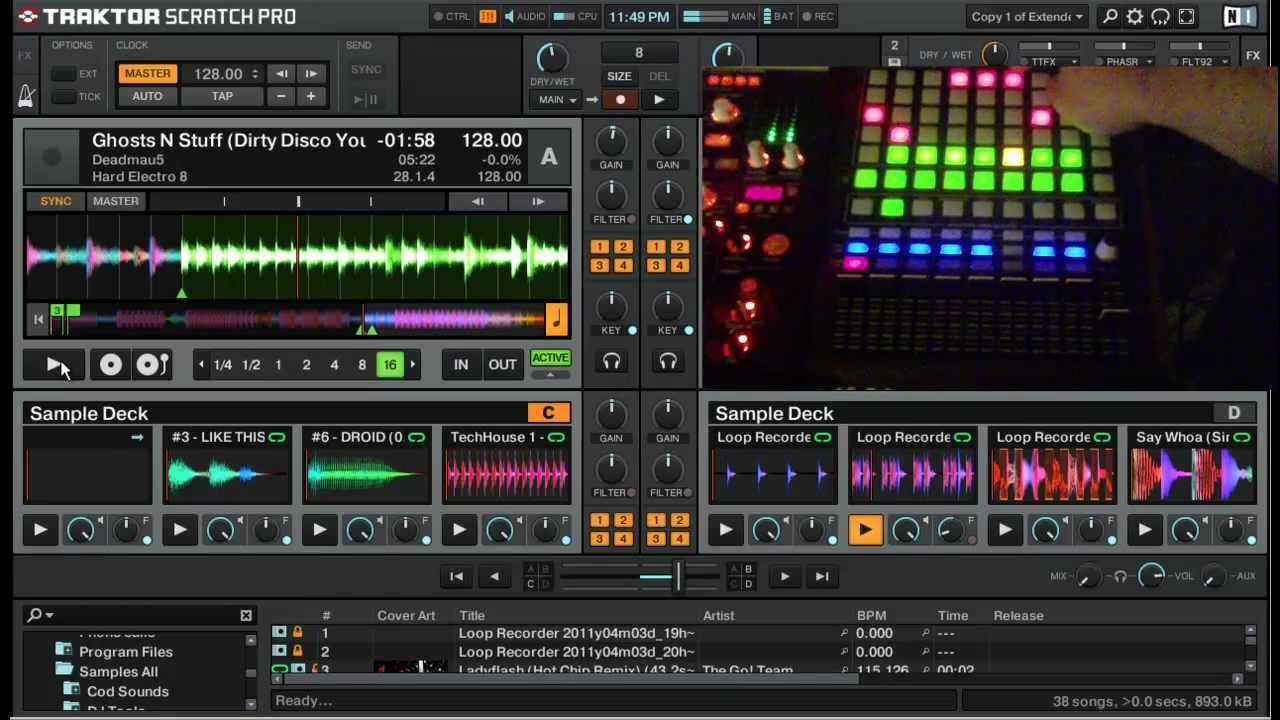
Here is my latest and greatest mapping for Traktor’s Sample Decks using the Akai APC20. I have one action button per sample deck that changes it’s function based on which modifies are engaged. I have 8 mods: Load, Play, Mute, Retrigger, Erase, Load from List, Copy from Loop Recorder, and Group mode.

On each Sample Deck I can halve, double, and reset the length of the loop, as well as sync the Sample Deck to the Master Tempo. I can also toggle between One Shot and Looped play mode.

My faders control Volume and Filter levels and the buttons above the work as filter on/offs and momentary mutes for the Sample Decks

When Copy from List is engaged ( Jean-Luc Picard style ), the up, down, and master buttons work at up, down, and collapse/expand in the browser tree. The cue level knob scrolls up and down in the track list.

Normally the cue level works as the dry/wet for the Loop Recorder and the Master button starts the recording. The shift button is play for the Loop Recorder. The button above that selects the loop size when the recorder is empty. The button above that deletes whatever is in the recorder and the button above that works as Undo/Redo when there is more than one layer in the recorder.

In Group Mode the Action buttons for the decks are as follows, from Left to Right: Group Play, Group Retrigger, Group Mute, and Group Play Mode.

I have a link to the tsi. file below.

Enjoy!!

[ame=What happened to the old Zshare File Hosting website? | zSHARE]Traktor 2 Apc20 Sample deck 1.tsi - 0.65MB[/ame]

Interesting!

Care to make a diagram of the function usage on the APC20?

Diagrams are easier to understand for some than videos I prefer both :stuck_out_tongue: Interesting ideas. I like the LED output you have there.

Hmm very interesting, I am now tempted to improve on my sample deck mapping for my launchpad :slight_smile:

Ahh…watched the video…so kinda get it…but its still not 100% clear.

I like the idea…and would like to give it a go…but the diagram would be needed.

Possible?

great! i will prove it… but i think that i need a diagram too…

i like the slicing the samples into 4 parts. are you using something like the beat phase monitor to select which button is lit and beat jumps to move around the sample?

i was thinking of creating some kind of mpc style slicer for a normal deck after seeing the slicing functionality on that new twitch controller.

Very NICE! I’ll try out your map when my apc20 comes.

What would be the best way to creat a diagram?

probably using the template from here http://traktorbible.com/freaks/controllertemplates.aspx

Here’s a diagram

Hope this makes sense!

thanks!!!

This is a sweet looking mapping! I’ve been thinking about getting rid of my launchpad and nano kontrol and getting an apc20 for a while now, and this mapping gives a really cool ableton style of mixing.
Really good led feed back too!

Can someone re-upload the tsi? The download link is down :disappointed: It is a really cool mapping!

Agreed. I finally get my hands on my apc20 and the link is dead. I blame SOPA. ha. awww. still sad.

it is probably the slickest sample decks mapping i have seen anywhere… someone must have the tsi to re-upload? shame he didn’t put it on the traktorbible site.

No doubt about that. ha. I’ve been drooling over this mapping for some time now… that being said… I’ve been scouring the net for days trying to find it. I knew I should’ve snagged it when I first saw it.

i mostly liked the led feedback that sliced the samples into 4 parts. not sure if you could also play the 4 parts like a slicer? if not shouldn’t be hard to add in theory. 8x samples all with a 4 part slicer would be cool. i think he used the % thru the track tho for the led feedback - which is why it slows down for a longer sample etc.

ofc all bets are off now with traktor 2.5 in the works… i’m going to hold off doing too much more coding for samples until that is out. maybe even finally need my two launchpads possibly with my 2x scs.3d’s too to control levels/filters etc for them all :wink:

I LOVED the led work. Ive been reading up on mapping them a bit. Kinda makes my head hurt. Already trying to piece something together though. Baby steps. ha. Not gonna lie, still holding my breath that a kind soul re ups it. but for now back to it. :smiley:

Heres a working link