[Traktor] Livid CNTRL:R advanced mapping
Hi guys,
I’ve been working on this for past few days and I’m happy to share my first CNTRL:R mapping for control over four decks and four FX units like a boss 
I have mapped Double Deck Focus concept in to this mapping which gives you ability to have control aver any of four decks at both sides of the unit using shift button to enable deck selectors. Also, you’ll find four banks of controls for 4x4 pad grid together with push encoders available via shift buttons as well. This mapping is divided in to sections so check the image to get idea.
Update: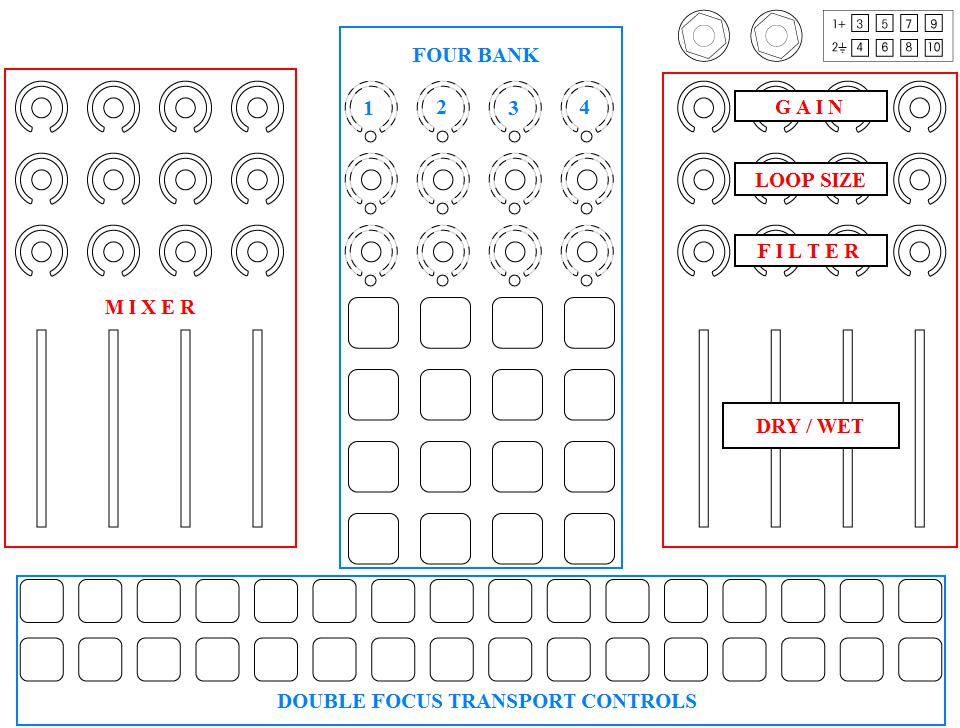

Download links:
http://www.traktorbible.com/freaks/mappingview.aspx?id=535

Importing and engaging:
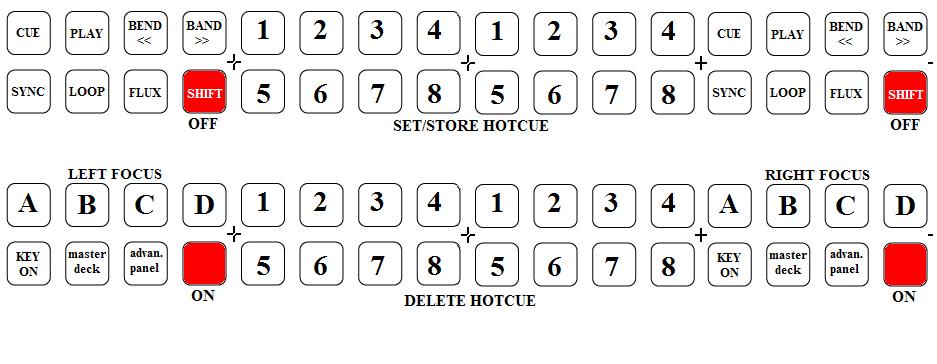
While importing make sure to use IMPORT button at the bottom of preferences window and I actually want you to do it twice so list of effects can be imported in proper order along with controller mappings. Once the mapping is imported note that you’ll see two buttons in transport section are lited in ‘red’ - those are your powerful shift buttons. Press them and four buttons above shift will lite up in ‘white’ suggesting you to press it and select which deck you wish to control, release shift and focus selector (white) will go out leaving those same buttons for transport controls for deck that is currently selected.
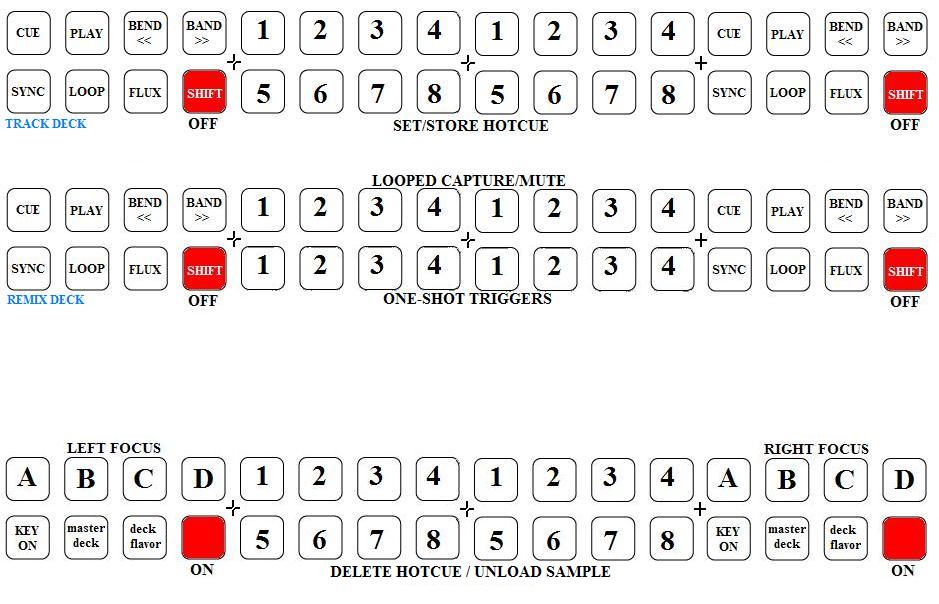
Here are diagrams of controls for all decks. Note that decks ‘C’ and ‘D’ are flavor switchable (track, remix, live input).
Decks ‘A’ and ‘B’:
Decks ‘C’ and ‘D’:
Note that left focus loads sample from deck ‘A’ and right focus loads sample from deck ‘B’.
Four bank modes:
Shift buttons are universal. Not just it enables deck focus selectors but those are enabling four bank selectors as well. While any of both shifts are on hold note that LED’s at upper push encoders row will lite up in ‘yellow’ showing you where all four banks are located. So, while shift is pressed hit any of four encoders to select which bank you want to use and LED will lite up in ‘red’ to show that bank is activated. Release shift and there you are, LED’s are working for commands related to bank that’s currently on. Full LED feedback supported!
Bank 1:
The image explain it all. There is also a shift state for this bank which brings second layer for pads matrix. Note that right faders are also mapped for ‘unit on’ when any of units is in single effect mode - holding shift and moving same faders disables effect but still controls effect dry/wet amount.

Bank 2 and 3:
These are mapped for pre-selected effects. Upper pads row controls unit deck assignment and it’s easy to use - just hit any of pads and all four units will become assigned to that deck leaving other three decks disengaged. Second bank is popular Instant Gratification effect concept with three supercombos which are color labeled in image and third bank keeps Beatmasher button row and echo-out with addition of some other effects to it. Encoders are mapped for related pad triggers so you can easily modulate effect after engaging. Full LED feedback for pads and encoders is supported and there is some fancy encoder LED trickery while supercombos are performing 

Bank 4:
The image says it. Here are browser controls, loop recorder etc..

Edit: New Bank.
Bank 5:
Activating this bank gives you ability to assign any of effects to specific EQ frequency using deck duplicate command. Basic idea is to use deck focus buttons (A, B, C) to select deck you wish to use Isolator for and then use ‘LOAD’ button to duplicate track in to deck D.
-First encoder row is dedicated for 3 band EQ knobs and Key adjust regards to focused deck. How to apply effect to EQ? - Simple, just turn any EQ knob over 12 o’clock and LED will lite up to indicate that Isolator is engaged for selected frequency (rmx-1000 replicate). Basically, when any of frequency isolators are engaged current track deck EQ kill become on and the same EQ at duplicated deck become off and ready for effect to be applied.
-Second encoder row is dedicated for FX unit 2 in group FX mode and it’s been designed for Macro FX. Pressing any of push encoders will directly engage effect on and reset parameter to center (dry).
-Third encoder row is dedicated for FX nit 4 in single FX mode and it’s related to effect preset buttons (see pic).
-Four faders on right side are dedicated for instant effects. First two are actually a superfaders and they are designed to be used in combination for best result. Other two are smart knobs. Note that this four faders are controlling instant effects only in 5th bank and FX unit dry/wet when using other banks.

For any additional information and questions you might have feel free to leave your comment below and I’ll be answering it ASAP.
Have fun!
Stewe


 !
!