[TUTORIAL] iTunes & Traktor: Music library management and workflow for DJs
Hi guys,
I’ve lurked here for a while, but only recently registered. Some background on me: I’ve DJed for over 12 years now, and I’ve been using Traktor for about 2. I write software for a living (websites, mobile apps, etc) and dabble in video game development on the side (http://quake2world.net for any FPS nerds out there).
I’ve put together a video tutorial explaining how I use iTunes Smart Playlists to manage my Traktor music collection, and how I use the comments meta-data field to capture textures and energy levels for my tracks and then navigate that information when preparing a set. As you might have guessed, I’ve applied my engineering mindset to the process, and so it’s perhaps a bit more “systematic” than some of the other tutorials out there – but I think that’s a good thing! You be the judge.
There’s absolutely nothing Mac-specific about this tutorial (I even say so about 10 seconds in ).
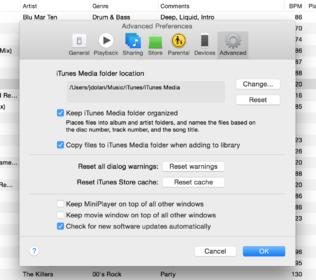
One thing I did not mention in the tutorial which really helps minimize any differences you might encounter from platform to platform in general, is letting iTunes organize your music library. It’s absolutely the easiest way to organize all of your tunes. Stop worrying about folders!
To do this, there are two check boxes in the iTunes preferences you must enable:
Keep iTunes Media Folder organized
Copy tracks into iTunes Media Folder when adding to Library
This way, when you download tracks from Beatport or whatever and open them in iTunes, they are copied into an appropriately named folder. You can delete the downloaded copy from your Downloads folder or Desktop or what have you. Likewise, as you tag your tracks and e.g. rename the artist or album, iTunes will update the backing folder structure accordingly. But the whole point is to forget about folders, and just let the computer worry about them. All you need to concern yourself with is the ID3 tags / meta-data.
Haha, thanks rocaso. It’s not that hard to do! Take a rainy weekend and rate all of your tracks, and back-fill the comments fields. Going through your tunes from head to toe a couple times a year is also a great opportunity to retire some tracks that’ve been cluttering up your crate, too.


 ).
).