VCI-400 headphone cueing – no sound, Traktor Pro 2
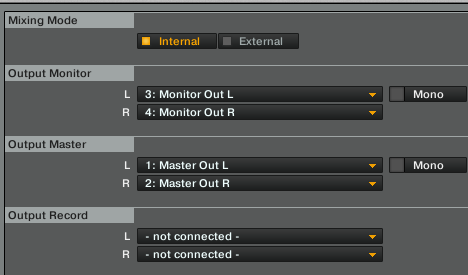
SOLUTION: In output routing, be sure to select the L/R monitors, or else you can’t headphone cue (nor use your monitors, of course).
Hi friends,
I am one of the lucky few that got their hands on the VCI-400 SE edition (hooray!), and let me just say it is beautiful~
I am still waiting for my new monitors to ship (old pair gave away due to relocation), so I have no speakers to hook up to at the moment… but I have a VCI-400 which needs to be played with. Right. Nao. So I figured I could just listen to it via headphone cueing and mess around with it a bit before my monitors come…
But no, the headphone cue does not work. Not sure why, but it isn’t working.
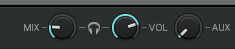
I’m running TP2. My headphones work (sound-tested with iPod) and they are plugged in the front next to the cue/master-level knobs. Both knobs have been adjusted, which cue/master all the way on cue and levels half way high. Gain is up on each channel, as is my master volume.
Firmware has been updated, mapping has been importer, all knobs work, all buttons work (as I can see them move in TP2), everything is plugged in correctly…
And yes, the cue button is on
…any ideas?
I guess I’ll get my monitors soon and I will test the sound that way. But still, the headphone cue should work!
i am also having this problem. just got vci400. on the internal output menu, when i click on monitor out or master out it only gives me speaker L and speake R. using a mapping called VCI400 - tp211 and the controller works fine with traktor on everything. have selected VCI 400 audio as my audio device. using windows vista at the moment. any insights as to why this might be?
at the moment when i press PFL on any of the channels, my monitors start to blast. way loud. ( how did ya all get separate monitor out and master out options in the pull down tap in the first place?
sorry, if this is a stupid question, but how did you get monitor out and master out? my output setting only gives me “speaker L” and “speaker R”…digging internet and playing around with traktor 2.5 for a while now.. just trying to get on with and make a mix for a dancer friend who is doing a workshop in a few weeks… any help really appreciated! I am one of the guys trying to find a creative way to combine ableton live ( just got apc40) and vestax + traktor set. and with a stage mic (beat boxing + traktor effect)
In Traktor i habe selected vci 400 as the audio device. Outsider traktor(on the Windows Vista side), vci 400 is the default Audio Interface as well. And i have selected vci 400 as the Build in Soundcard. my Guss is that Mabe its a Windows Vista 64 Bit Thing. I Should try the Set um on my Friends Computer i maybe
If I am using my laptops built in soundcard, can I still monitor with headphones via the VCI 400? Or do I have to use the VCI 400’s soundcard and send the master output to my monitors in order to do headphone monitoring?
Also, my stereo receiver only has RCA inputs. So I have to get some sort of adapter to go from 1/4’’ to RCA?
I got everything working. I reinstalled the updated windows driver, but this time I went into the windows “Sound & Audio Device Properties” and set everything to us the Vestax VCI-400. Seem to fix all my problems.
Anyone got this?? playing tonight and only showing speakers L and speakers R. NO sound in my headphones.. Only vestax sound is connected, no system card or anything. windows 7 64bit
I uninstalled all the drivers on my computer and then did a fresh install. Make sure you have the latest drivers from vestax. Its a driver issue, not hardware if the only option you’re getting is L/R. Check all levels for the headphones, you should be able to send master to headphone. Once you get the driver working headphone should work as expected.Hope this helps.