I unfortunately don’t have one to test but I need to know what the led on/off note is… are they the same as the the button messages in hexidecimal?
I also need vendor id and product id if it has one to be properly defined in VDJ.
to get that on a windows 7 pc, go into control panel → devices → right click the midi fighter → properties → hardware tab → properties → details tab → in the drop down menu select “hardware id’s”
actually don’t worry about the leds, they are the same as the buttons note’s according to this thread. but the VID and PID would really help me out or even just the driver name if that information is not available
mapper is finished, led light show is good but might need to be toned down a little, but it might work as it is all beat synced, it will depend on user feedback really… I only have it mapped to an icon istage
beat slicer workaround (like twitch) using a map that jumps around the 2 bar section and repeats using a roll plugin. Then returns to the point in the track it should be on release. Can work in or out of a loop.
cue juggle 8 cues
slip role similar to DJTT’s rejuggle mode
basic transport: play, sync, pitchbend, pitch
maybe - 4 banks of 8 samples the user will need to edit, will have the functions of play_stop (for one shots), play_sync (for loops), play while_pressed, stop & play (for drumming). working on a way to load samples recorded on the fly.
I am waiting for atomix to fix a bug in their “repeat” verb so I can create a crazy lightshow for when supercombos are activated and held, again it may be overkill but some may like it.. it will also allow me more importantly to create automations in what the effects do, so it can change multiple parameters at different times for the supercombos.
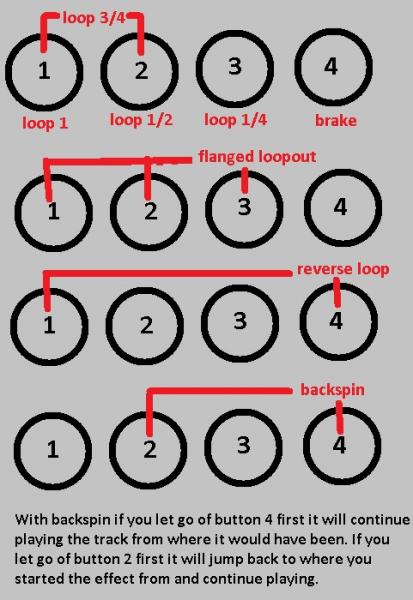
this is what the beatmasher buttons can do in combinations
would I be able to get this Map, and were could I find it if so? Waiting on my midi fighter now and Been a long time VDJ guy but was thinking of trying out traktor. But I hate to invest the money if I can use what I already paid for.
i’d be very keen to see the mapper xml too if possible. any idea if they’ll be keeping this format for vdj8? i’ve looked at the old djdecks (whose code will be in vdj8 to some extent i presume) xml format. not sure how the scripting parts differ tho…
Hey guys anyone who want’s it can have it, but not having a midifighter myself means I haven’t been able to have a working definition file so the device can be properly recognised. I have worked in correspondence with a guy but he understood very little of what was happening .
If you guys are able to test a couple of things for me we can get this thing pasted into the midi fighter in no time…
Zestoi check your pm… it’s big, and a little probably hard to follow.
and there are a few extra buttons in there because I am using it on an icon istage so ignore anything with “MID” in the name
i have a midifighter if i can help at all, but then don’t have a copy of vdj apart from the one that came with my hercules mk2, but that doesn’t support stuff like custom mappings i presume.
cool no PM atm, u can always email at zestoi at djism or djism at zestoi, both dot com’s…
i almost bought an istage a while back but went for a 2nd launchpad instead. an istage would fit nicely next to my idj tho. what do u think of the controller?
I can’t get the leds to work as they should in vdj, for some reason they send multiple led on messages when sending information from the software, which I have spent long time trying everything in my aresenal to fix… still no luck.
the istage though, is built for ableton, if you are using it with traktor, and you want to map the leds there is only one setting out of the 4 that you can use… in traktor mode the pad half lights up in purple and half in blue, with note on messages making the pads go red. so not the greatest control, and you don’t have the ability to use both colors in mapping, you also lose the aftertouch in traktor mode, that is reserved for ableton only
And don’t even consider emailing icon support, I have pleaded with them 4 times with very precise information drawing them diagrams, video’s of my results, providing code to get some information, and not a single reply…
The other bad thing bout it is if you are pressing a button down the device will stop receiving note on messages for the leds, It’s a great size, decent quality, terrible implimentation, I’d say you were easily better off getting the launchpad.
that’s odd… could it be like the apc40 that has an ableton mode and a dumb mode and it just takes a sysex message to switch between them? the kludge fix being to connect it to ableton and then after closing ableton it stays in the same mode?
that is even odder… can’t see any rationale for that. i went for the launchpad as a) it was a known entity and b) they look cool next to each other tho also c) i’ve spent a heck of a lot of time coding midi in midimasher for it
u could send out some sysex to the istage from midimasher if that would help get it in a more usable mode like ableton has access to.
the launchpad is sloooow in it’s led updates which is one bad thing. i use it’s double buffering mechanism so it looks like they all change instantly which kind of helps
awesome i might not get back to my email for a bit, but can’t wait to see it…
Yes I would be willing to test it and give you feed back. If I can figure anything out Ill try to help out as well. I have VDJ already and have the midi fighter as well (well that is when they finally decied to take it out of the asembly area its been in for a week and ship it to me since I ordered it to assemble my self..lol) You can email me at onebuckwild at yahoo.com
hey onebuckwild, yeah I will release 2 versions, one on here that uses vst only effects, but still trying to find a suitable loop roll for the beatmasher, I was using “instajungle”, but it isn’t reliable on my system and can’t pinpoint why exactly and “supatrigger” doesn’t work at all, and a fully featured one on the vdj forum that uses vdj effects that you will need a pro licence to download.
I’m going to see if zestoi can help me next week get a definition file working so I can map the leds.
but really all i need is for someone put the midi fighter in 1 bank mode and use the miditrace program (link above), press the buttons in order of 1(bottom left) - 16(top right), and give me the results.
couldn’t find your link to miditrace but here’s the raw output from pressing and releasing buttons one row at a time in normal mode, top to bottom, from my dump.exe:
edit: you’ll notice that my decode is an octave out from the official midifighter docs as they seem to use the (odd) traktor starting octave, which is one out of what most other apps seem to use. the raw is what you are intersted in i presume anyway
You Sir are a gentleman and a scholar, that’s exactly what I was after… I sent you an email, I’ll get this read for you on monday. or maybe on the train tonight.
I will thank you both as this will benifit me as well.. Just let me know when its availiable and Ill grab both and play with them and get you some feed back as well. My Midi is delayed but I couldnt get mad once I read this
I must apologize, but our supplier of PCBs has hung us out to dry with a big error in their shipment to us. Due to that fact, we are quite behind in getting these MF orders out. Expect yours to ship next week. My apologies.
Hey guys, im super interesting in this mapping, iv been working on basic mapping for my midi fighter but im struggleing a little bit, i was wondering if you guys could send me your mapping and any vst effects that i would need to run your mapping, i have some interesting ideas for things i would like to be able to do with the midi fighter so once iv had a play with your mapping i may be able to help work out some bugs and make some improvements.
on a side note, does anyone know if you use recorded triggers with vdj… for example, if i played a sample on the 4th beat in the song and i want this sample to play on every 4th beat though the rest of song, does anyone know if this is possible and if so could you help me programme it into the midi fighter.
I’m still working on one that uses only vst’s, but I’m having trouble finding a suitable roll effect that works flawlessly.. If you have a vdj pro licence you can download the effects from the vdj forum (unfortunately I won’t be giving these away due to the wishes of the creators of the plugins and atomix productions).
I have a basic mapper that covers the masher, a 4 grat effects, slicer, couple of cues and transport that I made to work with both mac and pc that will be uploaded today. I am honestly just waiting for the masher and it will be finished with everything in the picture, but i’ll quickly edit the one i’m uploading to virtualdj.com to loop instead of roll.
The closest I have come is instajungle version 1, if you could download and report back on whether it works properly on a different system that would be very handy. In all my tests it will only work on deck 2 if deck 1 isn’t loaded with a track…
to make instajungle work turn it on and move the 1st slider past 50% to
engage the roll, and slider 5 to change the roll size.
On the side note… you cant do that natively as vdj doesn’t have automation yet, but if you are good at computer coding in c++ you could make a plugin that retriggers anything you would want, as vdj has verb
get beat_num 1 16 ? action if true : action if false
which will only return true if on the first beat of each 4 bar section
the other way around it is just to record a sample loop that is 16 beats long with silence where you want it, then just loop the sample
Uggggg. this day can not go fast enough… My MF is on the UPS truck for delivery, hope it makes it before I get off work. Then home to make the family mad while I ignore them all night and go into a zone with my new toy!!! LOL
So if all goes well Ill have some feed back for you tomorrow.
this is my problem right now, i have a full liscenced version of traktor pro, and a LE lisence (with full vdj7) that i got w2ith my vestax typhoon, but because of how expensive vdj is compared to traktor i want to make sure it is able to perform as i want it before i invest.
could you please give me the link for the basic mapper please, mostly so i can use it as a base to work from,
i’m in the same situation pretty much. own traktor pro 2 and the ‘le’ version of vdj that came with my hercules mk2. i do like the idea of buying vdj for all it’s expandability potential - but the price seems pretty steep.
i’d quite like to own a copy in addition to traktor - not instead of tho.

 .
. no PM atm, u can always email at zestoi at djism or djism at zestoi, both dot com’s…
 tho also c) i’ve spent a heck of a lot of time coding midi in midimasher for it