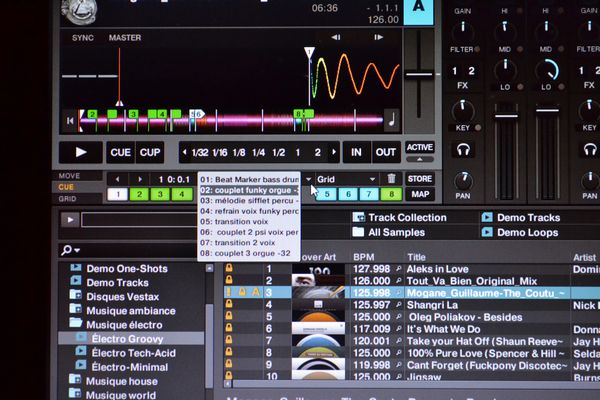
I Have send a request to NI.
I would like to be abble to map the small arrow on the rigth of the cue menu.
That arrow give you the access of the »Hot Cues list.
Native Instrument, say’s < it’s not possible to map this arrow, you need to send request >
I don’t want to use the mouse, i need it to be fast, only on button to open and close the menu.
Dj’s out there that do juggling, I Need help! We need to send request to NI.
When i beat grid my track’s, i wright the informations that i need to play, in the Hot Cues.
The break, the sax solo, the funky bass, the accapellas, ect…
When i play, i need this info fast ! when i upload a track.
I don’t understand what’s the point of having a Hot Cues list and not having a fast access
I us a S4 and a Korg NanoPad. ( i can use tree different effects on fader at the same time with tree fingers, very pratical )
If those are what I’m thinking (two arrows above cues) those are for jumping between hotcues. You can store up to 30+ hotcues in traktor but only eight can be mappable to play directly and with this arrows you can go trough all the rest.
it sounds like he wants to expand and close the list of hotcue notes with one button for quick reference. i was putting a lot of notes in my hotcues for a while and found it a pain to click the mouse to see what i had written. then i started applying certain hotcue numbers to certain events, which takes me less time and pretty much eliminates the need for me to see any notes.
You are correct. It’s just my english, I’m not native speaker and it’s not perfect but I have learned it myself and still learning it so sorry about my confusion
@ Stewe
i’m using Traktor S4 / Pro2 and a Korg Nano Kontrol.
The arrow that i want to map is the one just above the mouse arrow in the picture.
@ Nicky H
I’ve already map the advance pannel on a button with toggle.
I want just a little bit more.
@ Squidot
Exactly. that’s the one, that’s the list that i want!
I find it very usefull for me, for the kind of playing that i do.
It’s a lot of work!
to use the number would be for me a plan b.
I have another problem with that list when I open it with the mouse.
It stays open when I change my window, from the deck window
to the browser window. So i have to close it with the mouse and
open it again when i come back to the deck window.
Like Squidot said " it’s a pain ".
That’s the other reason why, a open/close button would be very heplful.
Thank you very much for your time everyone
i’m new on this forum.
They are right - isn’t mappable but I think there are more important commands that needs to bee added before that like Unit/clock and Unit/recorder toggles that should be essential from long time.
Everybody want’s something different.. I want more modifiers and slots, advanced LED output, more new effects, etc welcome to the club
Thank you, for the information Stewe.
I think i’m going to use a code with the numbers and follow
Squidot suggestion. Cue 1: beat Marker, Cue 2: Intro, Cue 3 transition, etc…
I plan to change to Traktor Pro 2.5 and probably remap, my things, a little bit.
Can you reffer to me some link or other forum on the modifier. I would like to
lurn more this application. Before I ask questions.