Basic MIDI Light Controller
This is a very basic light controller that uses MIDI input to activate the 16 relays (on and off) that can be connected to any type of normal lighting (christmas lights, can lights, disco balls, etc.). The lighting sequences I used are created using Sonar (you can use any other MIDI based software) that are syncronized to audio back tracks (created via MIDI files) so that music and the lighting are syncronized.

See the bench test video on you Tube -

The basic components are listed below and at the time of this post are still available online.
SainSmart 16-Channel Relay Module:
Prime Elidgable
$23.21
Arduino MEGA 2560 R3:
Prime Elidgable
$41.73
Amazon.com: Arduino Mega 2560 REV3 [A000067] - ATmega2560, 16MHz, 54 Digital I/O, 16 Analog Inputs, 256KB Flash, USB, Compatible with Arduino IDE for Advanced Projects : Electronics
Amazon.com: Arduino Mega 2560 REV3 [A000067] - ATmega2560, 16MHz, 54 Digital I/O, 16 Analog Inputs, 256KB Flash, USB, Compatible with Arduino IDE for Advanced Projects : Electronics
Programming Arduino: Getting Started With Sketches - Optional, I bought to learn how to program the Arduino. Included in this post the code so you may not need this.
Prime Elidgable
$8.48
Programming Arduino: Getting Started With Sketches: Simon, Monk: 8601404418389: Amazon.com: Books
Interface cable for Sainsmart to Arduino:
Prime Elidgable
$5.00
Amazon.com: Phantom YoYo Compatible/Replacement for Dupont Cable 200mm Male to Female 40p/Set : Electronics
MIDI Interface:
Prime Elidgable
$25.00
http://www.amazon.com/SHIELD-MIDI-Arduino-Shield-keyboard-inputs/dp/B00MKZXX5M/ref=sr_1_cc_1?s=aps&ie=UTF8&qid=1425332952&sr=1-1-catcorr&keywords=Olimex+MIDI+SHield
SHIELD-MIDI - Open Source Hardware Board
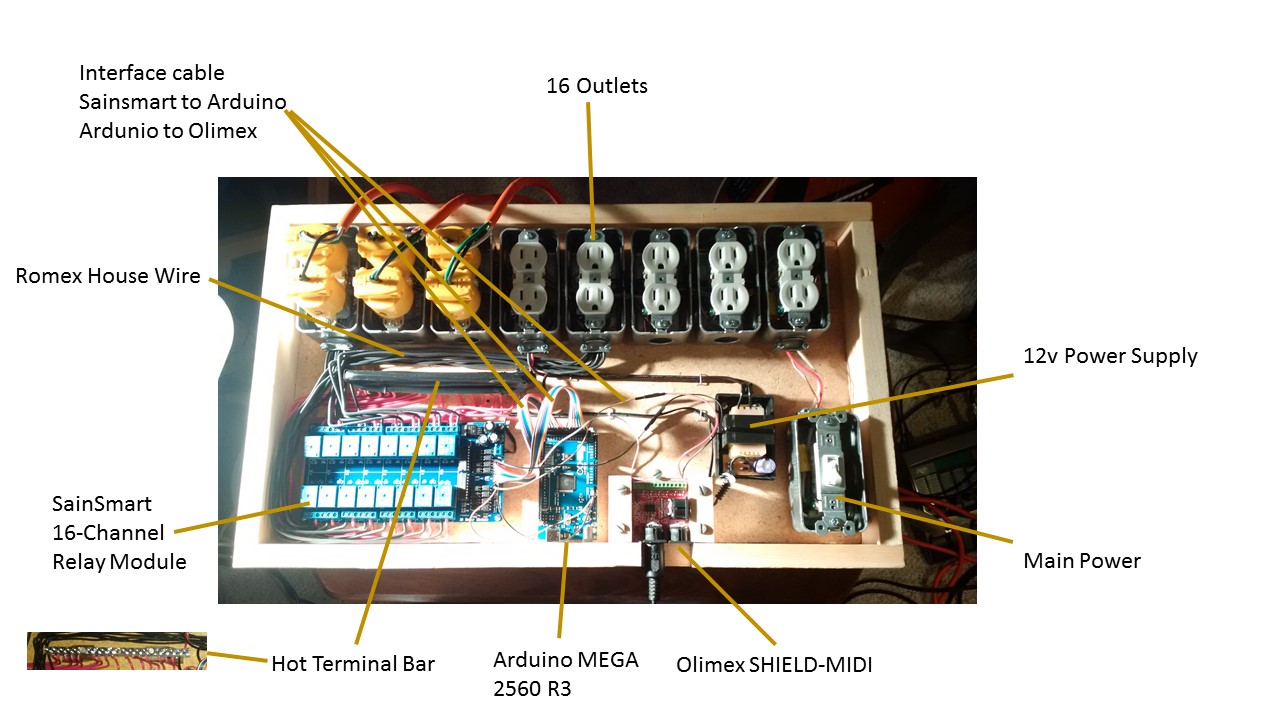
The shell was built with basic materials that can be found at any Lowes or Home Depot. The dimensions are 22" X 13" X 2.5". The bottom is a piece of partical board. The face is 3/16" smooth plywood. I used regular home metal gang boxes and outlets. The bridging tabs on the outlets were broken out so that each plug is on its own circuit. Regular house wiring was used to connect the outlets to thier respective relay. The relay board is powered by a spare 12v power adapter that I had lying around in which I removed the casing to fit it in the enclosure. The Arduino is power by a convenient 5v connection from the relay board. The Olimex is also powered by a second convenient 5v power connection on the Arduino. A terminal bar was used for the 110v power connections leading to each relay. I am pretty sure I got this from the electrical department at Lowes.
From the Arduino code (attached “Arduino MIDI Input Code.txt”) you can determine the pin connections from the Arduino to the the relay board. There is a single connection that runs from the Olimex’s analog TX pin to the RX0 pin on the Arduino. The MIDI note to relay pin assignments can also be determined from the attach code “Arduino MIDI Input Code.txt”.
The Arduino Software can be found at the below link:
arduino-1.6.0-windows.exe
Looks like they are up to 1.6.5. Should be OK, if not look in the lower right “Download the previous version of the current release”
https://www.arduino.cc/en/main/software
You will also need to download the “Arduino_MIDI_Library_v4.2” library and add it to the Arduino Sofware.
Launch Arduino Software.
Select the “sketch” menu.
Select “Import Library” the “Add Library”.
Locate the “Arduino_MIDI_Library_v4.2.zip” file (yes, it imports from the .zip file if I remember correctly).
Click Open (lower right).
Hope this helps you on your quest…