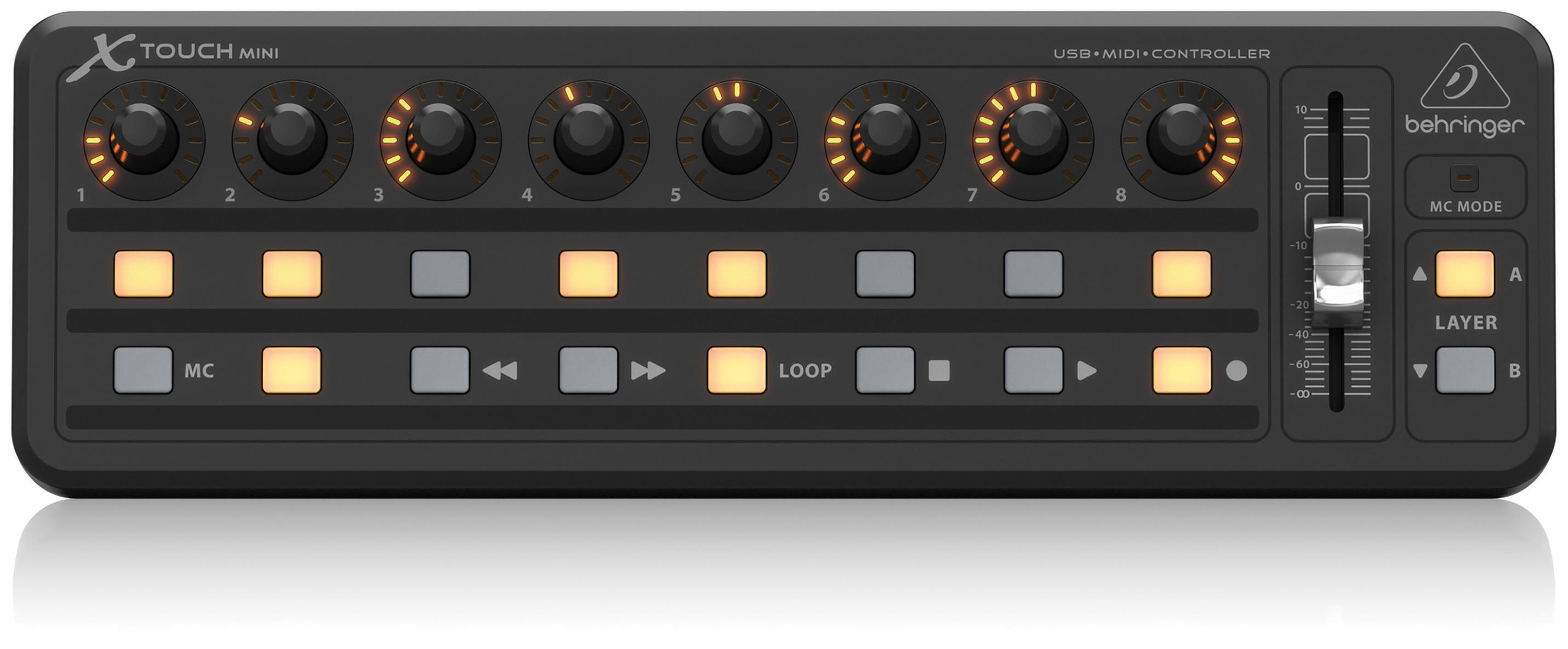
Behringer X-touch mini with traktor - how to toggle lights in midi?
Hi guys,
i got a x-touch mini to go with my NI s2mk3 for the FX and to basically give me a full control for deck C.
i got everything working as i want to control stuff. i am just having issues with toggling the lights on the x-touch.
if i use toggle mode in thex-touch editor it seems to mess up the sync. meaning i have to press multiple times to get the lights right. first press just removes the light on the pad and doesnt control traktor?! 2nd press controls traktor but then toggles the light again - doh!
if i set them to not be toggled in the x-touch editor it all works bar the pads lighting up.
at the moment i also need to load traktor and reset all the dials to zero to get them to syc up, but with my keyboard it knew what settings from the midi device. i think i can fix this with soft takeover tho so not end of world again.
any ideas? its not the end of the world but would be nice. btw, anyone wanting a little control for FX and 3rd deck control these are a bargain at about 1/4 of the price of the X1
the buttons and everything seem decent and for £35 compared to £140 its a bargain. as i have an S2 i dont need a lot of the functionality of the NI version. this was mainly just for FX 1+2 but it seems as a bonus i can have a lot of control over deck C too. you can control the way the knobs work and light up but im having issues with the toggles to light up the buttons but its not a big issue really so far.
there are 2 buttons for layer A and B so i can effectively swap between 2 of these layouts on the fly. i just cut them off my photo. doh. pink is layer B and normal post it note colour is layer A
<< & >> on Layer B control loop length
loop and basically start and stop my loop
play and O are basically play and stop
the top row of pads all control hotcues 1-8
i can scroll deck c, gain etc with the knobs. i can also press for some added things like i have the 8th one set for headphone cue.
the bottom left 2 buttons toggle FX 1 & 2 on deck C on and off.
on the normal post it notes i have FX 1 & 2. pressing the knobs or the button below will toggle the effect. since the first and 5th buttons are not used on effect i use them to enter freeze mode on deck A & B. i have the 2 browse buttons on each S2 deck assigned to FX 1&2 toggle for deck A&B.
i am temped to get another to control deck D and FX 3&4 but if i did i would likely use deck D more and mainly keep this one for FX 1&2. if you forget to toggle between the layers you can seriously mess up
xtouch bins and traktor TSI.zip (30.7 KB)
here are the 2 layers and bin files (they have an editor to flash the device’s settings). and the TSI file for the device in traktor.
i will write more on what i have done tomorrow now when i get a chance.
I don’t have the editor but I’m considering to buying this unit next week. When I look into your TSI I cannot see any output commands for FX and other functions - you can click on each command that you wish to add output for and than click on “Add Out” button (the new output command should be generated automatically, just click on it and it will be added to the bottom of the list).
i tried an add out and it didnt seem to do anything. the editor software lets me switch between toggle and momentary but when i use that it messes up the sync with traktor.
just had my first good play with it all tonight and was a lot of fun. made using a 3rd deck really easy and FX too. i just wish i could nail the toggled buttons but i cant seem to get traktor to talk to the unit.
if you have looked at the TSI you can see how many things you can assign to this one little unit. the only real thing i am missing is key change on the c-deck and a speed control for it but i tend to use it more of a looping deck anyway. i would deffo recommend one
ok, here are my working bin files and TSI. i have now mapped speed to pressing the knobs and key too. so all good! xtouch bins and traktor TSI V2.zip (30.9 KB)
i will take a new photo of the labels after i get my phone back from my son
i will try and do a photoshop overlay next week as im sure these post-it notes will fall off soon and it looks a mess. but v happy and wanting another for deck D. this also allows me to set things like freeze to a button for decks ABC which i havent played with but looks fun. i also bought a cheap laptop stand to raise them up a bit on so i can see better if sat on my lazy (,)
the top row of buttons on mode B (pink) are all hotcues for deck c.
on layer A if i click the knobs it also duplicates pressing the button below. im tempted to make it so then are hold and the buttons below are toggle. i need to have more of a play to decide what suits me best
i also COULD in theory map a shift button. means 4 sets of knobs effectively. if it can handle it, but i think it may. ideally knobs for some of the things i am using buttons for might be nice. but being able to do a nice pan is a bonus as is being able to switch the key or enter freeze mode etc.
ordered another one of these and my little laptop stand arrived, perfect to mount 2 of these things.
imagine the possibilities? they are almost half price at amazon
just had a thought, if i get another i will have to configure FX 3+4. and not sure how i would add extra buttons. i may simply use deck C & D for layering and have them just use FX 3&4 and keep FX 1&2 for decks A&B. that might keep things more simple… or i could just not use FX 4 at all and use those buttons for other stuff. frees up 4 extra knobs for things. hmmmm i feel like i am building my own little machine. if i plug in my m-audio keyboard i think i can use a channel for live stuff as long as i midi clock it back. some nice arpeggios in sync would be cool
Your first 5 posts need to be approved by a Moderator - you can post freely after that.
You can create the Shift button by adding a modifier. Create a second layer of control for your encoders and map key, loop move and anything else that you find useful.
Cool! You could upload it on maps.djtechtools.com as well so it is easier to discover by others.
That is beauty of mapping controllers, you can assign them how ever you wish. I use Midifighter Twister for effects in Traktor but I might buy one of this Behringer’s to control Photoshop.
ok. i have been messing about with modifiers (i thought there was just a shift key i could map lol).
anyway, i can map a modifier and get it to work like a shift button but the problem is that i then need to have soft takeover on really as otherwise it can jump as the controller doesnt recall the setting like it does flipping between the 2 layers. oh, that uses Program Change 0 and 1. maybe i can add more? hmmmmm. i doubt it actually.

 but its not a big issue really so far.
 is layer A