I have some issues, worked many times on this but still no success, hope you guys can help me with it:
8 pads each deck. I configured each pad to Set and activate a loop, from 1/8 to 16.
I could not figure out how to activate and deactivate each LED, because when any loop is active, all the pads are lightening.
Almost same issue as 1. but this time concerning the remix track sampler pads. Pressing one pad sample enables all pads LEDs.
I have 3 buttons to enable an EFX, the MIDI out is working normal.
When the shift button is pressed, these buttons send different commands, therefore I assigned these buttons to one shot effects like echo freeze. The problem is, MIDI out does not work, I cannot get the LED active when shift is pressed. This is dangerous after echo freeze, because it is possible to forget disabling echo freeze again.
I know it is depending on each controller, but does anybody know if it is possible to have a LED blinking? Tried some other MIDI/controller range values already.
My gear:
Traktor 2.10.013
Win7
Gemini G4V (I absolutely can recommend this controller)
For the loops you first need to use a modifier to tell wether X deck is in a loop or not and then configure the output for each button to the specific loop length it triggers.
You need to map “Out>Remix Deck>Direct Mapping>Slot X Cell State Y” and then assign it to the right deck. You need to do this for EVERY remix deck slot you plan on using. You can use a modifier to replicate the scrolling on a F1/S8/S5.
Make sure you change the feedback for the non shifted state to ONLY send feedback when that is true, otherwise it will also pump it when you press the shift key. Might come in handy to toss in a “Send Monitor State” to the shift key to force an update.
Totally up to the controller if you want it blinking while a deck is stopped. Otherwise try mapping the Beat Phase monitor.
Tried this before and right now again. The only thing I can get with the pads is solid light on. Want to find a way to just light up when pressed. Can you send a screenshot?
Cannot follow you because the buttons are already in two modes, depending if shift pressed or not. I mapped the buttons without combination of a shift button. Normally I would understand, when button A1 lights and shift is pressed and the button state switches to A2 but the light should turn off. The problem is, the light still remain on.
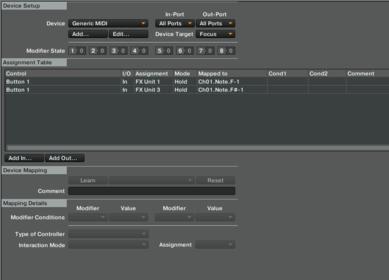
Here is what I have right now and again, it is the same button on the controller C#1 without shift pressed and D#2 with shift pressed.
Try with 'Cell State" modifier you can assign that mod to a command and then determine which state it will be using (empty, loaded, waiting (which is bugged) and playing)
Well if you wish to map LED’s to lite up when they are shifted just do that - enable Learn > Hold shift + press the button with LED output > Disable Learn.
No modifiers is necessary so you might also want to remove them from all your commands associated with the Shift.
Does not work like you said!
What I did is, mapped the refering button twice, one without shift (F-1), and one with shift (F#-1), and no modifier assignment at all (see screenshot below.)
The shift button is only assigned to the fader knobs by using modifiers. For this I have a separate mapping.
Your screen grab didn’t show any output commands and I can’t somehow magically see what is in your mapping.
But I understand what you’re trying to map. Can you please upload your whole TSI for me to take a look? I should be able to figure it out with your MIDI chart from your Facebook page.
Here is the TSI file from Deck B. Also check out the images - I marked the buttons w,th red circle. But same issue is with the pads, they come into another state if shift is pressed, but I cannot handle the LED’s when shift is held.
There are no output commands for this issue included, as I could not get it to work. Thanks for your help.
OK cool - what I did was added output command which I manually assigned to Ch2.Note.F#-1 and I couldn’t find any duplicates in the mapping which means there is nothing else mapped in the Shift later. If there is nothing mapped to the Shift Note then the LED will remain it’s first button state eve with shift button pressed down. This is exactly what I could notice going on in your vid.
Man now I’m sorry that I haven’t bought this controller from my friend. It’s kinda cool unit but no one really haven’t made it to it’s full potential in Traktor.
Because it is for deck mixer I’d arrange deck selectors in two for-deck formations (A, B, C, D buttons left and right from the crossfader are ideal for this) This buttons would also route FX to selected deck leaving all other three deck killed. This concept allows you to select any of four decks on both sides of the unit automatically solving A/C and B/D selectors which was an issue to me. What if you want A+C at a same time? Or, you can select a same deck in both focuses and have a benefit of two use cases in the performance mode (ie Sample triggers in the left performance section + insta FX in the right)