It’s FireWire though; most Macs these days don’t have FireWire, although I think you might be able to get a Thunderbolt → FireWire converter. Still, if you just want a basic output device you’re probably better off the NI Audio 2. Or, do what I’m thinking of doing and get the Zomo MC-1000; fits to the back of your mixer (or the front, there’s a few different brackets) and has 4 stereo outputs, same as the Contour.
The 92 is my dream mixer. I really want to replicate what hawtin is doing to bad i’m stuck with an S4
Ahhhh man, that’s it.. For the time being until I get a new interface, I could actually sacrifice a Traktor deck, and have 3 deck channels and one for Maschine okay…
I understood that, but one thing that’s confusing me, is the send and return, because on the back of my 92 it said ‘return 1 L/M R’ & ‘return 2 L/M R’. It doesn’t say ‘send’ on there…
Or is that just the send and returns anyway?
So if so, I understood everything else, and I would need dual 1/4 from ‘return 1’ going to RCA into the audio 10 MAIN IN, and then RCA > MAIN OUT back into the xone92 ‘return 2’ dual 1/4. Correct?
Once ive got that, ill check up on how to route ableton for the send and returns, this part isn’t hard at all is it, just clicking and settings yeah? Lastly, can I choose what channel I want to apply the ableton plugin/FX over, like if I have all 3 channels/Traktor decks up, and channel 4 Maschine up, and I just want to put some delay from ableton over Maschine/channel 4, would it effect just that channel or all 4 channels?
Cheers man, sorry for all the questions I just need to take it in.. Thanks a lot
Instead of the RME Fireface UFX, for now go with the Audio 10 and once you’ll have the money, buy an Echo Audiofire 12. Like I said, it will give you 6 outputs and it’s FireWire, so latency is very low. Also, it’s not that much more expensive than an Audio 10. FireWire isn’t a problem, since you’ll have the same Mac model as me (with FireWire).
But what you can do for the Send/Return, is buying two of these:
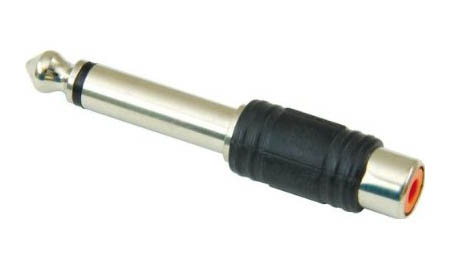
And then just use RCA cables for the Send/Return principle. That’s how I set it up for a friend of mine. When I’m at his, I will make a picture and upload it here, regarding the routing.
Yep, going to do that for the time being and sacrifice a Traktor deck.
Okay, so Don’t I need 4 of them adapters? As there is two ‘return’ sections, both with two 1/4 sockets..
They both have 1/4 ‘L/M - R’ sockets on them, I have to use one return to audio 10 main in and then the 2nd return slots going into the audio 10 main out. That’s right yeah?
I think give the three tracks a go, seriously with 4 tracks playing at once you have to be very picky with your loops and samples otherwise it sounds like rubbish, add Maschine on top, wow fuckin nightmare.
+1
i never have 4 tracks playing at once, but it is still very handy to have 4 decks ready for preperation purposes etc.
Yes, you’re right. You’ll need 4 adapters, 2 for the Sends and 2 for the Returns.
@ekwipt - Good point, I’ve been thinking 3 Traktor decks will really be enough, especially with Maschine too, and ableton!
So let me just get this straight, I can actually achieve what I want to do now, with Traktor, Maschine, and ableton, without having to get a new Soundcard. Just by sacrificing a Traktor deck?
@JDFS - nice one! Now I just need to get the adapters or ill just get 2 RCA to 1/4 cables! Can’t wait to get this set up!!
A10 A - D into Ch 1- 4 X92
Traktor - A B C Track Decks
Traktor D in Thru
Ableton - Maschine (with external FX plugin [Ableton FX] out Track D of A10
Maschine as VST
Don’t send to Main out
Mashine is now Ch4 on its own channel on X92
X92 - Aux Out 1 into Main In A10
Ableton - Main out or send (however you end up routing inside Ableton) to Main Out of A10
Maschine is not sent to this channel!
Into Xone Return 1
You can now FX Traktor channels into Ableton
You could also run cables from X92 Aux out 2 straight back into return 10
But you’ll get a lot of feedback as your remixing everything back into each other.
Don’t crank the Aux Chanel’s or you’ll blow up the universe
PS I think this is right.
Someone look over this…
Okay people,
Just got my 1/4 adapters,
I have it set up like this..
x4 RCA from xone92 channels 1,2,3,4 to the 4 INs on audio 10,
3 Traktor Decks A, B, C.
Traktor deck D and channel 4 is Maschine.
Then one of the Return channels on Xone 92: 1/4 to RCA going to the master IN on the audio 10, and then the 2nd ‘return’ slots 1/4 to RCA to the master OUT of the audio 10.
Now, everything’s playing sound okay, but how do I set this up in ableton? I dragged the plugin I would like to use into the session view ‘drag audio effects here’ session…
I’ve set ‘audio 10’ and my input and output in ableton preferences,
As long as my routing Is right with the audio 10 and xone92, then I’m just stuck with the ableton side, how do I now send my Maschine sounds or Traktor sounds to abletons FX,
Help please! Thanks guys 
I really need help with this people.. I have no idea how to do the ableton side of this… 
Have you tried Soundflower???
What would I do with soundflower dude?
I was told I could achieve this with everything I already had
Read this, I’ve explained everything here.
One note though, you’d better replace the audio channel for a Send channel where you put the FX and make a new Audio channel where the Audio from the AUX is coming in. And then you can use the sends to give sound over that channel. I’ll make a screenshot of how I set it up because it’s complex routing and you must be full aware of what you are doing.
Okay I must have not been doing it right,
I haven’t connected any leads to any of the 2 ‘AUX’ channels, the ‘aux L R’ slots wernt being used. I was just connecting 1/4 jack into both ‘return’ channels. Return 1 & return 2…
Okay so know I have got:
One of the xone 92’s AUX channels ‘AUX 1’ going into the IN 3/4 of my audio 10… And then I have connected one of the Xone 92’s return channels ‘RETURN 1’ into the 9/10 OUT of my audio 10…
I inserted a new AUDIO TRACK in ableton, set the AUDIO FROM to ‘EXT. In’ and underneath that I set it to ‘3/4’..
(There was no option to select ‘audio from Traktor’ ???
Now when I play deck A, I can see input coming in through the inserted audio track in ableton, and I dragged my delay plugin to that audio track, but cant hear any FX.
I also can’t insert a SEND channel? I can only I insert a MIDI, AUDIO or RETURN track?
EDIT** Okay, I managed to get it going, just turning the Aux 1 knob on top of each channel, applied some effect to my Traktor tracks, but it sounds a bit muddy, what controls do what, like I know the mic/Rtn fader seems to send then channel into the plugin, but I can’t get it to sound nice at all.
Muddy in what way? I’m not 100% familiar with the 92 but do the aux sends cut the audio from the track it’s on? If not, then it most likely sounds muddy just because it’s a blend of both the dry signal through the mixer AND the wet coming back from Live.
If that’s not your issue, it could just be with how your effects are tuned in Live.
I don’t know it just sounds not so clean, maybe I need to get used to the plugin more to get the parameters set RIFGT before sending my track into it…
I had it workin last night, but now it’s decided to stop working 
Also, I want to add a reverb plugin, so do I just create a new audio track and set the audio from > ext. in and my audio 10 channel that my send is plugged into, then drop the reverb plugin into that audio track, so then the aux 2 knob will be the reverb and my already set up delay is on my aux 1 knob… ?
Here’s a screenshot how I’ve set it up for a friend of mine.
One thing, you must put the knob at the Return channel which says Off, Duck and On to On.
So here’s the routing:
AUX 1 L/R going into Traktor Audio 10 MAIN In;
Traktor Audio 10 MAIN Out going into Return 1 L/R.
In Ableton, raise the Sends for the FX you want to full in channel Xone 92 AUX. And then, if you have the Return Fader on the Xone 92 up, and on a channel where music is playing twist the AUX 1 knob (on top), you must hear FX.
Maybe one day I can make a movie of how everything is working… I thought it was so complex when I saw a couple of DJ’s utilizing it, but I’ve figured this out for myself. So, it’s not that difficult!