I know that his name was recently mentioned in a predictions for the future thread. I only saw him for the first time in the documentary RIP: A Remix Manifesto (highly recommend for any DJ to watch). All I can say is WOW. The man is living proof that it’s not the tools it’s how you use it, and the power to rock a crowd largely comes from one’s own charisma and energy rather then skill alone.
Anyways I got thinking about his performance and couldn’t help but want to attempt something similar with Maschine. The only problem is once you have a sample in Maschine it’s final, you can’t really speed it up or adjust the pitch without throwing it completely off time. Is something like this possible with Maschine or could be in the future?
Also would someone be able to walk me through the gear he uses. I’m aware of the program he uses but how does it enable him to have such drastic changes and additions and keep everything in time.
its possible - if your phrases/loops aren’t densely orchestrated you can chop your phrases into seperate samples; this allows you to scramble the order in which they play, the timing/tempo, individually effect single sounds, strip away elements…
if it is too densely orchestrated, your next option goes further down the road towards production - you gotta recreate the track
How would that work in Maschine though. Let’s say you have something sampled in there, there is no way to tell what the BPM of that sample is and no way to speed it up or slow it down.
this is something people with mpc’s have been doing for ages.
listen to your source before you sample it.
figure out the tempo.
make program with same tempo.
sample.
slice.
program pattern so that slices playback correctly.
add milk and cheese and scramble.
i dont own a maschine but on the hardware side ive owned an mpc1000, korg electribe sx, and some other bits and its all the same principle behind it. since its sliced and its a pattern, no matter what tempo you play it at the pitch will not be effected and on the flip side pitch can be bent without effecting the tempo.
this idea can be further flipped by assigning the slices to its own pattern.
if youve got what was sampled as a 4 bar loop and have it divided into 4 one bar samples, make 4 one bar patterns each pattern corresponding to the sample…
im starting to get off point, the point is youve got to be conscious of how you use patterns in order to use a sampler as something other than a drum machine.
i’m pretty sure girltalk uses a software called audiomulch to create his songs and perform his “live” sets. I’ve never used audiomulch so I’m not really sure how you’d go about doing it that way. also you notice that girltalk doesn’t use controllers at all, he just uses hotkeys and his mouse with the software.
i think if you want to do the audio collage/live remix mashup thing like girltalk but using controllers such as maschine, your best bet is grabbing a copy of ableton.
My road into Ableton started with the Launchpad. With it, I easily grasped the idea of clips and scenes.
That said, the hardware was only an insight into the concept. The basic construction for Session mode is a “table” of rows and columns. You put all similar ideas into the same column, i.e. clips of the same type (audio or midi) and nature (basic kick, kick hh, kick hh and shaker, etc), as only one clip in a column can play at a time. Now a row, called a Scene, is just a set of clips you would like to play together. So by starting a Scene, all the clips in that row start together (quantized too if you like). But nothing stops you from firing individual clips (quantized or not) at any time, just remember that starting a clip will stop any other clip in the same column.
The best way to understand it is to open a song in Ableton and just press the clip buttons and then press a Scene, then the next Scene and you see the interaction.
Effects are built on a clip-by-clip basis, so you can get really funky from one clip to the next (i.e. the same bass line in two clips in the same column can sound way different).
Once you get your parts built up, it is a LOT of fun playing with all the different possibilities. You feel like a painter with all these “colours” at your disposal to paint! But a piece of hardware with lots of buttons soon becomes understandable (not necessary, but you see why lots of people use one).
Ableton IS intimidating at the beginning but gets really cool when you scratch the surface. I am still such a noob with it, but a noob having fun!
He is in a movie called RiP!: A Remix Manifesto. I haven’t seen this movie in years. The movie is about intellectual property and he demonstates how he assembles his mashups. I’m not sure if it will help you but give it a shot.
there are a couple vids floating around that show how he is using audiomulch but he is using it very basic, all the samples and noises are ready, he really from what i saw is basically muting/unmuting loops/samples at the right time, which is why he doesn’t really need a controller or anything special.
audiomulch is a cool program but this could be replicated in other programs as well.
you do not need ableton or any additional programs or hardware.
this is a solution that requires just trying it over and over and eventually you will understand it more than any tutorial could teach. maschine is a fucking beast, and if people can do this shit on a beat up old ass mpc2000 (or hell even a 60…) than you can sure as hell do it on maschine. youre just psyching yourself out by thinking about it too much. he is able to do what he does because he has been doing forever and has an extensive library of shit he has prepped. you just gotta stop talking and just do it. the more you do it the more you will figure out how these ideas apply to what youre trying to do
I have Maschine, but daym… Sampling in Ableton is just way easier. I’d create clips in Ableton to do this sort of thing. Use Maschine to add beats and additional sounds.
That’s it. I just watch the whole documentary. He appears in it several more times so you can see how he performs too. But thanks for finding this clip for me. I was at work when I posted so I couldn’t really look for it.
Where I got confused was how easy he made it look. It’s definitely more of a prepared set as opposed to doing it on the fly, which clears things up for me. The thing I like about Maschine not having to ever use the mouse really or have the window open. With ableton that would require switching between Traktor and Ableton windows, with Maschine I keep it in the background while it’s running and never have to look at it.
diezdiazgiant’s would you be able to show me an example of the kind of chopping you were talking about. Also I just recently discovered how to make loops and export them,m very helpful.
yeah, i just took a look at youtube and there are so many mpc videos of varying styles (and quality) - i just started my “weekend” at work i will see what i can do about throwing together a demo video on thursday. i dont have maschine, i use ableton, but again this is a pretty universal concept so it can be easily demonstrated with a single track in ableton with drum racks
I’d also take a look at The Glitch Mob if you’re interested in this style of mashups as well. I have to say one of the most impressive live performances I’ve seen.
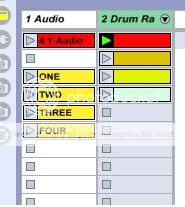
not quite a video, im too retarded to bother with learning how to make this screen cap software sync with the audio but heres a quick walk thru with some illustration that should clear up what im saying
again this is done in ableton but this is something thats really universal with any sampler drum machine thats got a half way decent sequencer. on the korg electribes its called “pattern set” on mpcs its “next seq” but you want to turn your patterns into cue points. for those that dont know now you know; this is beat indexing…
we start off with a simple recording, for this demonstration its my drunk ass saying “one two three four” into my lappys microphone.
here we have our raw file:
now what alot of people will do when they slice - is they program the beat in one pattern. the function in this comes from making a bunch of small patterns that are the length of the slice divisions.
here we see our 4 patterns in drum racks (ignore the audio channel thats just what i used to chop our phrase)
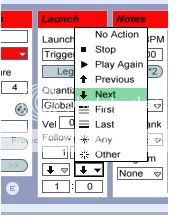
finally this part depends on what youre sequencing with, (i doubt maschine would exclude this as a feature but having not used it i cant say for sure) but on ableton you set clip launch so that if you trigger clip one, after clip 1 is done playing it goes to 2, 3, 4 and then it auto repeats.