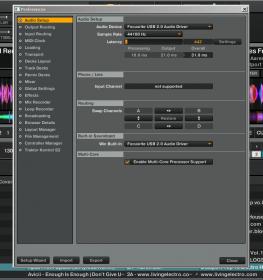
Hey everyone! I have a question about audio interfaces and Traktor 2?
So I just recently purchased a Scarlett 8i6 for recording and Dj’ing. I downloaded and updated everything (including Traktor). The audio interface works and I can play songs on itunes/youtube, but when I open Traktor and set up the audio preferences to use the Focusrite Asio driver there is no sound coming out. Maybe I’m routing the signal wrong, please help!!! Or else I have to use my cruddy laptop soundcard!
and output 3 and 4 is what your soundcard main outs are connected to your monitors from and not something else? Main outs are usually 1 and 2 which is what system output will default to.
Its weird, on the routing it doesn’t say line 1 or line 2 it says mon 1 and mon 2 and if I connect those to my speaker I just get a metronome clicking sound and no audio.
connect your speakers to outputs 1 and 2, select 1 and 2 on the soundcard, turn up the monitor volume knob on the soundcard, and go into the metronome in traktor and make sure tick is off and the master volume knob in traktor is up…
Yes, all you have to do is match up whichever channel number the S/PDIF output is with the output routing in Traktor, the same way you would with any of the outputs.
Okay, so I selected the channels and now I can tell that it’s getting the audio but I’m not hearing anything. So maybe its the mixer for the audio interface?
I can see that traktor is playing the audio but this is what the mixer looks like.
Okay so I got it to finally work out and it was definitely something with the mixer software but it was also how I had the routing configured in traktor that the software wasn’t reading correctly. Thank you so much for your help, it definitely helped me fix my problem, and now I can Dj confidently tonight!!!