How to deal with BPM change distortion on Ableton?
When I edit some tracks and change their BPM’s using Re-Pitch they go a little further than 0 db.
What can I do to make it not sound distorted when I’m playing, or what can I do to deal with it?
Like, can I get the volume a little bit lower, than the peak which was further than 0 db will be now exacly 0 db? Or doing this will mess the track even more…?
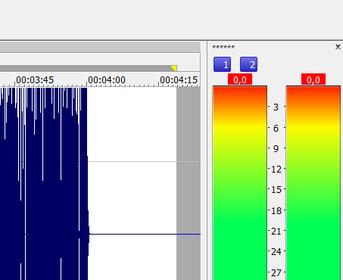
Actually, when I export the track that seems to be distorting in ableton and throw it on Sony Sound Forge 10 it seems that its not getting over 0 db at any time of the track:
you dont want to be running a track upto or beyond 0db in any software as digital clipping takes the peak of the wave form away causing in accuracy and its also removing any headroom given to apply effects ideally you want to be aiming for an RMS output of around -12dB from your daw
also note if the original file was clipping you have limited options for getting none distorted audio out even with setting the levels correctly due to once audio is clipped the data isnt present in the wave.
ok sounds very odd if im honest might have to see if warping within ableton does that naturally for myself as its a feature im not familiar with but it does seam like a strange behaviour
Its happening with all files. The bigger the BPM difference the most distortion. Also its a MP3 track, lossless files seem to distort much less when changing bpms
just processed a 120bpm 2bar loop stretched it into a 12bar so effectively changing the tempo from 120 to 20bpm and it doesnt effect its output volume in anyway at all