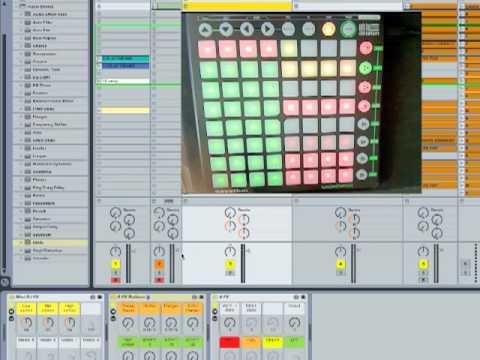
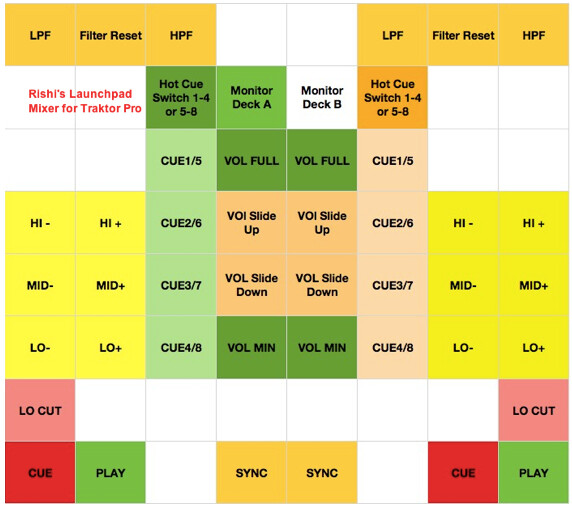
Here’s my new 4 deck mapping for the Launchpad with full visual feedback.
I started off making this as a supplement to my KX1 but I have been loving the bigger buttons and visual feedback so it has almost taken over the KX1.
Images below show complete mapping and default state.
Summary:
4 Deck Control with visual feedback on nearly every element
Automatic full screen browser mode
Preset selector to load up to 6 different Chained FX combo’s
Full loop control with feedback states on loop set and active
8 cue point access with out shift. Use shift to Remove and change CUE type
Cue points also color coded - Greed=Grid, Yellow=Load, Red=Cue, Green=Loop and OFF for NO Cue point
Cue, Play with Feedback RED for OFF, Green for ON
Temp Cue set and CuePlay
Orange Track end warning light
The only thing outstanding is 4 chained effect combo’s. I’ve done 2 and am still looking for good combo’s to program, so if anyone has recommendations I’d be willing to put them in.
This is awesome man. Im having a great time with it. Thanks for the hard work. Ive been trying to find a Launchpad tsi file where it could replace my mixer. This is pretty awesome tho. i wish i could move the crossfader and the vol faders so bad.
Thanks. I have been loving it too. Bigger buttons than the KX1 make the difference. IT’s like 4 midi fighters on one page.
I can actually add a mixer page in to this but you would need to use a free script that I provide with it.
I originally made the extra pages for use with Ableton but I can add the mixer page so that you could toggle between the tsi you have now and the mixer view. Keeping in mind that its a mixer that works entirely with buttons.
You can see it in action in a vid I made for use with Ableton. You would just need to look for the section on the mixer.
Wow man. ive never really messed with the launch pad much since i bought scratch pro. I really want my launchpad to work like that in ableton! thats awesome. And an extra page for a mixer in traktor would be awesome. Hit me up wit the files i need! ill PM u my email!
Also it seems when im using this mapping along with the ean mapping for the Vci100mkII that loading songs creates a glitch noise. like if a track is playing and you load into the stopped deck. Just what im experiencing.
If you’re using windows, then you’re experiencing the “Send Monitor State” glitch, but have no fear there is a fix for this on the way. There’s a beta version of the app available on page 7 of this post…
The setup instructions are scattered throughout the post.
And the final release will be coming out shortly.
Indeed as expected, it is an excellent mapping.
I just had small one problems for looping, there is a conflict with traktor when traktor play a loop(cue) predefined by me and when I want reduire this loop, if the value was already more low than the loop pre defined and what I touch a parameter of the looping the loop, me loses the rhytme of the mix (effect cd broke) xD)
But otherwise it is incredible, it has of set a lot of time has to make it!
You uses it with your x1 and a mixer or just x1?
Awesome man! I look forward to checkin that mediafire link out when i get off work. Not sure what it does but if it can fix my glitches or will in the future ill def get it!
There are two links on that page. The first one us just the single page mega map. The second link called TraktorPad is the one with the mixer.
Once set up you access the mega map by pressing User 2. Once in User 2 you can use the scene buttons on the right to get to the other pages. The mixer is the first scene button down on the right.
They are (on the controller manager tab)- double and triple checked
[quote=“rishi, post:19, topic:14759, username:rishi”]
Press User 2 to bring up the page.
[/quote] -
This part is working fine
When I push buttons on the launchpad there is no midi activity and there are no controls showing as being mapped to functions once the tsi has been imported - There are 2 instances of it btw