MIDI FIghter 3D OSX Not recognizing device.

MIDI FIghter 3D OSX Not recognizing device.

I recently received a MacBook Pro as a gift and I started installing my Traktor Software onto the OS. I installed the MIDI Fighter Utility as well but it is not recognizing the MIDI Fighter 3D at all. I know a common issue was the version of OSX but I have all the new software updates. I am very new to OSX and never owned a MAC before but under traktor is lists the MIDI Fighters as a USB MIDI device. I don’t know if that has anything to do with it. But I figure any info would help. Thanks.

Updates:

OSX recognizes the device as a MIDI Fighter 3D in the system information utility.

Would this have anything to do with my using and initially installing the MIDI fighter 3D under windows?

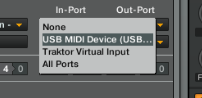
I got the MIDI Fighter to work using Traktor but it still reads the MIDI Fighter as a MIDI Controller. The Midi fighter utility does not work at all.

Hi Bootleg,
So am I right that the Midi Fighter works fine in Traktor, but the problem is that the utility will not recognize it?

Yeah that’s correct.

But it doesn’t list as a MIDI fighter 3D in traktor but I’m still able to use it.

Hey Bootleg,

Im back from vacation now so Ill be looking into this issue in the next couple of days.

Can you tell me what name appears in Traktor? Also can you confirm what build of OSX you are using?

Best Regards,

Michael

My OSX build is 10.7.4

I currently don’t have my MIDI Fighter 3D on me but I’ll be home soon and post. I just know it says MIDI Controller and cuts off. I’ll screen cap it.

Thats a screen cap. My tractor is also up to date as well.

Screen Shot 2012-05-22 at 6.01.22 PM.png

Hey Bootleg - I have PM’d you

I’m having the same issue…my midifighter 3d isn’t being recognized by the utility.

This is what I was told to do and it worked:

The first thing you can try is going to your audio midi setup ( you can search for that using spotlight). Click “Window” then select Show Midi Window.

You will now see a page which contains every midi controller you have ever connected. Look through this list until you find the 3D, once you find the entry for the 3D delete it. (the 3D will need to be disconnected for this to work)

Once it has been deleted connect your Midi Fighter and see if it now works.

I just received my MIDI Fighter 3d today. Keen to use it, But the MF utility won’t recognise the controller.

Mac Version 10.10
Utility Version 2.63

The midi fighter works in Traktor if i go new device ect and map it.

I’ve tried the following at the top, deleting the file and plugging it in but that file just returns and the program wont detect it.

Thanks.

I received my MIDI fighter today. Keen to use it. But having the same issue at the OP.

Installed the software (2.63) plugged it in and not detected.
Deleted the file while the MF is unplugged and still nothing.

osx 10.10

Ideas?