Been trolling the site for a couple years now, always hoped my first post would not be a plea for help! Although, if all goes well, I’ll soon have a fresh Traktor performance mapping to share with Novation Twitch users.
I’m stuck on LED behavior regarding ‘track end warning’. I have my play/pause button mapped to light green while deck is playing, turning red when track end warning comes up (no LED for paused deck). However, if I get into the “red zone” and then jump back (via hotcue or beatjump) somewhere in the track, I lose LED feedback until I reach the track end warning again. I’d obviously like for the LED to go back to green if I jump back from the red zone, but the LED cuts out completely in this scenario.
I’ve looked into mapping tutorials (particularly related to LED output) and searched as many variations of this topic as I could think of but, still can’t put the pieces together. I did come across mention of this exact issue but, no solution was proposed.
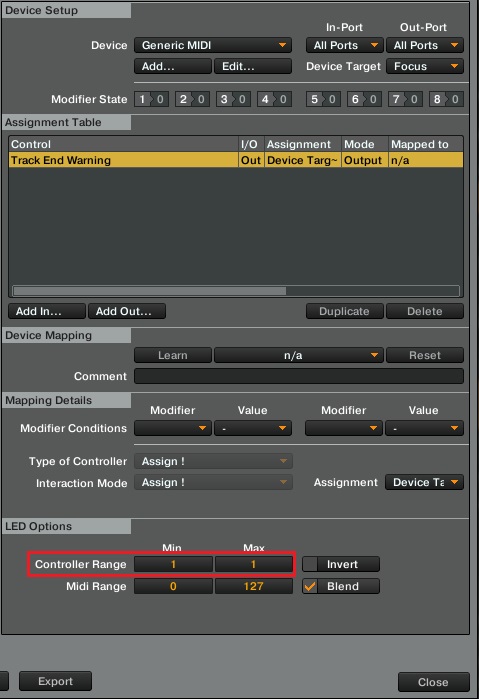
Dunno, that should do… Did you by any chance have mess with MIDI range?? MIDI Range is used to set up the colors for your multicolor pads and the Controller Range is where you determine the LED state for any output command.
Yes, I have set the MIDI ranges based on what I’ve figured out about the Twitch’s LED setup for most of its buttons:
0 = off
1-15 = red
16 = off
17–111 = orangish red - orange - yellow (with some off positions between the transitions)
112=off
113-127 = green
The logical thing to me was, to set the play button’s green output at 0-127 (off and full green) and the track end warning output at 0-15 (off and full red).
How so? I understand how the midi range works. Did I present the Twitch’s settings in a way that doesn’t make sense to you? I can try another approach if it’d be more helpful.
To reiterate, the LED does turn red as it should, it just doesn’t automatically go back to green when I jump back in the track. I can’t help but think that a set of modifier conditions would resolve the issue but, I just can’t manage to figure out something that will work.
I’ve tried all 9 possible controller range settings between the Red and Green LED outputs, with and without the blend option ticked. I even tried playing with invert.. Still no dice.
Is it possible that I’m dealing with a limitation of the Twitch controller, not a Traktor issue? I wanted to test this with one of my Native Instruments controllers but, it seems that their LED colors are predetermined by the Controller Manager software (F1, Z1, X1 MK1, Maschine).
Thanks again for your input, I appreciate that you took the time to post a screen shot and all.
Finally!! This didn’t quite do it for me, Stewe, but it got me very close. Thank you for sticking with me on this one! I was hung up on the minimum MIDI range value, don’t know why, it’s so obvious now! Here’s where I finally ended up:
I thought for sure that it was going to be the perfect controller for me but, in the end, it just was not. If I planned to DJ in more of a traditional sense, this could actually be a great controller! However, I’m a drummer and a producer above all, primarily looking for a live performance setup that feels right for me. I just wanted to also have a good platform to mix, should the occasion arise.
I already have an F1, Z1, and Maschine, so I decided to pick up another F1 instead. Might not be the most sensible track deck scenario, but it’ll do. I really should just be focused on my own material anyway.
I’m sure the information in this thread will be useful to somebody along their mapping journey. In the meantime, I’ll be getting into a remix-deck-only mapping utilizing dual F1s. It’s going to be tailored very specifically to my own performance needs, but I’ll share it at some point anyhow!

 but you should set the controller range in order to make this to work: