Need urgent help with audio setup!

Need urgent help with audio setup!

Hey guys, so I have been mixing without the ability to cue and use my headphones since I’ve been using my comp soundcard instead of my controller.

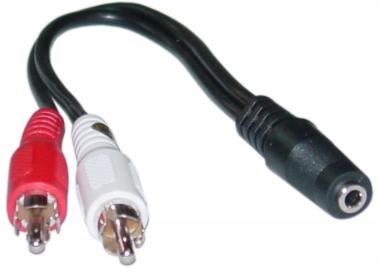
The problem was that, my speakers only have one aux cord, whilst my Denon Mc3000 controller requires a master L and R output. So I went and bought an adapter connecting my single aux cable (speaker cable) to a adapter to an RCA cable which connects to my controller.

My audio set up is:

Denon DJ ASIO Driver
Sample rate 48000 HZ

Built in soundcard:
win built-in: denon DJ asio driver

OUTPUT ROUTING:

Output monitor-
L) 3: MC3000 3
R) 4: MC3000 4

Output Master-
L) 1: MC3000 1
R) 2: MC3000 2

INPUT ROUTING:

Input Deck A-
L (Mono) 1: Mc30001
R) 2: Mc3000 2

Input Deck B-
L (mono) 3: mc3000 3
R) 4: mc3000 4

Input deck C and the rest are not connected

There is no sound coming from my speakers nor my headphones. What is the issue?

Previously I have been using my computer soundcard and the audio came through just fine, but I really need to fix this issue of not being able to use my headphones nor my controller soundcard. Any help is much appreciated! This is really starting to bug me.

PICTURES:

This is the RCA audio chord connected to the controller:

This is the adapter to connect my single AUX audio cable to the dual RCA cables:
And the green cable is the single AUX cable which is connected to my speakers (my speakers are not self powered, they require a power chord FYI)

And this is my RCA cable plugged into a cable jack to connect to the master output:
There’s so much confusing and wrong here that I don’t even know where to start. Read your manuals and learn about connectors and signal flow.

No help at all.

I’ve made a thread about this a couple weeks back and the only answer I got was: buy a cable splitter

My manual says I need a TRS balanced cable, isn’t that what I have?

Then it says to connect it to an AMP, however I don’t see why it can’t connect directly to a powered speaker?

Lose the 1/4" to RCA adapters and plug into the RCA master output on your controller. That’s a start… still trying to decipher everything else going on.

Not sure what you mean by this, the reason I have the RCA chord and the adapter is to branch out the one aux chord into 2 outputs so I can plug it in to the master L and R (since it requires 2 separate output chords)

u CANT GO BALANCED TO UNBALANCED! when there are rca’s coming out the back of your controller and u need rca to hook up- use those outputs!!

So I should have plugged it into the unbalanced output? I took out the cable jacks and just plugged in the rca cable to the master out unbalanced L and R but still no sound is coming out.

+1

It’ll help you in the long run because this really should be simple stuff, you’ve just confused the shit out of me as well somehow…

Why on earth aren’t you using the RCA outputs?

Sorry I can’t help you more.

Yeah sorry for being a complete noob at all of this, I thought it would be as simple as connecting 1 + 1 but apparently it’s not.


This is exactly what I have, that rca cable is connected to my master out unbalanced L and R, with the end of the connector connected directly into my aux speaker cable.

do I NEED an amp? does it not work if i directly connect it to a speaker?

The single AUX cable is whats throwing me off. Go from rca to rca? This should be a really simple hook up.

You need to have RCA In’s on your amp.

My speakers are for desktops, so it only has one aux cable.

Is there no way to connect a single aux cable into a controller?

As I said,

http://de.virtualdj.com/image/33954/...Cwholesale.jpg

and 2 cable jacks are what I have, I thought they would be sufficient enough to connect a single aux cable into my master output.

What do you mean RCA In’s on my amp? I don’t have an amp atm

Yeah that’s fine. RCA to 3.5mm… You don’t need an amp that SHOULD work fine.

I gotta feeling it’s your routing. You said your using the computers soundcard? Why? Change it to the Denon soundcard in Traktors preferences.

Then sit down and carefully read the manual’s section on Audio Routing and follow exactly what they’ve said.

If that fails I’d find someone that knows more about audioand get them to help you.

Well, this is exactly what I’ve done. Connect the RCA to the master L R unbalanced, set the audio to the controllers soundcard DENON DJ ASIO, yet no sound…

I’ve re-tried it with using the set up wizard to restart everything to default, checked if my controller driver was enabled, still, no sound.

Could it be that I need an amp?

The manual shows a picture stating:

TRS balanced cable connecetd to the balanced master output leading to a power amp then connected to 2 separate speakers.

Other then that picture, there isn’t anything else specifically about setting up the audio, just a picture showing what I’ve previously stated, and a basic guide to the traktor set up which just tells you what to input during the set up guide.

You don’t need an amp. Do your speakers work when you plug your phone/discman/laptop in? If yes. Your ok.

Are you sure all your cables are working?

Post up a screenshot of your Output Routing and Input Routing screens from Traktor.

In the manual, there should be a little guide on which software “outputs” correspond to each hardware output. Read that, match up the master RCA outs with the “master out” in Traktor, and the headphone out with the “monitor out” in Traktor.

Come to think of it, there should be a profile in Traktor for the MC3000… Have you checked the hardware controls for volume?

Yeah I can’t read those images too well on my screen sorry… But like I and others have said are you sure there is nothing in the manual?

Otherwise try asking here Engine DJ Community - Product Resource & Community

Those guys should be able to tell you how it should look a bit quicker, I’ve never used the MC3000

Thanks, i bought my denon from ebay so it didn’t come with a hard copy manual, which im guessing has more detail regarding this issue.

Anyways thanks for all the replies!

Why are you inputting anything and you likely should switch your monitor to 4 and 4 and master to 1 and 2 … Get a female RCA to 1/8th female cable and the can connect speakers right to RCA’s now back to why are you inputting anything from a midi controller lost here… Audio hookups are hella simple I honestly think you are reading way too much into this.

I don’t quite understand, can you tell me exactly what I should change in the audio settings?