Novation Dicer Mapping Cue/Loop Point mapping LED help

Novation Dicer Mapping Cue/Loop Point mapping LED help

I’ve searched a bit and haven’t really found anything directly answering my question on if this is possible or not. I’m working on a Traktor mapping for the Novation Dicer that is based on the DJTT official mapping, with a few changes. What I’m trying to sort out is the LED feedback for loops versus cue points. If there is a cue point present on say slot 1, the LED on the 1st button on the dicer lights up fine, but if in the same slot, I save a loop, the LED doesn’t light up. I’d like to have this LED feedback for loops and load markers in addition to cue points. I’m trying to make the Cue points/Load markers light up red, and the Loops light up Green. I’ve tried several options in the controller editor and so far haven’t had any luck with any of them. Any suggestions/guidance would be greatly appreciated as this is the last thing I want to finish before I call it complete.

Anyone?

i don’t know if i’m correct, but i think the controller range should be 5 to 5 for the loop. you have to map for hotcue one

OUT: hotcue 1 type - controller range 0-4 - note of red led → (4 is normal hotcue i guess and 0 beatgrid - but not sure)
OUT: hotcue 1 type - controller range 5-5 - note of green led
(will work on xone k2 since every colour has its own note)

OR

OUT: hotcue 1 type - controller range 0-4 - midi range for red led
OUT: hotcue 1 type - controller range 5-5 - midi range for green led
(will work on apc-40 since every colour is connected to a midi range)

i think one of these methods should work on your controller too…

oh and thank you for reminding me that i had to fix this in my own map :wink:

Thank you for the help! I’ll try this shortly. Just to be clear, you are saying that for EVERY loop stored, I need to map to “Hotcue 1” or just for the example I provided?

you have two commands for each button, because you have two different states:

  1. hotcue is no loop (means every other hotcue type like cue, grid, fade in, …)
  2. hotcue is loop

if i get this correctly, the dicer has 5 buttons to use as hotcues - so you have to map 10 commands per deck. :wink:

Great! Ok, I’m trying it now and I’m halfway there. The controller ranges seem to be:

Min: 0, Max: 0 = Cue Point
Min: 1, Max: 1 = Fade-In
Min: 2, Max: 2 = Fade-Out
Min: 3, Max: 3 = Load
Min: 4, Max: 4 = Grid
Min: 5, Max: 5 = Loop

When I have two midi outputs mapped to the same button, only one at a time will work correctly. I have the following:

Hotcue State 1, Out, Deck A, Ch11.Note.C4 (Left Dicer Button #1), Controller Range Min: 1 Max: 1 (Cue), Midi Range: 15 (Red LED)
Hotcue State 1, Out, Deck A, Ch11.Note.C4 (Left Dicer Button #1), Controller Range Min: 5 Max: 5 (Loop), Midi Range: 127 (Green LED)

When I change the cue marker to a loop, the light is not illuminated, but when I change the marker back to a cue, it turns red. It seems that the output that I map first will work, and the second mapped one will not. I can delete them both, and make the loop one first, and it will work fine, but the cue will not light up. I’m so close!!

does it work when you map like i said wit controller range 0-4=red and 5-5=green? are you changing the cue-points while you perform? because when not, this is no problem :wink:

Unfortunately, it still only has 1 of the two states lighting up, and the other will not. When I closed Traktor and re-opened it the loop state will light green, but the cue state will not light at all

here is a screenshot from my mapping. i just tried to do this with hotcue 3. the different assignment has to do with the controller, as i mentioned earlier it has different assignments per colour. perhaps it helps…
controller range is of cours 1-4 and 5-5… still works :wink:

Thanks. I’ve tried everything you suggested, and no luck. It must be something abou the Dicer itself

source: Multi-Colored Dicer LED Mapping - DJ TechTools

Hey everyone!

There are two LED output options in Traktor Controller Manager.

First is controller range.

This is the range of the control the corresponding input is mapped to. For example, Play/Pause can have two values, 0 or 1, so the default controller range that comes up when you create the Play/Pause LED output is 0 Min, 1 Max.


Example 2: Hotcue # type. There are 7 different types of hotcues, so -1 Min, 5 Max shows up. You can view the hotcue types in the pull-down cue menu on the right side of the deck advanced tab. The cue types are: — (there is no cue saved), Cue, fade-in, fade-out, load, grid, loop. Each one has it’s own number. If you do 3 Min 3 Max, the LED comes on only if the cue is a Load Cue. If you do 0 Min, 5 Max, the LED comes on for all cue types except — (there is no cue).

Controller range sets which values the LED reacts to. Kind of like a condition for it to turn on.

The second set of LED output options is called Midi Range.

These numbers tell Traktor what value to send to the MIDI controller, to be interpreted as LED on/off status or color (if the controller is equipped with multi-color LEDs). The Novation Dicer contains 3 colors of LEDs, and can be mapped to output 8 different colors with 15 brightness levels for each color.

To get ONE color output, set the Min and Max to the same value in the MIDI range section.

The LED color outputs for the Novation Dicer are as follows:
0 - OFF
1 - dim red - 15 bright red
16 - OFF
17 - dim red/orange - 31 bright red/orange
32 - OFF
33 - dim red/orange - 47 bright red/orange
48 - OFF
49 - dim orange/red - 63 bright orange/red
64 - OFF
65 - dim orange - 79 bright orange
80 - OFF
81 - dim orange/green - 95 bright orange/green
96 - OFF
97 - dim green/orange - 111 bright green/orange
112 - OFF
113 - dim green - 127 bright green

How does this work with a range of numbers (different MIN and MAX values)?
When the controller range value is NOT within the MIN and MAX values, Traktor sends the MIN value of the midi range to the controller.
When the controller range value is within the MIN and MAX values, Traktor sends the MAX value of the midi range to the controller.

Example 1: Play/Pause
controller range: 0 to 1
midi range: 0 to 127
When deck is not playing (value 0), Traktor sends 0 to the LED. When deck is playing (value 1), Traktor sends 127 to the LED.

Example 2: Hotcue type
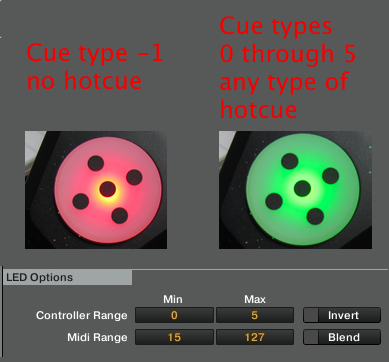
In this example Hotcue 1 (or any other number 1-8) type has a default range of -1 to 5.
-1 means no hotcue exists in that slot. 0 through 5 are the types of hotcues (cue, fade-in, fade-out, load, grid, loop).
In this example, the range excludes controller range -1, so that one corresponds to a midi output of 15 (red).
All other numbers 0 to 5 are within range, so Traktor sends a 127 to the controller (green).

Thanks for the great write-up Paulz1265!! I was able to figure out everything you mentioned but that should be a sticky post!

I would make that info right there a new thread… :thumbsup:

WELCOME!!!