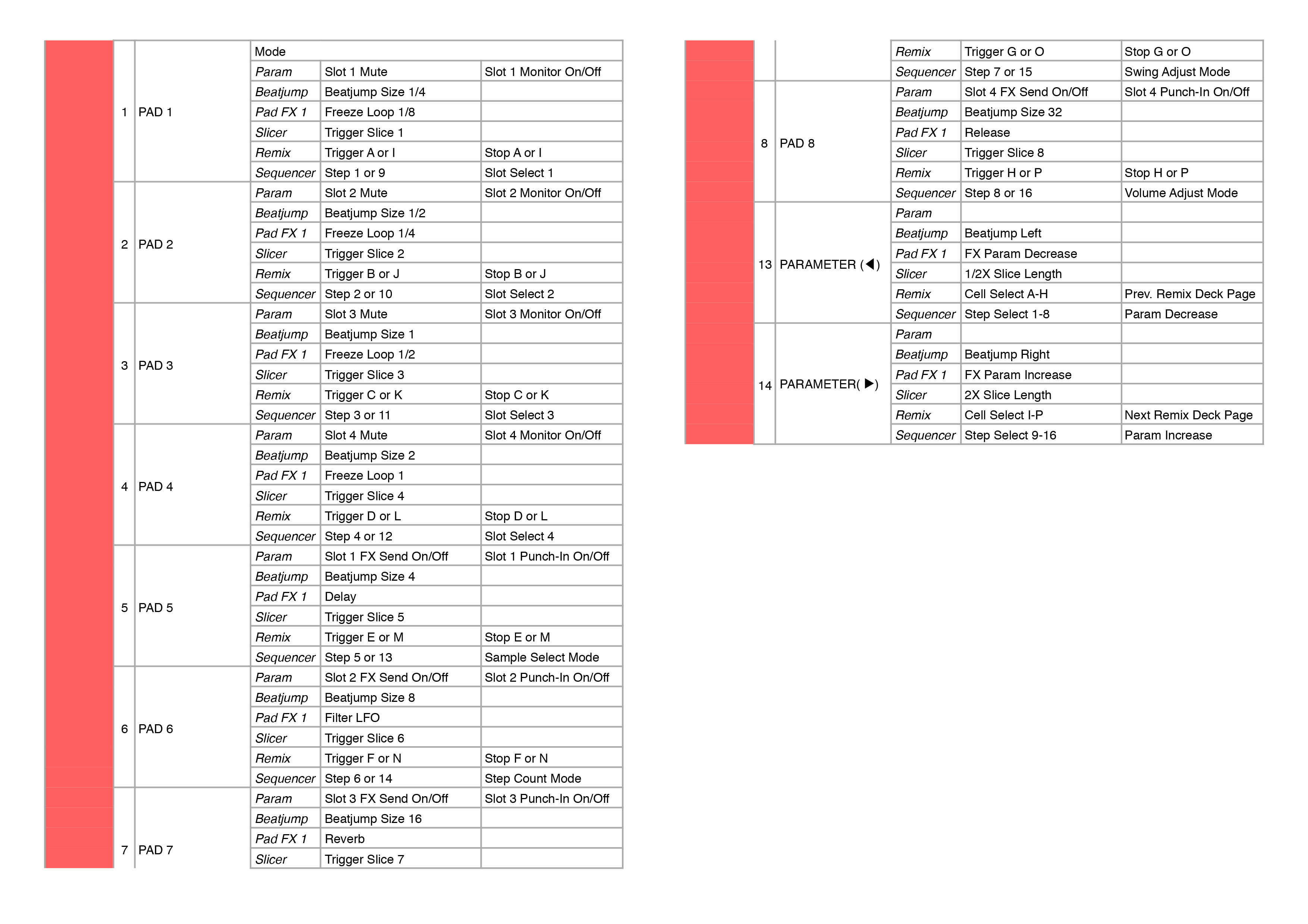
Bit later than promised but worth the wait! This mapping focuses on Rekordbox’s workflow for the most part while taking advantage of Traktor specific features such as the Remix Decks and new Sequencer functionality.
Full install instructions and documentation is included in the download explaining what each control does.
NOTE: Traktor 2.11 or higher is required for this mapping to work
All feedback is welcome if anyone thinks something can be done better. The only thing I’d avoid doing is having the PadFX use all FX Units since I tend to use 1&2 independently for the most time and hate mappings that shuffle those about.
Added a few simple yet handy tricks. Nothing earth shattering but found those improve the workflow quite a bit.
Waveform zooming in when you touch the platter to make gridding and cueing spot on.
Track Analysis lock is disabled/enabled when you hold the grid buttons so you can easily edit that and then jumps right back out to avoid any accidental grid edits.
Browse only view when the browse encoder is turned (since it has no touch sensitivity)
Very good mapping! all seems to work fine ! the only thing i found is the needle search who works only when i press shift and not in normal use, but a part of this … Perfect! i was waiting for a mapping like this since a while…
thank you very much
One snag when setting it up though. The audio settings it says to set input FX Send (Ext) to Master outs, however that’s not an option. It only shows DDJ-RX Aux/Mic as an option in that selector.
Any suggestions? Using the latest ddj-rx asio and firmware
Yeah that works too, wording might be slightly different under Windows or they might have changed it via a firmware update, end result is still having the external inputs routed back into Traktor.
I tried this map for my ddj rz
And everything’s good well done mate
The only thing I can’t do is monitor each channel only the master is there anything you can help with this please
I’ve been using traktor for some time now and it is in a different class to
Please help
Thanks
The RZ might be using different MIDI notes on those buttons. Sadly I don’t have a RZ to test it with. Just in case try enabling it from the software itself and playing with the cue/mix knobs.
On the page for output routing for output monitor there is only a list of ddj-rz out 1-10
There is no option for headphone monitor
I’ve Tried clicking on the headphone icon on the software it’s self but nothing happens
I can phone on the master but that’s it
Also when I press cue on the headphone channel for each channel and press play sound comes out of that channel regardless if the fader is up or not as soon as I press the headphone cue button on that channel the sound stops coming out to play sound even with the fader up I have to press headphone cue for that channel?
Everything else seems to be fine
Please help traktor is much better than record box in my option so any help would be much appreciated
Can anyone help everything works fine on the traktor map for the ddj-rx apart from headphone cues,I only get them out of the master channel.please help
What about the “reverse”-Function? Does it work? ? If yes, how exactly? Because nobody ever got Traktor to play a track backwarts like the CDJs can, without using a timecode-signal to force the reverse playback.