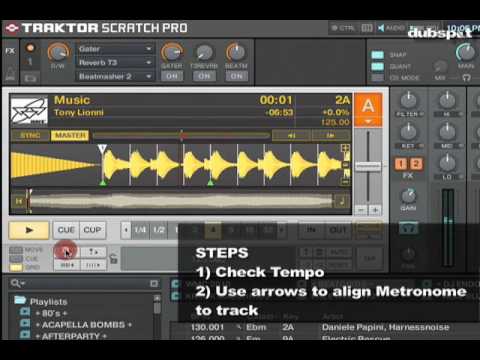
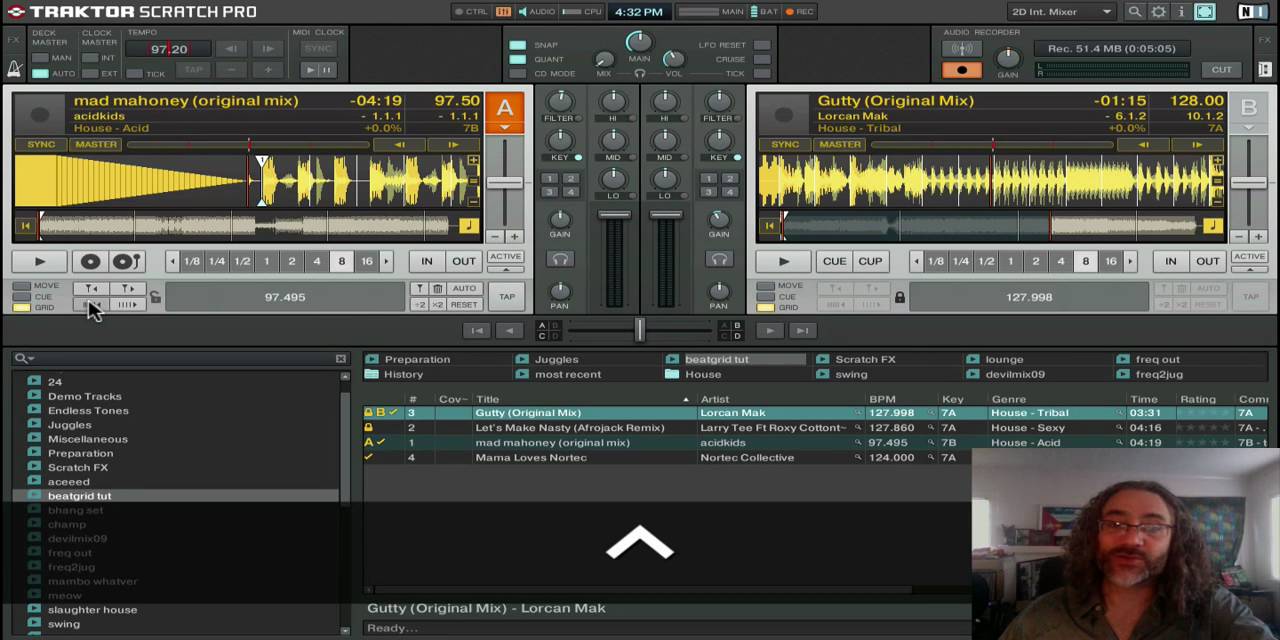
I know this has been asked and answered and pounded on so many times, I have seen the threads and yet (who knows maybe i am mentally retarded) I still do not understand how to beatgrid, can somebody explain in laments terms (maybe with pictures or something of what exactly to look for)… Right now all I am doing is finding the first beat and then I zoom in onto that beat and move the beatgrid marker to the exact beginning of that beat and I save it… seems to me that my beatgridding doesn’t sync well when I am transitioning into other songs or even when I am looping … I just do not get it .. I really would like to learn how to beatgrid properly. Thanks, sorry for the repetitive question.
1> Drop Grid Marker On A Beat.
2> Move Marker Untill The Grid Is Tight.
3> Follow The Track Through Making Adjustments to the BPM Where Needed (Using The Second Row Of Arrows)
4> Rock Out.
Have you seen this video? How Ean sets the first grid marker with the cue is a bit different than I’d do it, but he does explain the basics fairly clearly.
Something Ean also doesn’t mention is you can enter (I think) as many beat grid markers as you’d like. So if you have, for instance, a track that has a real drummer in it, who can’t keep a perfect beat (no human can), then you can set multiple beat grid markers to correct the “off-rhythm” of the drummer.
What I do is get a visually close grid and then just adjust using my ear and my jogwheel on the s4 with sync off to a specific track in my collection that is correct… works pretty well…be aware that some older edm will waver a bit, beatport mp3 or no…so you will have to do some manual adjustments on the fly…
and i also occasionally stumble on an old tune where the drummer or the way the song was edited, or both, is so near perfect that you can keep them mixed with minimal pitch riding.
Well, you could say, every time you have to bump the jog while mixing, that would be a beat grid marker. So do it once with a beat grid marker, while beat gridding, turn on sync and never worry about having to bump the jog again. Then you’d have more time to do other probably more important and wicked things.
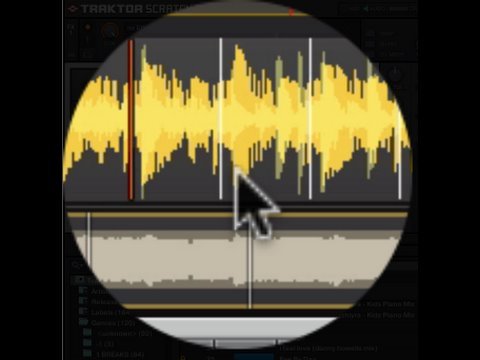
Tight means the white lines, The Grid, are perfectly lined up with the down beats. There is a button that looks like a headset on the grid panel. Turn it on and you will hear the metronome in your earphones (make sure your cued in to the deck). When the metronome is perfectly on the beat, then the grid is “tight”.
It’s funny no one mentions the tap function to set the BPM.
Beat gridding is very simple, you just have to let your ear do the work for you and be consistent…one thing I do (because god knows traktor can’t seem to judge the tempo of a drum and bass tune for the world) Is get my grid set and beat jump into the track 8 beats over and over, if I get about 3 phrases (48 bars) and it’s still in place I probably have the tempo right (or right enough to be able to use the jogwheel on the fly) And to people saying get your grids tight and you wont have more time to do stuff…firstly there is little to no time in getting the grids lined up with a jogwheel (literally less than a second generally) secondly, learning the effects before you can actually mix is definitely putting the cart before the horse.
Who said that? You will have more time to do more stuff. And if you can beat match two tracks in just 1 second, with just your ears, then you are a DJ god!
You are right though. Learn to do basic mixing first, then learn how to manipulate the music with effects or scratching or whatever fits your boat.
I recently started going through my collection and beatgridding all of my tracks. I was struggling at first when I was just setting the grid marker on the first beat and then using the arrows to adjust the BPM. Once I started using the Tap function it made it SOOO much easier. I’m also suprised more people haven’t mentioned that.
I’ve found that letting a track play, hitting the tap button several times, will usually nail the BPM.
I then zoom in to the beginning, middle, and end of the track to make sure the grid is very close to the beginning of the beats on the waveform.
My question is that I am not setting the grid markers at the VERY beginning of the beat. I am doing it slightly to the right of the beat when zoomed all the way in. Before adjusting the grid, but after hitting the tap button, I’ve noticed after zooming in that sometimes Traktor’s grids are BEFORE the start of the beat.
So, is my approach okay as long as I beatgrid all of my tracks in this manner? Basically, if the grids are all in the same positions relative to the beats for each track does it matter if the grid hits the beat at the ABSOLUTE beginning vs. slightly to the right of it?
I was worried that if I tried to put the grid at the absolute begging of the beat, that I would miss on ocassion and it would screw things up.
I have been checking my grids by doing 4 bar loops and making sure they sound clean… Thanks!
Why beatgrid? Just phase match manually and cue properly. As long as your tempo is right the grid isn’t really essential and just handicaps you if you fall prey to using sync too much. Sometimes you need to offset the phase of one track to match another - especially if they aren’t regular old 4/4 house tracks.
You need to definitely beat grid your tracks properly and also use sync, if you want to effectively use samples, cue point juggling and effects all at the same time and have them all timed right.
good to grid proper for sure. personally i’ve just started using “move grid” mapped buttons so i can do it on the fly with songs synced and it’s a bit like beatmatching plus the grid is sorted for next time
 Then you’d have more time to do other probably more important and wicked things.