Quick tagging Energy, Genre & Mood (with customized foobar)

Quick tagging Energy, Genre & Mood (with customized foobar)

Ever felt like the genre of d/led tracks are simply not right?
Ever felt like energy-level on auto-pilot using MIK for ex. are not doing it right?
Ever felt like u wanted the mood of a song in your tag too?
Ever felt like u wanted the characteristics of a tune showing in your DJ app?
…But there was no simple easy fast solution?

PROBLEM
Genre tags in audio files are simply not correct.
Whether downloaded from popular source like iTunes, Beatport or d/led elsewhere,
It seems due marketing they intent to put a different tag, a less explicit genre in there.

If you google on this topic, u will see there is no real solution.
Scripts try to grab the genre based on last.fm tags or on lyrics, which doesn’t lead anywhere solid.
People may even have a different opinion what kind of genre a track is.

And what about Energy level?
MIK seems to be the only automatic software out there and does a so/so job IMHO.
What about mood?

To listen to them yourself and right-clicking them > edit id3-tag, and fill in the right genre, energy & mood is a tedious job.
What if this could be semi-automated by providing an app that provides a straight-forward method to do this?

SOLUTION
An app that lets the user (and therefor the whole DJ community + music lovers) quickly tag pre-defined tags to the Metadata of a music file, preferably in Comment tag, since all mediaplayers can handle it.

In the fight of getting my music-collection in shape, I found out about foobar and its cool plugins.
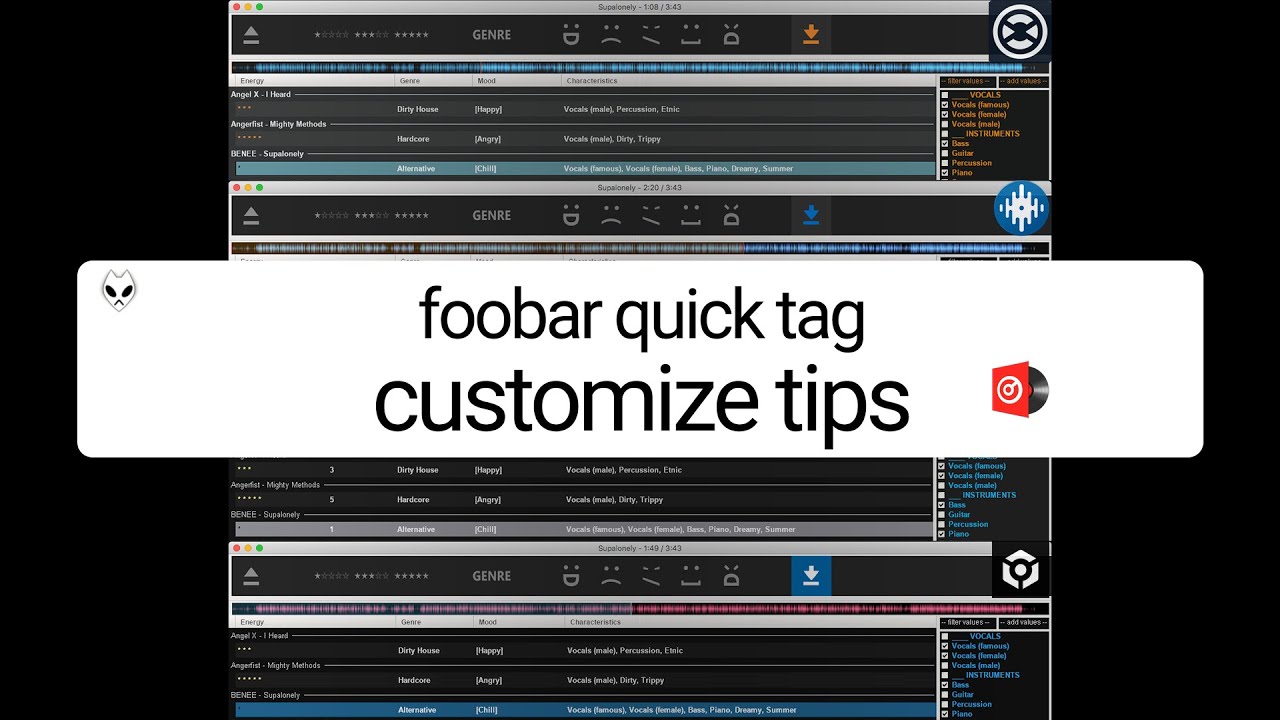
I’ve made a demo + tutorial, how to quickly tag genre, mood and energy to your music in 15 seconds per track!

Download foobar quicktag themed (Portable):

0) ENTER to Play; SPACE to Pause/Play;
1) using LEFT & RIGHT to skip backward/forward in the track;
2) Using custom buttons made in Photoshop;
3) Energy-wise using 1, 2, 3 for Low, Mid or High;
4) Using shortkey ‘G’ to open Genre tag;
5) Mood-wise using ‘D’ for Dark , ‘C’ for Chill, ‘H’ for Happy, ‘S’ for Sad; ‘A’ for Aggressive
6) Using CTRL-DEL to delete file;
7) Starrating will be automatically filled in based on amount of energy;
8) CTRL-S to save;
9) Using foorbar2000 only.

How to make your own customized version?
See tutorial:

Let me know what you guys think :slight_smile:
Need any help? Just ask!

I changed my mind and decided to use dedicated fields (instead of putting all info to the comment field).
Since not every field is read the same in the Big 4 (Traktor, VirtualDJ, Serato, Rekordbox)
I had to make 4 portable variants, each pre-themed and pre-configured so it works out of the box.

Also added CHARACTERISTICS (like Vocals, Instruments, Vibe…) but you can add your own descriptions too.

All are fully MP3 compatible, with a bonus, Traktor variant is fully FLAC compatible aswell.
Others are partly FLAC compatible, see also:

https://forums.pioneerdj.com/hc/en-us/community/posts/360017937246-FLAC-Star-rating-Where-does-it-save-How-to-manipulate-

The shortcut keys are all the same:
Open (CTRL+O)
Energy low/1 star (1)
Energy mid/3 stars (2)
Energy high/5 stars (3)
Genre (G)
Happy (H)
Sad (S)
Dark (D)
Chill (C)
Angry/aggressive (A)
Save (CTRL+S)

Pause/Play (SPACE)
Skip forward (->)
Skip backward (<-)
Up & Down
Select (ENTER)
Select all (CTRL+A)
Delete file (CTRL+DEL)

right-click a picture > open in new tab > to zoom in

Traktor themed (FLAC + MP3 compatible)
Download link: MEGA
FLAC:
Energy = RATING WMP
Mood = MIXARTIST
Characteristics = ORGANIZATION

MP3:
Energy = RATING
Mood = REMIXED BY
Characteristics = PUBLISHER

Traktor Pro 3 themed (FLAC + MP3 compatible)
Download link (Windows): 8.66 MB file on MEGA
Download link (macOS): 10.05 MB file on MEGA
FLAC:
Energy = RATING WMP
Mood = MIXARTIST
Characteristics = ORGANIZATION

MP3:
Energy = RATING
Mood = REMIXED BY
Characteristics = PUBLISHER

See Traktor Pro 3 preconfigured theme in action here
How to install on macOS? See here

VirtualDJ themed (MP3: Set rating to 1,3,5 / FLAC: Set rating to 20,60,100)

Download link: MEGA
FLAC:
Energy = RATING
Mood = REMIXER
Characteristics = COMPOSER

MP3:
Energy = RATING
Mood = REMIXED BY
Characteristics = COMPOSER

Serato themed (MP3 compatible)

Download link: MEGA
FLAC:
Energy = COMPOSER
Mood = n/a
Characteristics = n/a

MP3:
Energy = COMPOSER
Mood = REMIXED BY
Characteristics = PUBLISHER

Rekordbox themed (MP3 compatible)

Download link: MEGA
FLAC:
Energy = n/a
Mood = MIXARTIST
Characteristics = LABEL

MP3:
Energy = RATING
Mood = MIXARTIST
Characteristics = PUBLISHER

Thankyou!

Thank you for this work, what a great idea :slight_smile:
I’m trying to use your portable version for Traktror, my
only question is how do I pull up the charecterstics menu,
it isn’t on the ride side of my foobar’s window?

Thanks :slight_smile:

Strange?
What is the resolution of your screen?

Just tested it, should show up , out of the box, see:

@devs try this one (optimized for low resolution screen (1280x800):

Can’t believe I missed this first time round…

Amazing work, mate.

Why on earth did Serato choose to save RATING in the COMPOSER tag?

Thanks bro :sunglasses:

Alternative would be something like Beatport Pro for Desktop, but it doesn’t have these handy keyboard shortcuts built-in + it’s not customizable to your own values/likings.

Regarding Serato:
Serato using its local database for certain values.
This way the rating value for example, can’t be written directly to the file through any other program.
Hence I had to use a standard field (like Composer) in order to write the value to the file, as a work-around.

You can change where to write those values to, field-wise though.

Ahhh, it was a resolution thing! Changed to a lower res and now it’s there haha…
Thanks dude :slight_smile:

One other bug I seem to have is that when I save a genre, it minimizes foobar. Any ideas?

This sounds good, is it available for Mac?

It is it seems :sunglasses:
Check this out:

Good catch @devs.
It seems when you got more windows open (a folder in explorer, a browser etc.) it tends to shift to such window, when hitting ENTER.

However, when you close these (…make a shortcut of this .exe to your desktop) all works fine.
In other words, hitting ENTER when you typed in your genre, won’t minimize Foobar.

Way to use it proper:
Make sure to close all other windows, so you can really focus on the tagging itself.
…+ this way it won’t shift to the other window.

UPDATE 12-7-2020:

How to install foobar quick tag on macOS (and fix some GUI quirks):

How to customize it to your own likings (and values):

Containing:
0:00 How to get rid off ugly windows gray theme
1:30 Re-assigning & adding keyboard shortcut keys (handy for mac users to replace ctrl with cmd key)
3:11 Changing mood output value (or make it about when to play: build-up/peak/sustain/etc.)
5:41 Changing toolbar appearance
8:09 Adding mood buttons to toolbar & shortcut keys
11:29 Adding/changing characteristics values
12:52 Changing where to write output of characteristics (for example to comment field instead)

characteristics..

Great app tweak!

Is there anyway to have the characteristics tags populate like the others instead of just showing the ‘?’

I would like to see what I have in there already and choose to add on or subtract from what is already in there.

Thanks!

Thanks =)
The moment u have the characteristics tagged, and select a different track (using your cursor or up/down arrows) they’ll show up,
for the previous track u tagged.

What u prolly want, is tagged tracks to load in, and see if you need to add certain values right?

Yes.. have the values pre checked to the right. Then I can go and un check or check values as I need to. I was looking at the beatport pro but I like to work on my windows machine too which it does not offer at this time.

I like what you have going on and I can customize it like you said. I wish that you could use the checkmarks to select the genres too but I will just use the other tags for that to add twerk or transition and the like.

I had to hack my way around some limitations, hence u see a ? at first glance - which is a dummy field - that gets deleted when you hit Save.
Before it gets deleted, the values get copied over to ‘wherever-u-like’.

You could however display the ‘wherever-u-like’ column to compare if u missed a value, or wanna subtract one.
For example, if I had the characteristics written to PUBLISHER field before…
I can show it by right-clicking the header bar (artist/title/energy/genre/etc.) and hit Edit column.

Click New and rename the column under Options.
Click Display script and enter %PUBLISHER& & hit Apply.

Like this: Imgur: The magic of the Internet

I wished we could use the checkmarks for genres too, but we can only set values to write to one certain metafield with the Tagger Panel component.
Also most of the times, Genres are filled in but need to be reviewed and sometimes altered.
Hence the Quick Tagger component for such isn’t that bad.