Roland DJ-202 Traktor Mapping

Roland DJ-202 Traktor Mapping

Hi all,

I’ve replaced my Mixtrack Pro with a Roland DJ-202, however I’m still wanting to use Traktor over Serato for a number of reasons.

I knew there weren’t many full mappings for a 202 from a quick search but I’ve programmed MIDI controllers in the past with earlier versions of Traktor so I didn’t think it’d be that hard to create a full map. Plus I could customise the performance pads for what I actually wanted rather than drum samples!

Anyway… I have most of the basics figured out and working perfectly fine (jog wheel, EQ, play/pause, cue etc.), however I have two issues:

  1. The “Shift” button doesn’t work when assigned as a modifier. Other buttons to, but not the “Shift” button. Interestingly it’s the same MIDI channel/ID on deck B too, however I wouldn’t have thought that would be an issue.

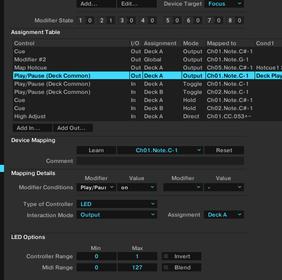
  2. I can’t seem to get the LED output working correctly. From my previous mappings and other research, it seems everything is correct and kind of works, however the light does not stay lit.
    E.g. when pressing play/pause to start a track, it lights up when pressing the button but doesn’t stay lit.
    What does work however, is if I press play on the UI using the mouse! This way, the button stays lit.

I presume this could be something within the controller firmware and to do with button presses and LED outputs but there’s not much technical information online about the 202.

Anyone have any suggestions on the above?

I’m willing to put the time in to build a full working mapping for this, just can’t get past theses two hurdles :disappointed:

Thanks!

  1. Shift modifier is probably built in to a firmware. Check the midi channel and note changes when you hold down the Shift button and press other buttons.

  2. Can you please upload a screencapture of your Play/Pause output command?

Stewe,

Thanks for the reply:

  1. I thought it could be! I didn’t think of trying that. I’ll test it when I get home :slight_smile:

  2. Will upload one when I’m home

I reluctantly had a session with Serato DJ Pro last night just to get some use out of it… Controller 9/10, Serato 3/10.

Cheers!

Update…

  1. Shift + Hotcue pad gives a different MIDI mapping channel/ID and works for deleting hot cues! Thanks for the tip

  2. Picture of output mapping attempted to upload below…

Seems there a bit small but you should be able to click on untitled2 and zoom in.

Can email them you too if it’s easier.

Thanks

  1. The modifiers are built in, that’s cool.
  2. Remove the modifier condition “Deck is playing” the rest of settings looks fine.
  1. Awesome, learnt something new today :slight_smile:

  2. Same results with the modifier set blank. Werid how it works from the UI. Hence why I think they’re built into the firmware too. They flash when pushed but don’t stay lit. Same for other buttons too.

And when you close Traktor, pressing a buttons also gives that same blinking LED pattern?

Correct!

Bad news? Not mappable?

I tried to force the Start/Stop sampler LED flashing too through Traktor by changing the MIDI max value to 0 but didn’t stop it either.

Maybe if we bypass the Note On message by inverting the Play/Pause command. (check Invert under button Options section)

I tested it with invert too.

It doesn’t flash on play, but does on pause. Again, doesn’t stay lit.

Interestingly, one of the first things I did was set the CUE buttons to stay lit constantly by setting the min value to 1 and these stay lit.

The same doesn’t work for the play/pause button.

Seems like it’s a no go :disappointed: The last thing that’s hindering it now!

Try this one: Note Off trigger Play.zip (29.5 KB)

Just remap it to your Play button of Deck A.

Damn, you’re good! That works.

I think I understand it…

Button toggles (briefly) M1=1
When pressing play/pause, will only play when M1=1 (same button so same time as M1=1)
Output LED is based off M1=1 which it was briefly

I’ll try applying this to the other buttons I need to sort the LEDs for :slight_smile:

Really appreciate your help dude! Once I’ve completed this, I’ll upload it.

Nice! Glad that worked!

Cheers,

I think I should be able to get the other buttons lit that I need too following the same principal.

  • Scratch/slip enable
  • Hotcues
  • FX

I presume I can use the same modifier # for multiple buttons to enable the LEDs? They’re unlikely to be pressed at the same time I guess :slight_smile:

For the Hotcues, this might not be an ideal solution as you are supposed to trigger them with Note On message (if you you are planning to beat juggle). But you should be good with triggering Cues with “release of the button” and and have Quantize enabled.

Basically you will always have to tap the Cue button. (or hold it down, and time the release to trigger a Cue)

If you run out of modifiers you can always add another Generic Midi device which will give you a new set of 8 modifiers.

Looking forwards to see the result :slight_smile:
I’m sure this mapping will make many people happy!

Yeah, I thought about that for the hotcues!
I’ll have a play around and see what I can do. They have different brightnesses to.

When using it in Serato there isn’t much that’s lit up. The play/pause flashes when a track is loaded but not playing. I’m not too worried about that though :smiley:

Didn’t think about adding another generic device and adding more modifiers! Thanks!

Yeah, I should get some time over the weekend to finish the mapping off then I’ll upload to the DJTT list.

Might actually be able to get some mixing done after all this :slight_smile:

dj-202 pad LEDs

Hi guys, i have been doing the same. can i ask if anybody has managed to get the pad select sections LED’s working like they do in serato? Once i had the serato dj subscription but i dont now. If i loaded serato 1st, the button LED’s would flash when pressed with shift or in a row(once + shift slow flash, twice + shift flash quickly, solid light default, press again flsh). I could then close serato and open traktor to use my mapping and the LEDs would continue to work on the pad select buttons as if it was still using serato. This is handy to see which mode the pads were in.

so here is a brief of what the buttons supposed to do:

The 4 buttons are all 1 note, with different velocities (16 different velocities) - the controller only sends these velocities if i have opened serato then closed it. The controller buttons only flash at different rates when pressed once I have done the same (open closed serato).
Im wondering if theres a way to get the controller working the same (as far as the pad select modes are concerned) as if i opened serato first, in traktor with the flashing lights for these buttons. Is there some sort of message sent back and forth to enable this? or is this just down to the controller firmware?
#If i dont open serato, the 4 buttons stay solid green.

Anybody managed to get them flashing?

bellow is a very confusing ‘diagram’ of what the buttons do in different modes. Also note when swiching between buttons; 1-2 , 1 -4 1- 3, or 2-1, 4-2, the pad notes are all changed for cue, loop, seq, sampler. but for different modes for the same button, the pads stay the same note. So all i can think of is having a modifier or 2 to track which button or mode of the same button the pads are in.

Button 1 Hotcue - velocity x
HOT CUE - 1 PRESS (OR DEFult). Cue Loop - 2nd press Pitch Play - shift press. another mode - shift 2nd press

button 2 LOOP velocity x velocity x velocity x
LOOP - 1 PRESS (or default). split beat jump / auto lloop manual loop another mode

button 3 - velocity x
SEQUENCER (or default)

button 4 velocity x
SAMPLER - 1 PRESS (OR DEFAULT) slicer freeze mode another mode

also sorry for my cconfusing engllish skills, i blame my laptop, so thanks for taking the time to read this.

led velocities

i have found that with brightness on LEDs that output velocity 0 / 127 = off, 1 / 127 = dim, 2 / 127 = on full

Nspark21,

I’ve not looked the LED mapping for the pads yet.

That’s my plan for this evening. I only use the hotcues and loop currently myself.

The pad notes do change depending on which button above you have pressed (and selected via lit LED).

From what I understand from your post above, each one of those buttons (hotcue, loop, sequencer, sampler) would have to be a modifier and then the pads have an output condition of that modifier = 1.

However, based on what Stewe has posted, I’m not sure how difficult that would be as I still don’t fully understand how I got the play button to work using his export :smiley: