Have you turned the mix knob next to volume in Traktor? Full left and you should only hear the cued track if your output routing is correct. Post a screen shot of your output routing.
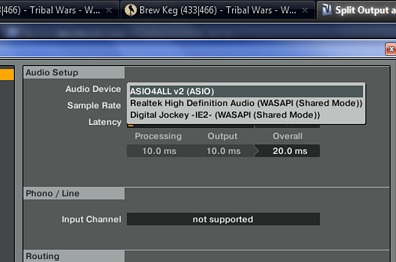
Surely you’d set the audio device to the name of the controller, not the ASIO drivers? It might have Reloop Digital Jockey 2 Interface Edition if that’s what you mean?
Assuming your interface has two stereo outputs (four mono outputs) which it should since it’s aimed at DJing:
We’ll refer to your outputs as 1 & 2 and 3 & 4. 1 & 2 are the outputs on the back, 3 & 4 are your headphone jack. Your outputs may actually be called something else, but they should either be numbered like this or labeled as “headphone” and “speakers” or something equivalent.
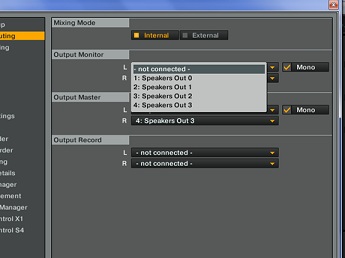
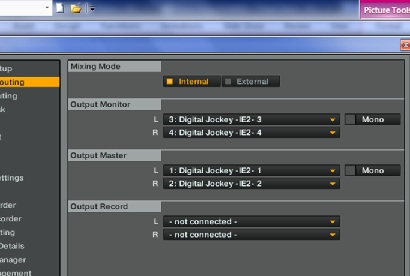
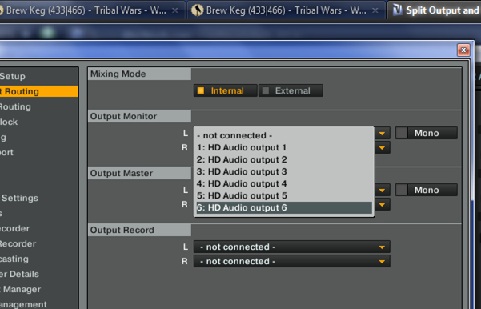
Go to the Audio Setup tab in Traktor. Under Audio Device, choose your Reloop interface (I’m assuming you’ve already installed the drivers as you’re a windows user and this should be your first step with any hardware you’re using before you even plug it in). Under the Output Routing tab: Output Monitor set L as output 3 and R as output 4. Under Output Master set L as output 1 and R as Output 2. Test it (listening to track B will require you to activate the cue button in the software, FYI if you don’t know this already). If it’s not working as expected - say your cue output is playing over your speakers instead, just switch the outputs around - 1 and 2 for monitor and 3 and 4 for main. Also, read the manual. Not kidding.
I Have already read the manual, and it doesn’t speak of cueing or output set up.
I may have found the problem. The installation disk doesn’t work on 64 bit computers. I got the asio driver and traktor pro seperately aside from installing via. promo software disk. The manual speaks of changing settings to “Reloop” during the disk installation process. With the Asio software setup, i wasn’t given that option. - Here picture of my output:
I was talking about the manual for Traktor, which does talk about audio output routing. I’m glad you got it working but yes, your answer was in the manual.