Good point - Traktor needs a more prominent signal that the beatgrid has not been checked; like maybe a different color on the phase meter. I wouldn’t mind being able to switch to a stacking waveform grid when I want to (or maybe even have the program automatically show small parallel grids when the beatgrid lock is off), but the thing I like about Traktor’s way of doing it currently is that the waveforms stay out of my way; if I’m concentrating on the moving pictures I’m not focusing on the music (or the crowd). When used right, the phase meter gives me more important info for basic beatmatching than the waveforms - I can instantly see not only how far off the beats are, but which record is ahead and how much I need to correct it by. Waveforms are great when you want more information but for just beatmatching, the phase meter (used properly) is simple and elegant. But yeah if you don’t have good beat grids it’s a mess (and you’re right, so far Mixxx is pretty bad at autobeatgridding, at least based on the 3 or 4 pretty basic house songs I loaded up).
PS wanted to add that I started using DVS with Serato several years ago and the lack of parallel wave forms was my biggest beef with Traktor when I first made the switch. It took a while for me to appreciate what the phase meter was doing but now I like it a lot better.
I personally feel that he more advanced the programs become, the less we are focusing on the music that really matters.
You have phase meters which people rely on 100%, stacked waveforms where you squint to see how much you are off beat, auto and manual beat gridding, which if not correct, causes shit to hit the fan as you both has stated.
I have been playing for the last 6 months or so with no phase meter, no beat grids - not even auto, and no BPM readout. I can honestly say that my sets are 1000 times more enjoyable due to the fact that my matching, phrasing, ect. is all done by hand and ear. It just makes me more proud of my mixing and you may even catch a smirk on my face when something I thought I could only do with sync or gridding, is pulled off without.
But as for the gui of MIXXX, I would like to see it more modern as someone has pointed out. That is one of the reasons I chose Traktor over Serato and VDJ…they look like cheap toys for layouts…unrealistic if you will.
can mixxx transmit midi sync now to a selected midi port? i seem to remember hunting round the mixxx wiki a while ago and found a request for it, but it wasn’t available at the time. i guess that’s a possibility now with beat detection etc?
Mixxx 1.10.0 is at least a step in the right direction here. There is a beatgrid-adjust button so you can adjust the offset of your beatgrids easily. Changing the spacing is not as easy because you have to manually adjust the BPM whereas Traktor gives you buttons to easily adjust. Easier buttons for fine-tuned adjusting are in progress.
Totally agree here – in the end the music is what matters. We think a lot about this because if we give people crutches it limits their ability to grow and expand their skills.
On the other hand, if you take away distractions (i.e. the DJ doesn’t have to worry about timing a hotcue on the beat, or keeping the decks in sync) then the DJ can presumably focus more on the high-level: the music, phrasing, harmonics, track selection, engaging with the crowd, etc.
I know that if I had to beatmatch by hand, I just don’t have the mental agility to keep 4 decks in play. I’d have to stick to 2. I think part of the reason we’re seeing this 4-deck revolution come around in DJ hardware is that the tools are helping DJs expand their art by taking away distractions.
I think it’s a delicate line to walk. In the end, we hope the DJ doesn’t use the tool as a crutch – but more as a power suit that helps them jump higher and run faster.
I did that for over ten years - it was called vinyl. And you’re right it can be a lot more rewarding to pull off a great set because you’re constantly engaged with beatmatching. The lack of visual distraction keeps you focused on the music and the crowd. But if you’re going to have a computer in front of you, the phase meter requires a lot less of your focus than side by side waveforms. But yeah if you want the experience of playing without any visual distraction, you ought to be able to turn these things off.
I haven’t read through all of the posts, ive just skimmed through them. I don’t care what anyone says, keep up the good work! It’s free. NOTHING beats free.
Big thanks to the team for putting this project together and working hard on it! I’ll definitely give it a shot! Very very awesome!
I can honestly say that Mixxx was the first “DJing” program I tried out. Because it was free. I still had it installed on my old computer before the HDD crashed even, because every so often I would get it out and fuck around with it.
I think you guys have a great thing going with the open source idea, which I think more things should be honestly. Open Source = better overall when something is done right, but it doesn’t get the same funding as proprietary software companies, and so can move slower in development I think.
Great job and thank you for introducing me to everything. I know you’re working toward getting things running against the top dogs, but there is something to be said for all the work ya’ll have put it.
I was trying to set up timecode vinyl control and am having trouble. I am running traktor vinyl through my DB4 and I have the ins setup and assigned to deck a and b in the timecode tab I get good scopes but it just doesn’t seem to do anything to control the deck no matter which buttons I press. what am I missing?
Have you setup your vinyl type and settings in the Vinyl Control section of the preferences? If the signal quality meter looks good (nice green donuts) then I assume you’ve already done this.
This is a dumb question but do you have a master output selected? Can you load tracks and play them with vinyl control not enabled?
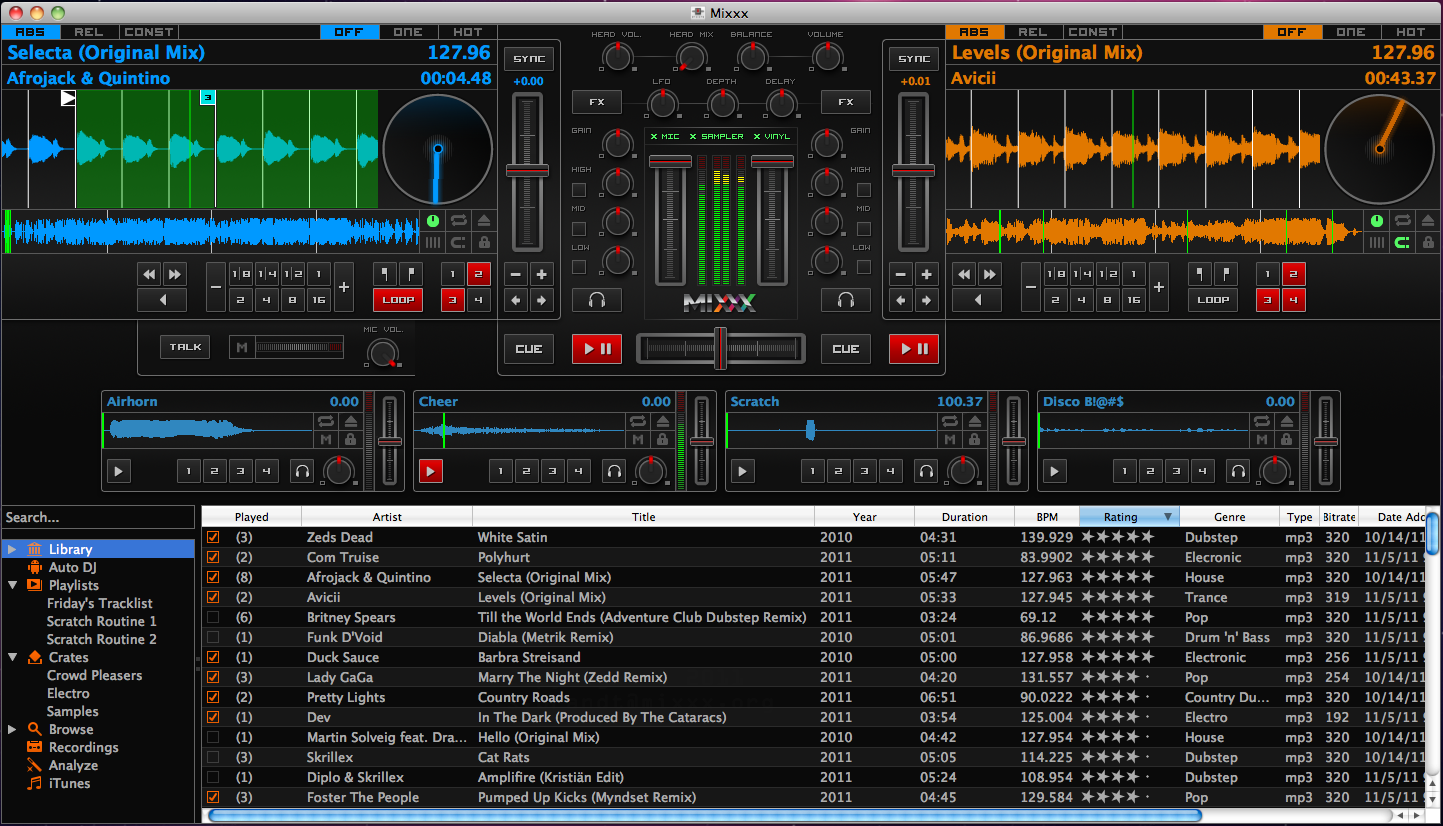
What mode are you in for vinyl control? ABS REL or CONST? You can check this by enabling the vinyl control widgets in the skin by hitting “VINYL” in the center column. (Check this screenshot: http://3.bp.blogspot.com/-41_sNG1XT3Q/Trbua67yulI/AAAAAAAAD7g/FXkzi8bLoCs/s1600/Mixxx+1.10.0+-+Deere+Cropped.png). This exposes those ABS/REL/CONST buttons right above the track titles. Make sure you’re in ABS or REL and then play your timecode vinyl. If you have a track loaded then it should respond to your vinyl movements.
I’m going to have to check out mixxx, though I’m quite happy with tsp2. I had dismissed mixxx years ago… I had a PowerBook g4 with traktor Dj studio(?) and Stanton final scratch. While traktor barely broke a sweat on that old machine, mixxx had a really hard time just playing one track at a time.
So has performance increased to the point where it requires about the same resources as tsp2?
Yeah I set it to traktor control vinyl and tried both sides and got a green scope that showed a line rotating in the scope views. I didn’t set a master output I just outputted deck A to channels 1-2 and deck B to channels 3-4 and I can play tracks fine by just hitting play.
However when I try to use the vinyl to control a deck I get nothing when I try relative or absolute mode- it just doesn’t respond even though the scope in the preferences window looked fine.
I know the timecode developer for mixxx, and have used mixxx before just to try it out. It’s really not that bad at all. For a free product, I definitely could not complain about it. Lacks sample decks but I never use them anyway.
My audio 8 is screwed up and I just want something for timecode control and I really don’t use traktor’s effects so I figure mixxx could be cool to play with and teach a couple friends to dj with (it’s hard to learn anything using traktor and midi controllers without jogs).
Are there any more skins available for mixxx? I would love a skin that natively fit a 15" macbook pro resolution and I also don’t need the internal mixer.
This is a gallery of the skins available for 1.9. The certified ones have all been updated to support 1.10’s features (e.g. sample decks, beatloops, spinning vinyl widgets, microphone, etc.)
Our users are making new skins all the time. They usually post them in that section of our user forums.
 .
.