Can anyone tell me how I’d set up a switch for toggling between Timecode Control of 2 decks? I want to toggle between Deck B and D.
I’ve had a bash - but I’m getting in all sorts of trouble!
The functionality I want (attached to the deck toggle switch on the Zomo MC-1000) is:
Timecode control of Deck B.
Flick switch, and Deck B switches to internal mode, and Timecode Control switches to Deck D.
Flick switch again, and Deck D switches to internal mode, and Deck B switches BACK to timecode control.
I had some success - but it started to get confusing when I tried to have Timecode Control turn off and Internal mode turn on on a single deck.
This is the key for me to use 4 decks with control vinyl. Can it be done?
yes, pretty sure you do. the other thing to consider is if u want the non-vinyl deck to still be playing when you swap. and u might wanna do a tempo bend reset (sort of like a refresh) when you switch back, otherwise you’ll get your tempo fader out of sync from the turntable.
i made a button like this, i can share it once i’m back home tonight
I don’t think I used a modifier when I did this - I just mapped rel/abs/int as the deck will switch to internal playback automatically as soon as you assign the timecode control to another deck.
I never switched back from internal to timecode tho because of the pitch fader being out of sync when you do … and I had a pair of SCS3Ds with relative pitch faders and pitchbend controls for that lol There should be no real need to switch back to timecode control if you map pitch bend controls to a controller or keyboard mapping tho.
yeah, fairly sure there is a function that resets the tempo control - it doesn’t zero it out but it ‘refreshes’ it to what the turntable is actually doing.
yikes, i wouldn’t use that tempo adjust, cos you’ll be resetting the tempo bend every time u switch. you wanna use deck common > timecode > reset tempo offset. it usually takes a second or two for traktor to ‘refresh’ the display of tempo offset, but it doesn’t matter cos the turntable will be playing at whatever speed u have set it at.
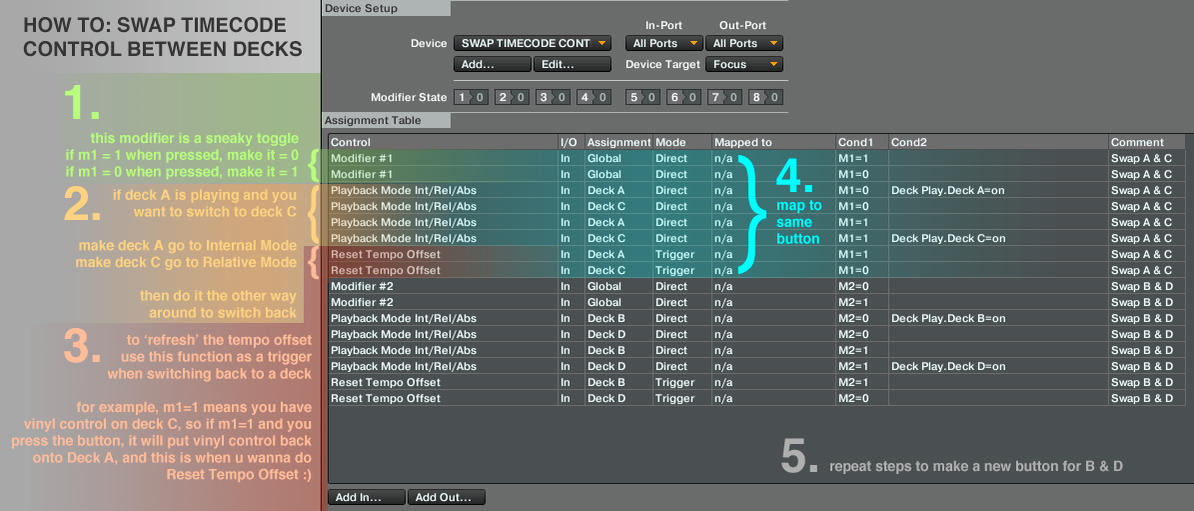
anyway, here is a mapping that u can try. I use the deck swap buttons on my Kontrol S4, but you can map these to any buttons - one for switching A & C, one for switching B & D.
so, do a little import of this mapping - and assign one button to all the ‘A & C’ ones, and a different button to all the ‘B & D’ ones and let me knnow if u have any questions about it
and… if u are putting it on a button with midi out (led feedback) then i would use the ‘modifier out’ to get that led to show on/off.
so i was told that tsi isn’t working for u guys cos it is in latest version. here is a mini tutorial that explains what is in the mapping, it is very easy to recreate
Hey trux - I’ve recreated your mapping (thanks for the awesome image!) but have run into a problem. I’m using a SWITCH (not Buttons) to toggle vinyl control. For info, the midi messages that the switches send:
Switch for Deck A/Deck C
Switch in DECK A position: CH01.Note.C#2
Switch in DECK C position: CH01.Note.B1
Switch for Deck A/Deck C
Switch in DECK A position: CH01.Note.D2
Switch in DECK C position: CH01.Note.C2
Any idea how I would assign these switches in your mapping? Or does it require a different mapping bearing in mind I’m using a switch, not buttons?