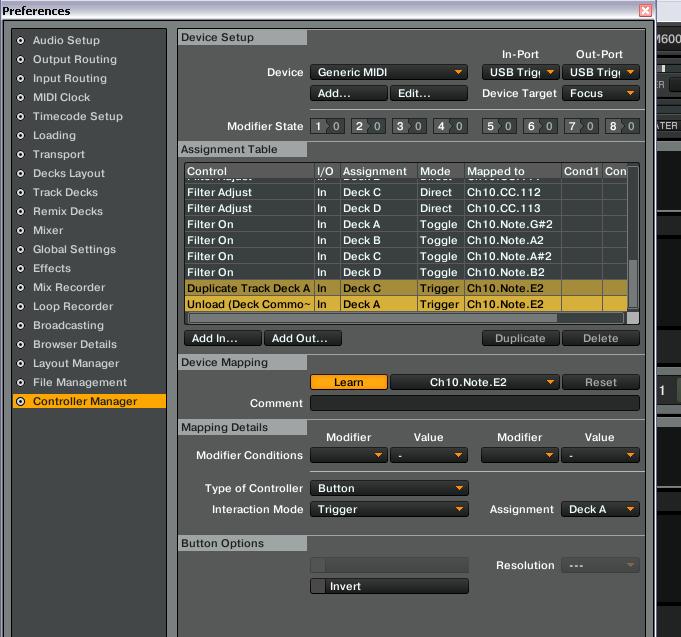
TRAKTOR mapping help on how to Change what deck is playing current song?
Any Traktor pros out there know the answer to this its driving me nuts? I am trying to send a midi note to a deck and load the current track to another deck while stopping the previous deck. So track is playing on deck A I want to load it to deck C and stop A from playing. Trying to map a way to use 4 decks and 2 analog mixer channels. I can load it to deck C but A keeps playing. I add midi command to unload deck A but then deck C is blank. Is there an order to firing off the MIDI commands? I cant seem to get it.
Essentially I want to change what deck is playing the same song at the same spot. I am trying to map out a way to use the 4 decks with 2 channels in external mixer mode..
Map uload A command to your load C button so Traktor can send both of this massages from same press. Just make sure both of commands are assigned regards to decks.
Thanks for your reply, I am trying to grasp what you are indicating but I am not using a load command. I have successfully programed the Duplicate Track Deck A so that it is assigned to C and hitting a button it loads C. I am not assigning load.
When I assign unload deck it removes it before it duplicates it so it duplicates a blank deck. Thats kinda what I meant by order almost like key commands… I know this is possible, has to be.
Basically looking for way to instantly swap what Deck the same song is playing with one button push…This way I can keep my TT in relative mode and controlling the same deck and have the same track playing out of the identical output. Then use the filter and mix that old song out… Thanks for your input guys!
Invert not doing it for me… When I map unload to be inverted and hit the pad it unloads A and C never changes. I will keep on messing. This has to be possible.
I have tried with checking and unchecking invert. I have been trying to get this for hours messing with various settings…It does copy the deck and plays at the right spot but I need the deck I am copying from to stop playing so there is not the same song playing out of two channels. Even if the Deck A stopped would be fine.
It does work (tried it myself), just copy this into your mapping.
I don’t remember if the Enigma MIDI editing software is still around but if it is, make sure the pads send gate messages, not trigger ones (otherwise it will only send a message when pressed, no info when released).
Ok. I want you to check various button settings from editor (hold, toggle, direct) and see what results do you got. Your button needs to send two signals to Traktor - one on press and second on release of the button so this mapping can work properly.
Check this by looking in little blinking dot in master section of the screen.
Thanks alot guys! I am still not having any luck. I appended the TSI to my setup and there was nothing there, I will try again.
I indeed do have the Enigma installed and even changed the program to P16 and re-added each control. All works well aside from this issue with not being able to get the track to swap decks and stop playing on the original. I do not see where I can
I am not sure what you are talking about when you are describing the editor. I am on Windows and I do recall once seeing something about an editor but it is on OSX.
I will indeed try another MIDI controller but I am stumped. I am quite familliar with MIDI and Traktor…
Here is something I did not mention. I have Play assigned to the top row of pads and it is also assigned to each decks sync button on. When I map those two together it works fine…
Ok I mapped it like you said with a generic keyboard and it worked as it should… I mapped it to the key D. Now why is my MIDI jacked up? I am going to go grab another controller to see if that makes a difference. hang tight… THANKS AGAIN!