Traktor one button looper
Hey guys. Is it possible to map a one button looper in Traktor? What I aim to achieve is to have a button that sets Loop In on first tap, Loop Out on second tap, and clear the loop on third tap. I played around with modifier but couldnt get it right. Any help would be appreciated!
Yes, I think that’s going to be ok to do..
Button press 1 = Loop in / Modifier 1 =1 (M1=0 M2=0)
Button press 2 = Loop out / Modifier 2 = 1 (M1=1 M2=0)
Button press 3 = Clear loop/loop active toggle off (depends if loop is mapped to a cue point)
See if that is of any help.
Remember to set your modifiers outside the parameters of other functions within traktor, incase they interfere with the interaction of other commands.
Edited. Problem fixed. See below.
Got it.
Loop is mapped to L.
Loop active settings.
wow. thanks for the detailed reply DJAdeSands
I will try this out soon as I get home!
Any issues, shout, the pics are a more accurate representation.
Patch
March 16, 2016, 9:37am
7
Nice work. That’s a really elegant solution.
Stewe
March 16, 2016, 1:17pm
8
DJAdeSends - not sure why there should be two modifiers involved.
Pretty much all you need is one incremental value modifier for such a button.
M1=0 → M1=1 → M1=2 —> M2=0 …
Yea stewe, it can be done that way too, dunno, just the way I did it I suppose,
Stewe:
DJAdeSends - not sure why there should be two modifiers involved.
Pretty much all you need is one incremental value modifier for such a button.
M1=0 → M1=1 → M1=2 —> M2=0 …
Hey Stewe, how does this one work?
Stewe
March 17, 2016, 1:03am
12
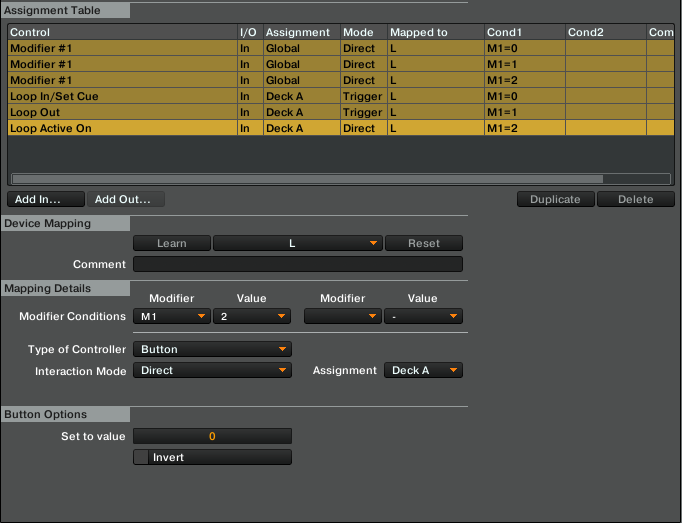
Here is quick tutorial, be sure to assign loop controls to a deck.
Add In > Modifier > Modifier 1 / if: M=0, than: M=1
Add In > Modifier > Modifier 1 / if: M=1, than: M=2
Add In > Modifier > Modifier 1 / if: M=2, than: M=0
Add In > Deck Common > Loop > Loop In/Set Cue / if: M=0, Trigger
Add In > Deck Common > Loop > Loop Out / if M=1, Trigger
Add In > Deck Common > Loop > Loop Active On / if: M=2, then: direct=0
I’ll upload the mapping in a bit.
DJAdeSands:
What bit doesn’t work?
It just set Loop In again and again each press.
Stewe:
Here is quick tutorial, be sure to assign loop controls to a deck.
Add In > Modifier > Modifier 1 / if: M=0, than: M=1
Add In > Modifier > Modifier 1 / if: M=1, than: M=2
Add In > Modifier > Modifier 1 / if: M=2, than: M=0
Add In > Deck Common > Loop > Loop In/Set Cue / if: M=0, Trigger
Add In > Deck Common > Loop > Loop Out / if M=1, Trigger
Add In > Deck Common > Loop > Loop Active On / if: M=2, then: direct=0
I’ll upload the mapping in a bit.
Cool! I’ll try this out later. Btw, this should be mappable to any button right? Cause I noticed you guys just use the L key for your examples.
Stewe
March 17, 2016, 2:27am
15
It’s L only because of the looping. You can remap this TSI to any other key that you want
one button loop.zip (945 Bytes)
great! works now. thank you both for helping
on a somewhat unrelated note, is there a way to clear Loop In? for example I accidentally set a Loop In and I wanna clear it.
Stewe
March 17, 2016, 4:54pm
18
So the second button press should track a “button tap” and “button hold” hold actions. This way you can choose if you want to proceed to adding the loop out point by tapping a key or you can hold it down for a second and then reset the sequence (modifiers=0) up on release of the key.
I’ll try to add this and then upload it to MAPS.
Stewe:
So the second button press should track a “button tap” and “button hold” hold actions. This way you can choose if you want to proceed to adding the loop out point by tapping a key or you can hold it down for a second and then reset the sequence (modifiers=0) up on release of the key.
I’ll try to add this and then upload it to MAPS.
that’d be cool if possible! really appreciate the help and learning a whole lot here.