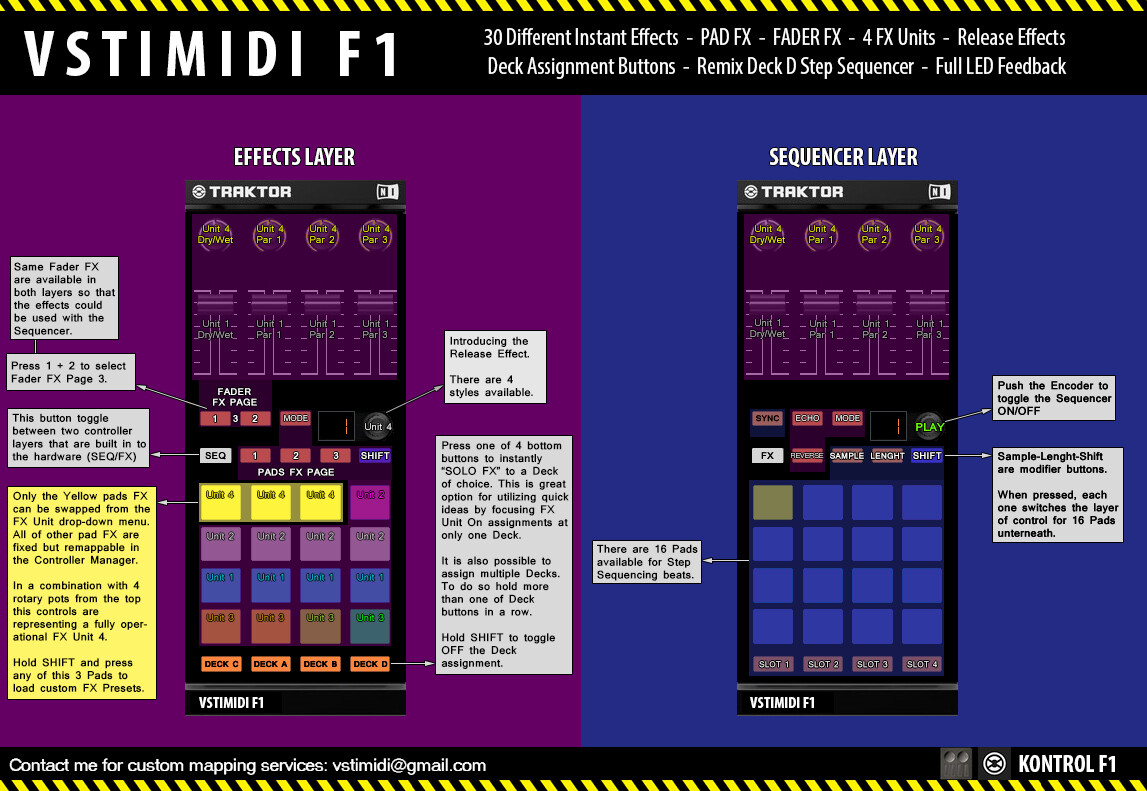
vstimidi F1 (Traktor Mapping)
Hey Guys,
I uploaded my first ever made mapping for Kontrol F1 
This mapping is something I’ve made for my backup controller but it packs some serious power nonetheless.
Go to MIDIMAPS
vstimidi F1 (Traktor Mapping)
Hey Guys,
I uploaded my first ever made mapping for Kontrol F1
This mapping is something I’ve made for my backup controller but it packs some serious power nonetheless.
Go to MIDIMAPS
nice. i’ll have a good look. and thank you already…
Welcome mate!
Let me know how it works for you, I play techno so this set of effects are my favorites.
haven’t stress tested it yet. the workflow is quite different from what i am used to with my other f1 mappings. i`ll juggle it with my next home mix (techno as well)
It should be stable enough as the FX layer is a two year old mapping that always worked fine. Only the sequencer is newly added.
Finally getting around to testing it for real.
Needs fixing:
Edit:
btw, i can’t find the toggle to switch from FX-controls to volume/filter controls (second mapping, modifier#1, ch12cc003). Did you remove it?
Edit2: Another small technicality. Should be Deck C instead of Deck A in the third of the marked lines.
Feedback:
Haven’t used the sequencer much, just a bit of testing. 16 pads are not enough for me using 4 slots.
I love your presets and their distribution among the 3 pages! 
Thank you for the feedback and hunting down all the bugs! I’ve fixed them all and updated the mapping page with new version.
[QUOTE]- SwappableFX(Unit4): condition (FXUnitMode=Group/Single) for button 1 to alternately toggle FXUnit=On/Off in SingleMode toggles FXUnit2 On/Off in SingleMode instead of FXUnit4.
Fixed both issues. I usually add the Unload command to the mapping and map it to which ever button/knob CC I heed to find/locate/edit in the assignments table. Sometimes I forget to delete it before uploading and only for that reason the unload is used in particular because it’s very easy to notice.
If you look under the device#3 in v1.0 you will find it located at the bottom of the commands list. Simply forgot to delete it when I lastly edited the mapping
[QUOTE]Edit:
btw, i can’t find the toggle to switch from FX-controls to volume/filter controls (second mapping, modifier#1, ch12cc003). Did you remove it?[/QUOTE]
Yes. Only the modifier was removed but the commands are still in the mapping if I ever want to enable them again.
[QUOTE]Edit2: Another small technicality. Should be Deck C instead of Deck A in the third of the marked lines.
Fixed - thanks!
Sequencer is what I use mostly. It’s bad that Traktor has a bug with LED feedback on PC’s but it should be usable when you memorize positions of all controls in the sequencer layer. On mac it works perfectly…
Glad that you like my presets they are super handy, especially when you work with just 16 pads.

I think i will put in the switch at least for the slot filters, maybe replacing the reverse grain fx. faders will stay with the FXUnit1/2.
One more small glitch: fader tape delay (layer 3, fader 4) switches the unit on only sporadically when pulled down to zero. Makes catching a soundbit a bit of a gamble. 
And yeah, the LED’s for the step sequencer have a small party here and there… 
The tape delay fader seems to be working fine at my end. Maybe it is the fader itself bleeding out? Did you try to remap it to some other knob/rotary on F1?
I am going to change the mapping so the effect switches on by first 2 or 3 values. That should do the job.
I changed this line from M6 := 1 to M6 := 0. Now all is working fine.
It was a typo, wasn’t it?
Edit: I will pack this mapping at my next gig. super cool. 
Everything went alright?
I can tell you next sunday…
I had no problems at all, although it turned out to be a much shorter gig than i expected. There wasn’t much of a crowd to disappoint at the end of the final shift so i had no qualms going crazy with the FX. I’ll be switching some of the FX of the triple layer from one layer to another for comfort, keeping the same pad. Will lessen the # of switches i need to do.
Great job.
Thanks, you are the man! I will look in to fixing that and Tape Delay too!
Updated!
vstimidi F1 0.1.2
Thanks again for your time and awesome feedback Sul. I didn’t get time to test the mapping very much (because I’m always working on some new mappings and this one was meant for my backup controller anyways) so it’s great to know that the mapping is properly tested now.
Hopefully NI will fix the midi mode LED feedback issue anytimes soon… because my F1 and JAM are practically useless to me right now…
You are welcome. You shouldn’t be surprised really, what goes around comes around and you are just as decent as can be.
Christmas 2018 sounds about right for the next really useful update from NI. Unless they stop throwing new equipment at us. ^^
Perfomance Report: Bug Free so far. Had both very relaxed and extremely hectic gigs. if you don’t switch pages often, the presets are easy to find. Been using the faders primarily for buildup. And the Filter Knobs for FX4 Kontrols (switched the units around a bit and seperated FX4 Channel Insert from the bulk assignment to 4 buttons via Browse-as-shift.
I am slowly finding use for some of the more hidden presets (pages 2 and 3, hehe ).
The only thing where i tested only for bugs is the step sequencer. I guess i have to find the time to put the samples together. Still, i’d rather use the akai apc mini i mapped for a friend.