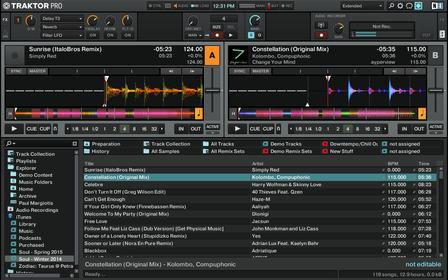
What’s your favorite view in Traktor
Is it viewing the decks or is it seeing your tracks or viewing the mixer. Im trying to optimize my viewing experience so I can have a little of everything whats more important to you as a DJ.
What’s your favorite view in Traktor
Is it viewing the decks or is it seeing your tracks or viewing the mixer. Im trying to optimize my viewing experience so I can have a little of everything whats more important to you as a DJ.
Set up a BUNCH of different views, and then set-up a button to scroll through them.
No need to be stuck with a single “favourite” view - layout manager is your friend! 
Maximized Decks A & B, Micro C & D with no mixer section.
+1 this is what I do, I also have it set up so when I use the knob I have mapped to scroll through tracks, it automatically goes to browser, and when I load a track it automatically goes to deck view, with an additional button that cycles the views so I can quickly move in and out of areas when needed.
I could never ever just use one view…
All decks micro, no mixer. Just like to see the playlist of tracks when at home since I don’t have CDJs that take USB/Rekordbox 
Me too. 
I can never understand when I see someone Traktor and they have the mixer section showing when they are using a hardware mixer.
I see it on Pro DJ videos, I see it on videos on DJTT.
I also don’t know why people show the mixer section when using an all-in-one controller.
I use it sometimes so i know when the kills are activated, as my mixer does not have them. Usually not tho.
I have the mixer on, force of habit tho.. although it’s handy to see on screen what’s active. I have a button mapped to scroll through 4 selections, and another one to toggle list.
I have the mixer section showing because I have decks C and D mapped to dual controls and I need to see if the filters are on ( they are mapped to a dual use as well ). I will scrap this once I finally move to a proper 4 channel mixer
[ATTACH=CONFIG]25231[/ATTACH]
[ATTACH=CONFIG]25233[/ATTACH]
"Last edited by Jester; Today at 04:56 PM. Reason: Enlarged pic, because reasons. "
You are welcome.
Decks A & B. 4 FX Units. Mixer Section.
All decks full, filter and gains, with effects and what not.
All decks with everything. 4 FX panels. No Cover art, headers, warnings, mixer, tempo fader, crossfader off!, basic browser.
I have my mixer on. I guess it’s because I’m so used to not trusting that what is happening on my controller is actually happening in the software. I use tech every day. The more I use it, the less that I trust it’s going to work the way that I want it to.
My fav view is to have decks a&b small then have c&d as remix decks full.