V6.5.0: Worldwide first traktor mapping for the 1000/800 with jog Screens support. This requires BOME
v6.3.0: First version for ddj-1000/800, mass translated from the SX2/SZ/SRT familiy.
v6.1.0 : Latest SX2/SZ/SRT version. Major features were TP3 mixerFX, reverse Slip and page shortcuts. Previous features are MacroFX and JogFX.
v5.2.3: This was the last SZ/SX2 map made by JaJa in 2015. All my mappings were built on top of his amazing work. In turn this was inspired(?) by the Viper SX1 mapping
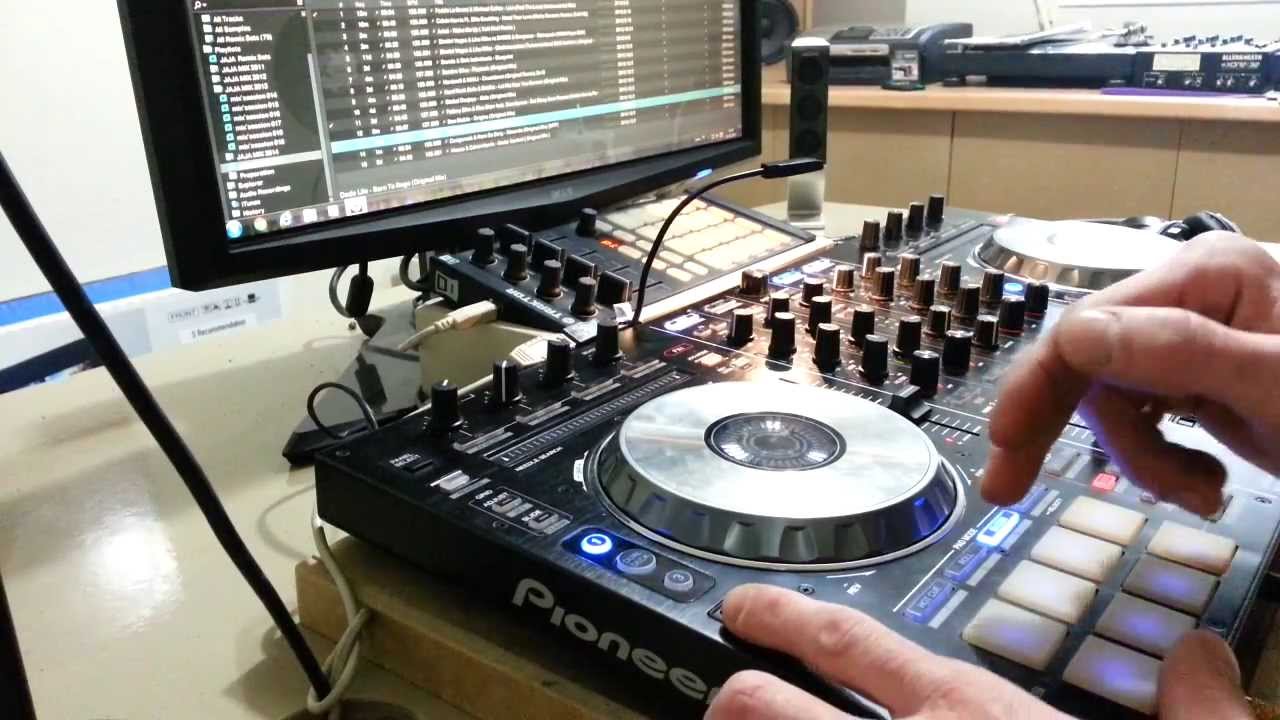
I’ve now ported my lastest SX2 traktor mapping to the DDJ-1000, which I now made as tight as possible (Jogs, VU meters, custom buttons).
A second major change is that all FX modes are now in the front positions - accessible without shifts. Pressing the mode button cycles the top-2 pages per mode.
Other new features are a Preview Player, a Vinyl Break FX, Keyboard mode and updated Roll modes with/without quantization.
Released v6.3.3 with several bug fixes and feature requests
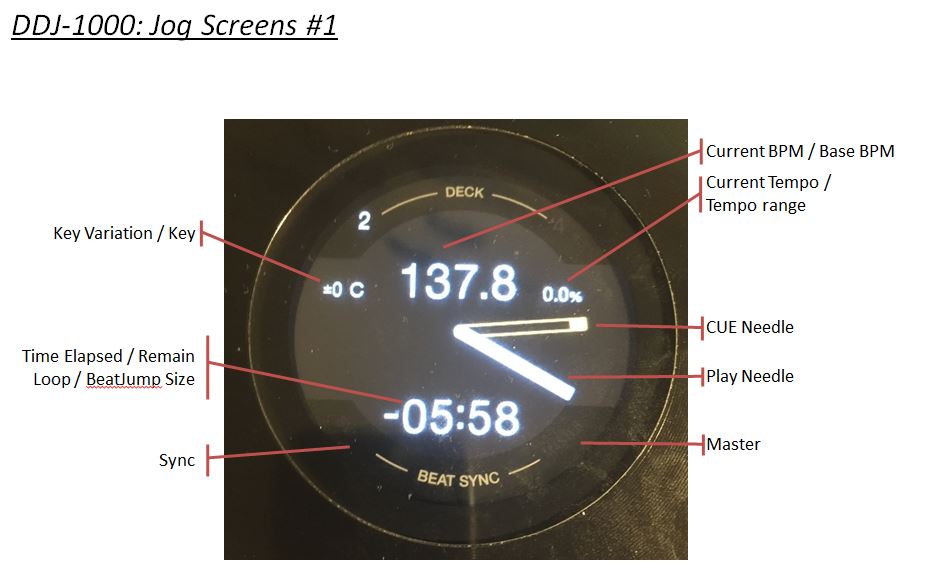
Jog screens update: I’ve now coded all the functions inside BOME Midi translator Pro that generates all the screen elements of the controller (current BPM, needle, track position, etc). However it will still take a while to release this because I don’t have my 1000 with me in the very short term.
PS: In this process I had to do a lot of BOME tricks that I will explain if anybody is interested (eg, higher resolution 7 bits messages, relative to absolute track position using a clock, etc)
All these entries need 14-bit messages to operate. The needle position is 0..360 degrees, which is above the 127 limit of 7 bit messages. So it needs 2x CC messages for the whole thing.
Traktor receives 14-bit just fine, but it cannot send 14-bit messages. I’ve confirmed this by hacking CMDR to make a TSI with combo OUT messages. TSI loaded fine, but no messages were generated by TK.
My solution is to send the regular beat phase position 0..90 degrees in a single message to BOME (with sign), and add this to its own internal variable that is mod 360. Then BOME can output this 14-bit message in a single go to the 1000.
–
There was a lot more tricks required. I will test my mapping in two weeks, and explain all the other tricks once I confirm they work correctly.
Some updates on the traktor mappings for Pioneer controlers:
DDJ-1000SRT:
I’ve now looked at the MIDI codes for the 1000 SRT version released today, and it is quite surprising:
the SRT pad codes match the SX2/SZ style of codes, and not the 1000RB style
While the screens look to be MIDI (no waveforms & cover art), there is no public MIDI codes like in the original 1000 RB version
the SRT runs in external mode, the 1000RB ran in internal mode. This means that all pioneer effects are there, a significant departure from the 1000RB. It also means the ColorFX buttons cannot be remapped - need to use the pads.
All together, it is very clear that my SX2/SZ mapping is the best starting point for the 1000SRT by far (pad codes, external mode). https://maps.djtechtools.com/mappings/9279
the SX3 now runs in external mode, just like the SZ. It means the Pioneer color FX can be used to Traktor sources. Also means that the colorFX buttons cannot be remapped.
Solution: use the current method of using the pads to enable mixerFX/macroFX, that is already on the DDJ-SX2/SZ mapping
DDJ-1000 - First Jog screens support on Traktor Pro 3 using BOME
This is the first traktor mapping supporting the DDJ-1000 screeens. Already working is current BPM, current tempo, time elapsed/remaining and needle position. With a shift layer you can see total time, tempo range, and loop/beatjump sizes (for 2 seconds).
This mapping is not released yet. To finish is integrating on my existing DD-1000 traktor mapping, and some bug fixes/optimizations. When released IT WILL REQUIRE bome midi translator Pro. A 100% function demo version is here: Bome MIDI Translator Pro – Bome Software
Features demo:
00:00 Current BPM / Tempo percentage
00:24 Tempo range
00:35 Min/sec = loop size/jump size (for 2 seconds)
01:00 Shift1/shift2 = hold to preview loop sizes and total time
01:08 Toggle time elasped / time remaining
01:15 Needle position
01:21 Deck B operation
Now made a custom version of my mapping to the DDJ-800. There were very small differences.
2019 DDJ-800 v6.3.3 - mapping for Traktor Pro 3 and 2 - DJ Estrela
This is a demo of my traktor mapping to the DDJ-800. This is the same mapping as my DDJ-1000 with very minor adaptations (described below).
All features, all pads, jog scratch and jogFXs taken from the 1000 work fine in the 800. Please see that video for a full description.
These are small differnces that I fixed on this specific 800 mapping:
mixerFX selector buttons require 2x presses to toggle (instad of being hold style)
beatFX selector has new MIDI codes, and now works as expected
The following are other differences that I did not customized (yet):
The Auto-Loop button is missing. Instead please press “Loop In long hold”;
I’ve now grouped all my demo videos in playlists, per controller family.
Videos are either long ones demoing every single function of the mappings, or update videos showing latest versions.
.
.
I’ve now released the BOME mapping for the jog screens.
.
.
As promised, below are the tricks I used inside BOME to go around all kinds of Traktor limitations. Please comment with your thoughts and experiences, because I would love to simplify the mapping.
I was messing with midi linking mapping devices before Elephant mapping was made but since there were usually 20 and more devices it is impossible to work with slow loading times (when an other device is selected).
I made a remix deck sequencer out of the Freeze Mode output (when NI added the Freeze Mode)
Hi, me again. You mention on page 44 of your installation guide that the DDJ-800 firmware has a bug that prevents the jog displays from working in MIDI mode, and that Pioneer has acknowledged this issue.
Do you have a link to where Pioneer acknowledged this? I can only find this thread, where Pioneer claims the issue is with other DJ software and not their firmware, which is just not true.