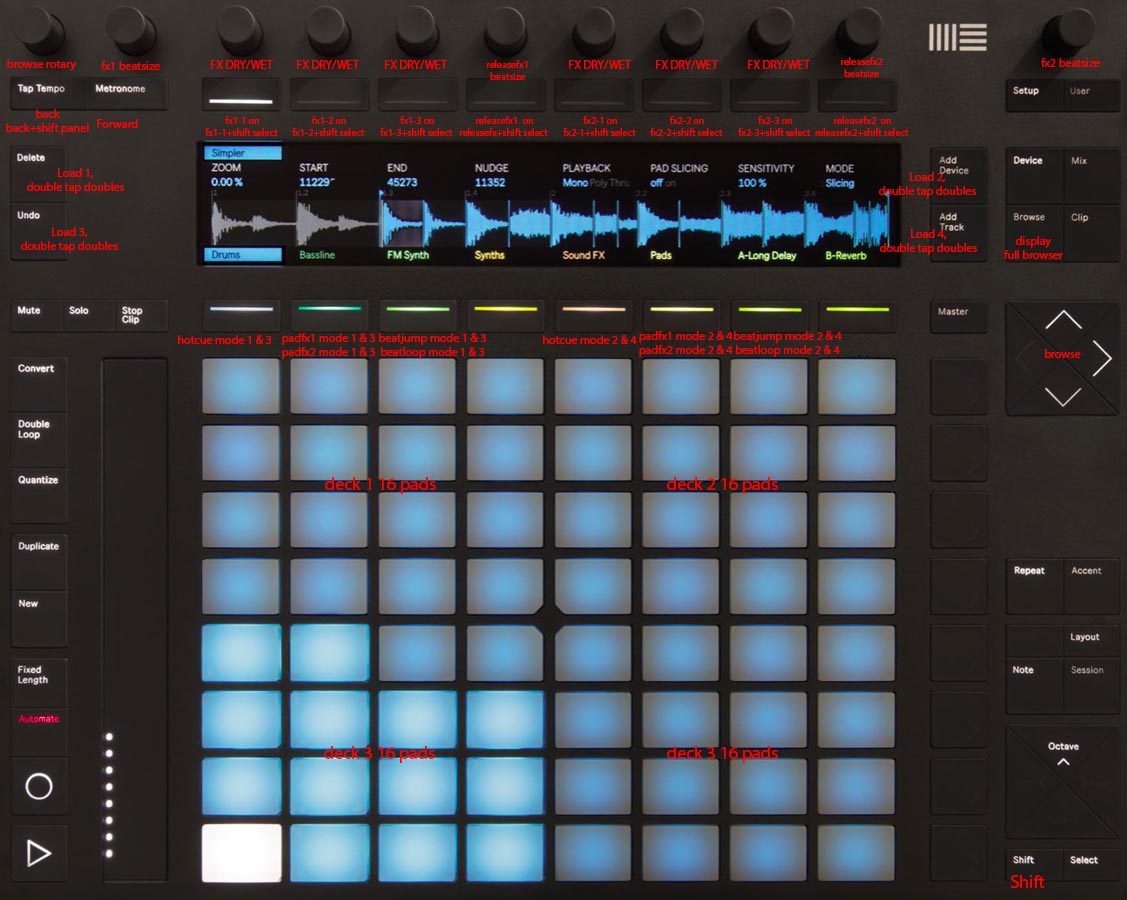
Requirements A Mac An Ableton Push 2 Bome midi translator pro (Duplicate the app and go to settings to allow multiple instances, i did this because i ran out of variables; In bome prefs use short midi name for first bome instances virtual midi and long name for the second instance. Ableton Live to put push 2 to user mode. And of course Rekordbox 5
Features RGB LED feedback (it’s stupid easy to enable rgb feedback for 3rd party controllers just by editing the csv file, however you need to convert the values that rekordbox sends out for correct colors) Different Pad Modes Touchstrip mapped to filters FX mapped to knobs and buttons Browse and Deck load mapped, also double tap for doubles.
**Hold shift for a different output for some buttons/knobs
Mapping files are attached.
Should be really easy to customize if you know some about midi and bome. If you can improve my mapping please share it!
Import the csv file to both bome midi devices in rekordbox
This reference image might not be 100% correct because i think i changed and added few things.
Hello, I made it so I can control everything with Push 2 but I have few issues here and there.
1.Sometimes when pressing shift the sound on deck 1 mutes and can’t find the reason.
2.Can’t get the display to work it keeps showing Push logo and don’t know what should be tweaked.
3.Can’t press play and stop with Push also how do you crossfade between tracks?
Thanks alot for your script is already making my life easier and with this issues fixed it would be amazing.
I might be so new to Push 2 maybe that’s why I wasn’t able to make it work successfully or I am a total noob with BOME. I imported both midi mapping in rekordbox while having my DDJ400 and Push 2 connected in user mode but I don’t know the next step and the lights on push 2 keep flashing. Could someone give steps or a link to the problem ?
Thank You